
Preview







Description
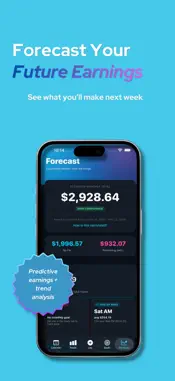
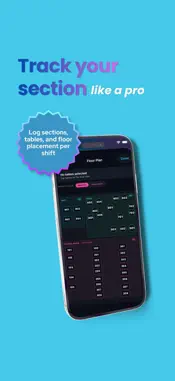
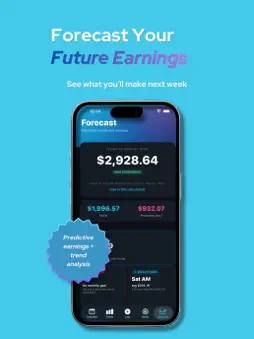
TipGenie is the tip tracker built by a server for servers. Stop fumbling with the Notes app at the end of your shift. TipGenie makes tracking your tips, sales, hours, and sections faster than typing your password — then turns all that data into insights that actually help you make more money. — WHY SERVERS LOVE IT — • Log a full shift in 10 seconds. Tap a preset for your hours, type tips and sales, tap your section, done. • See exactly which days and sections pay the most. The Forecast tab tells you stuff like "Pick up more Saturday PMs, skip Tuesday AMs" based on your real shift data. • Auto-sync with HotSchedules or any work calendar. Your hours fill in automatically when you log. • Home screen and Lock Screen widgets show today's take-home, week total, and your weekly schedule at a glance. • Track your weekly Google review mentions and see who in your crew is winning the contest. — WHAT'S INSIDE — LOG SCREEN One tap to log a shift. Quick-fill hours from your saved presets (AM, PM, Double). See your week-to-date take-home, hours, and per-hour rate up top. Tap any past shift to edit. CALENDAR Month view with color-coded AM, PM, and Double shifts. Scheduled shifts auto-appear from your work calendar. Weekly tip bars track your goal progress. TOTALS Earnings, hours, sales, and tip % broken down by week, month, year, or any custom date range. Interactive charts you can tap. YTD tax estimator with a 15% baseline for tipped workers. GOALS Set daily, weekly, monthly, or yearly take-home goals. Ring charts track your progress. Know if you're falling behind or crushing it. FORECAST Project your month-end earnings from your last 90 days of shifts. Smart insights compare your best days, sections, weather correlation, and shift combinations. Each card tells you something actionable. FLOOR PLAN Digital floor plan of your restaurant. Tap the tables you had during each shift. Over time, learn exactly which sections pay the most. REVIEW LEADERBOARD Track your Google review mentions. See live counts. Compete with your coworkers. SMART REMINDERS Set your work location once. TipGenie reminds you to log tips if you leave without logging. — PRIVACY FIRST — No accounts. No ads. No tracking. No data ever leaves your phone. Your tips, your business. — BUILT BY A SERVER — Made by Brady Cook, a server at The Catch in Gulf Shores, Alabama. If TipGenie helps you make more money, tell another server.
What's New
Version 1.7 2026-08-05
What's New in TipGenie 1.7 Weekly Replay Every Sunday, tap the banner on your Log screen for a story-style walk through your week — what you took home, the shi... Technical Analysis
Package Overview Basic metadata
Bundle ID
com.brady.TipTracker Current Version 1.7
Minimum iOS 26.2
Package Size App Store Size
Package Metadata 0 / 0 version records
Detailed binary, privacy manifest, framework, and Info.plist results have not been indexed for this package yet. The verified App Store and archive metadata above remains available.
Developer Information
Known Version Records
0 version records with stored package metadata
Stored metadata does not guarantee a package is currently available to download.
| Details | Version / IDs | Version date | Action |
|---|