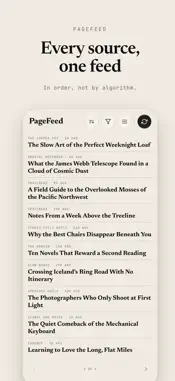
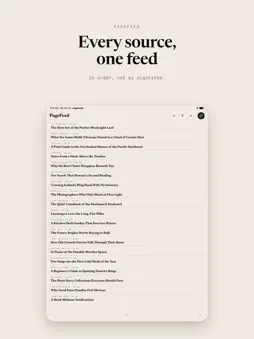
PageFeed App Icon

PageFeed

News • Brad Moss
12+ v2.0.4 Recorded price: Free App Store →
★★★★★
★★★★★
(3 App Store ratings)
🏆 Best: #15 Free (DEU)
IPA Analysis
Technical Specs
Bundle ID com.triforcelogic.pagefeed
Version 2.0.4
App Store Size 10.31 MB
Minimum iOS 26.0
Devices iPhone, iPad, iPod touch
Catalog release date 2026-06-28
Latest recorded version date 2026-11-01
Features & Support
Advisory 12+
Infrequent/Mild Horror/Fear Themes Infrequent/Mild Medical/Treatment Information Infrequent/Mild Realistic Violence Infrequent/Mild Alcohol, Tobacco, or Drug Use or References Infrequent/Mild Profanity or Crude Humor Infrequent/Mild Mature/Suggestive Themes
Languages (1)
EN
Top In App Purchases
No In App Purchases Listed

Preview

PageFeed screenshot 1 PageFeed screenshot 2 PageFeed screenshot 3 PageFeed screenshot 4 PageFeed screenshot 5 PageFeed screenshot 6 PageFeed screenshot 7 PageFeed screenshot 8 PageFeed screenshot 9 PageFeed screenshot 10 PageFeed screenshot 11 PageFeed screenshot 12 PageFeed screenshot 13 PageFeed screenshot 14 PageFeed screenshot 15 PageFeed screenshot 16

Description

PageFeed is a different kind of news reader, built for reading, not scrolling. Featured by Six Colors, iPhoneBlog.de and iphone-ticker.de: the news reader you page through like a book. The sites, blogs, and writers you follow, laid out in clean, full pages. You tap forward and back, like turning pages in a book. Nothing scrolls. Every page is set to fit, so you always know exactly where you are. WHY PAGEFEED • Read in pages, never scroll. A calm, book-like way through every story, and on iPad, a two-page spread like an open book. • Your sources in order, not by algorithm. Newest or oldest first, your choice. Nothing is promoted, hidden, or reordered for you. • Group your sources. Organize the sites you follow into your own categories and read one topic at a time. • Private sync, your way. Sync through your own iCloud account to keep your iPhone and iPad in step, or through your own Google Drive to sync cross-platform, including the web. Either way, we never see your reading. Prefer simple? A free PageFeed sync account also works everywhere. • Summaries on device. On an iPhone or iPad with Apple Intelligence, get the gist of any article in a few private, on-device bullet points. • Tags, on your terms. Every story is tagged, so you can follow a topic or mute one and never see it in your feed again. • Save anything. Share a web page to PageFeed to keep it, and star the stories you want to come back to. • Works offline. Once loaded, your reading is there on the subway, on a plane, anywhere. It catches up when you're back online. • Find your sources. Browse hundreds of publications by topic in Discover, and follow the ones you like. • Adjustable type and a high-contrast theme. Set the text size and switch to an easy-on-the-eyes look. PageFeed is deliberately minimal: no noise, no infinite scroll, no clutter. Just the news you choose, in order, one page at a time.

What's New

Version 2.0.4 2026-11-01
Summaries, reimagined. Tap Summarize and keep reading while it is written; the summary then slides in as a large index card over your page, in your reading size...Summaries, reimagined. Tap Summarize and keep reading while it is written; the summary then slides in as a large index card over your page, in your reading size, and your place never moves. A longer summary is a small deck: throw the card aside for the next one, or tap Keep reading to put it away. Catch up on what you missed. "Catch up" in Filter picks out the stories that matter most to you from the last few days, oldest first, each with a short summary. Page through them, and move the rest to Browsed when you are done. Group similar articles (Manage, Reading). When several of your sources report the same news, the list shows it once, with a line naming the other sources; tap it to see them. On devices with Apple Intelligence it also catches the same news told in different words. Clear a backlog in one move. In Filter, press and hold a source, a category or All to move its unread articles to Browsed, with Undo. "Mark read" in Housekeeping is now "Move to Browsed", and the articles leave the list at once. Turned a page by accident? Turn back within ten seconds and the page you left is unread again. Keep screen on while reading (Manage, Reading, on by default). The screen stays awake while an article is open, and sleeps as usual after ten minutes without a page turn. Time and battery (Manage, Reading). Print the time and a small battery gauge at the top of every page, in the app's own type. Bigger list thumbnails, about twice the size they were. iPhone Duo: the list's controls step out of the way of a Live Activity or banner in the status strip; a tap along the right edge of the closed display turns forward with the controls hidden; and the list and the open book keep their place more reliably when you fold, rotate or come back to the app. Plus many fixes: pages you turned past just before leaving the app now reach your other devices; reopening the app after a while starts the list at the newest articles; summaries no longer stop mid-sentence; "Load full article" no longer gets stuck on sites whose feed already carries the whole article; and stray shopping links are gone from the ends of articles.

Technical Analysis

Package Overview Basic metadata
Bundle ID com.triforcelogic.pagefeed
Current Version 2.0.4
Minimum iOS 26.0
Package Size App Store Size
Package Metadata 0 / 0 version records
Detailed binary, privacy manifest, framework, and Info.plist results have not been indexed for this package yet. The verified App Store and archive metadata above remains available.

Developer Information

Known Version Records

0 version records with stored package metadata

Stored metadata does not guarantee a package is currently available to download.

Details Version / IDs Version date Action