
Preview



Description
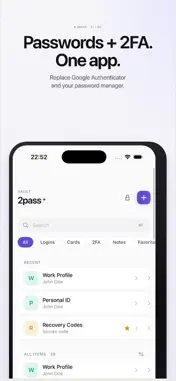
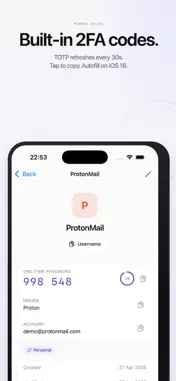
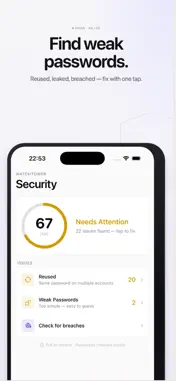
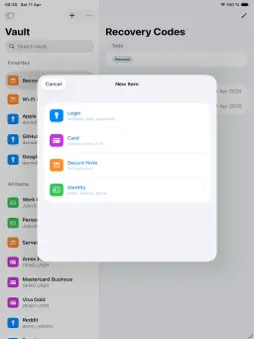
2Pass is a private password manager and 2FA authenticator built for iPhone and iPad. One app replaces both your password manager and Google Authenticator — with Face ID, iCloud Sync and a Recovery Key. === Passwords + 2FA in one place === Every login has its 2FA code right next to the password. Tap once to copy and autofill — no more switching between apps. Add codes by scanning a QR code, importing from photo, or entering a setup key. === What you can store === Passwords and logins with one-tap autofill in Safari and every app. 2FA codes (TOTP) — built-in authenticator that refreshes every 30 seconds. Credit cards with secure card view and clipboard auto-clear. Secure notes: recovery codes, Wi-Fi passwords, PIN codes. Identities for faster signup forms. === Generator === Create strong passwords from 8 to 128 characters — letters, digits, symbols or passphrases. Exclude look-alike characters in one tap. === Autofill everywhere === 2Pass plugs into the iOS system Password AutoFill API. On iOS 18, your 2FA codes autofill too — one tap and done. No browser extension required. === Watchtower === See which passwords are weak, reused or appeared in public data breaches. Powered by Have I Been Pwned k-anonymity — your actual password never leaves your device. === Why switch from Google Authenticator? === Google Authenticator stores only codes — no passwords, no autofill, no recovery option if you lose your phone. 2Pass keeps codes and passwords together, protected by AES-256 encryption and a Recovery Key you control. === Built for Apple === — Native iPhone and iPad app with adaptive split-view on iPad. — Face ID and Touch ID unlock. — Optional iCloud Sync, end-to-end encrypted. — Keyboard shortcuts on iPad: new item, search, copy password, lock vault. — Spotlight search for item titles. — Offline-first: works without a network connection. === Recovery Key === 2Pass gives you a Recovery Key during setup. Lose your phone? Use the key to restore full access — passwords and 2FA codes alike. The key is generated on your device and never stored on our servers. === Import === Move from 1Password, Bitwarden, Chrome or Keychain in minutes. Import CSV or JSON and 2Pass encrypts everything locally. === Privacy first === — Zero-knowledge: only you can decrypt your vault. — AES-256 encryption with a unique key per item. — No tracking, no analytics, no ads. — Your data never leaves your device unless you enable iCloud Sync. === Subscription === 2Pass is free to try for 3 days. After the trial: — 2Pass Premium Monthly — $4.99 / month — 2Pass Premium Yearly — $49.99 / year (Save 16%, about $4.17 / month) Payment will be charged to your Apple ID at confirmation of purchase. Subscription automatically renews unless canceled at least 24 hours before the end of the current period. You can manage and cancel your subscriptions in your App Store account settings after purchase. Privacy Policy: https://github.com/spiroba/2pass/blob/main/privacy-policy.md Terms of Use: https://github.com/spiroba/2pass/blob/main/terms-of-use.md
What's New
Version 2.3 2026-09-05
— Free plan: tap “Continue with free plan” at start and keep one login, one card, one note, one identity and one 2FA token at no cost. Premium unlocks unlimited... Technical Analysis
Package Overview Basic metadata
Bundle ID
com.Spiro.2Pass.-Pass Current Version 2.3
Minimum iOS 17.6
Package Size App Store Size
Package Metadata 1 / 5 version records
Detailed binary, privacy manifest, framework, and Info.plist results have not been indexed for this package yet. The verified App Store and archive metadata above remains available.
Developer Information
Known Version Records
1 version record with stored package metadata • 5 known version records
Stored metadata does not guarantee a package is currently available to download.
| Details | Version / IDs | Version date | Action |
|---|---|---|---|
| Not archived | App Store ID: 890886354 | Unknown | Request Version |
| Not archived | App Store ID: 890871680 | Unknown | Request Version |
| Not archived | App Store ID: 888591995 | Unknown | Request Version |
| 7.23 MB | v2.3 App Store ID: 884995992Build: 2.3 | 2026-09-06 01:52:05 | Get Version |
| Not archived | App Store ID: 884137335 | Unknown | Request Version |