Preview



Description
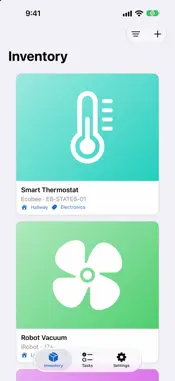
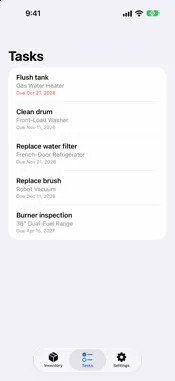
Every product you own, manual included. PaperGone is a private home inventory for iPhone, iPad and Mac. Photograph a product's model plate and PaperGone reads the label on your device, fills in the model and serial number, and keeps everything about that product in one place: manuals, receipts, warranty papers, parts and service history. The drawer of paper can finally go. SNAP IT • Take a photo of the label or import one. Text is read on your device. • Drag a photo onto your inventory to start a new product. • Add extra photos, a model plate shot, and notes to any product. FIND THE MANUAL • Find Links looks for official manuals, spec sheets, troubleshooting guides, support pages, warranty information, safety notices and parts. • Every result waits for your review before it is saved. Mark the ones you trust as Verified. • A checklist on each product shows what you have and what is still missing. • Uses a small research service that you set up in your own Cloudflare account, so no one else holds your searches. Setup is guided, and everything else in the app works without it. KEEP EVERYTHING TOGETHER • Drag receipts, PDFs, scans, photos and web links onto a product and PaperGone files them for you. • Text inside PDFs and photos is read on your device, so you can search files, links and notes later. • Organize by room and category, then search or filter your whole inventory. NEVER MISS A SERVICE • Record maintenance, such as a filter change or a tank flush, and set when it is next due. • The Tasks tab lists everything coming up across all your products. • Optional reminders arrive at 9:00, from the day of to a week before. PRIVATE BY DESIGN • By default PaperGone sends nothing to any server. • Serial numbers are never sent anywhere. • Find Links sends only the manufacturer and model, and only after you allow it. • No accounts, no ads, no tracking. YOURS ON EVERY DEVICE • Works offline. • Optional iCloud Sync keeps your inventory, photos and files on all your devices through your own private iCloud account. • Export and import a full backup any time. • Built for the keyboard on iPad and Mac, with shortcuts such as ⌘N for a new product. PaperGone is made by CHCS. Questions or ideas? Open Help from the app, or visit chcshq.com/papergone. • Find Links disclosure: it needs a research service you set up in your own Cloudflare account, so I said that plainly in the description. App Review and users will both hit that setup step, and stating it up front avoids a 1-star "doesn't work" review. • Sourcing: I wrote the feature claims from your in-app Help pages, so they match what the app does. Your marketing page claims "Works offline" too, which matches the sync help text. • Last line: it uses the chcshq.com/papergone URL from your marketing page. Change it if the support URL is different. • Formatting: App Store descriptions are plain text, so the bold headings won't render. Paste it in without the ** markers. The all-caps headings read fine on their own.
What's New
Version 3.1 2026-11-11
PaperGone 3.1 BROWSE AND ORGANIZE • Compact inventory: switch from cards to a dense list in the Filter menu. Each row shows the model number and warranty statu...PaperGone 3.1 BROWSE AND ORGANIZE • Compact inventory: switch from cards to a dense list in the Filter menu. Each row shows the model number and warranty status. • Suppliers: keep your stores and online shops as cards, and find local stores by zip code. Apple Intelligence on your device suggests the kinds of stores that suit what you own. • Links and files now appear as cards, with one-tap Download PDF. • On iPad and Mac, a product's details slide over the grid and use the whole window. ADD PRODUCTS FASTER • Live scanning: point the camera at a model label or barcode and PaperGone highlights what it can read. • Add from a web page: drop a product's link onto the Inventory to fill in its details. • Receipts and purchase emails: the retailer, date and amount are filled in on your device. • Replace a product's photo with a picture from the web. The best-looking one is chosen on your device. ASK AND FIND • Ask a question about a product's files or the internet. Every answer is saved with its date, time and sources under Q&A. • Find Links now looks for replacement parts and filters, and tries several wordings per category to find more manuals and warranty pages. • Review New Links in one place and accept or reject each. • Save manuals for offline reading. TRACK AND PROTECT • Enter a warranty length to see when coverage ends, with optional reminders 30 days before. • Tasks for each product, with due dates and costs. • Export a CSV or a PDF report for insurance claims or moving. ALSO • Easier-to-read status colors, better VoiceOver support, and sheets that no longer close by themselves. Note: internet search, Claude answers, and parts and filters in Find Links need an updated research service. Open Settings > Set Up Research Service to update it. Your saved keys are kept. Technical Analysis
Package Overview Basic metadata
Bundle ID
CHCS.PaperGone Current Version 3.1
Minimum iOS 26.4
Package Size App Store Size
Package Metadata 0 / 0 version records
Detailed binary, privacy manifest, framework, and Info.plist results have not been indexed for this package yet. The verified App Store and archive metadata above remains available.
Developer Information
Known Version Records
0 version records with stored package metadata
Stored metadata does not guarantee a package is currently available to download.
| Details | Version / IDs | Version date | Action |
|---|