Preview









Description
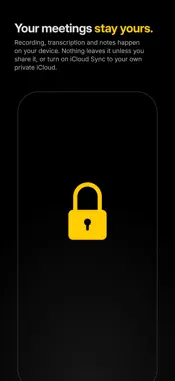
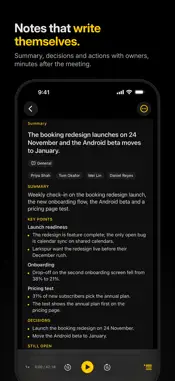
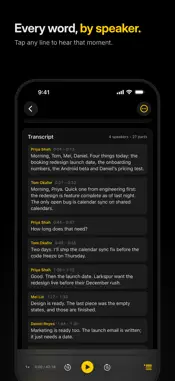
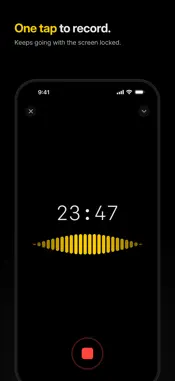
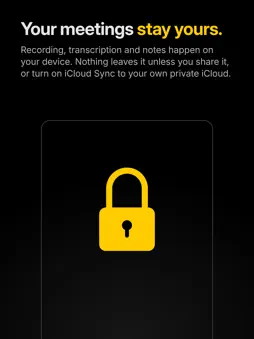
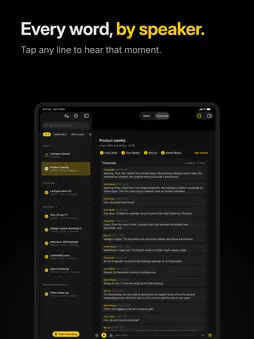
Upshot turns your meetings into clear, useful notes on your iPhone, iPad and Mac. Hit record, put your phone on the table and get on with the meeting. When you're done, Upshot gives you: - A clear title and a one-line summary of what happened - Key points, decisions and open questions - Action items with who's doing what and when, including tasks handed to someone else - Figures, dates and deadlines that were actually said - A full transcript, split by speaker If a recording is too short or too quiet to summarise, Upshot tells you rather than making something up. PRIVATE BY DEFAULT Recording, transcription and summaries happen on your device using Apple's built-in on-device AI. No account, no uploads, and we don't have servers to store your meetings on. Your meetings only leave your device if you choose to: by turning on iCloud Sync (your own private iCloud, which we can't see) or by connecting your own AI with Upshot Basic. MADE FOR CONFIDENTIAL CONVERSATIONS Client calls, case reviews, HR conversations, interviews, one-to-ones. If it shouldn't end up on someone else's server, Upshot is built for it. ON YOUR MAC Record in-person meetings with your Mac's microphone, or include call audio to capture Teams, Zoom or Meet calls straight from your desk. Recording carries on from the menu bar even when you close the window. A proper Mac app with a sidebar, Ask panel, keyboard shortcuts and a Settings window. ON YOUR IPAD Your meetings and notes side by side in Split View, with keyboard shortcuts and Ask the meeting right next to your notes. EVERY DEVICE, ONE LIBRARY Turn on iCloud Sync and your meetings, recordings, notes and named speakers follow you across iPhone, iPad and Mac, through your own private iCloud. Sync is optional and off until you turn it on. RECORD WITHOUT INTERRUPTION Minimise Upshot and keep using your phone, or lock it and put it down. Recording carries on, and the Dynamic Island and Lock Screen show it's still going at a glance. ASK THE MEETING Ask a question about any recording and get an answer with timestamps you can tap to hear the moment for yourself. LISTEN BACK AND FIND IT LATER Tap any part of the transcript to hear exactly what was said. Name speakers once and see them labelled throughout, search across every meeting, and import existing audio too. SHARE YOUR NOTES Email the minutes, export as Word, PDF or Markdown, or paste into Teams, Notion or wherever your team works. Send action items straight to Reminders or Calendar. UPSHOT BASIC (OPTIONAL) Everything above is free, including iCloud Sync. Upshot Basic is a monthly subscription that works across iPhone, iPad and Mac and adds: - Your own meeting types and notes guidance - Ask across meetings: one question across up to 10 meetings - Your own Claude or ChatGPT API key, or your organisation's AI server - Extra on-device models for supported devices Claude and ChatGPT aren't included. You bring your own key, and usage is billed by that provider. Your transcripts only go to the provider you choose, when you choose it. Payment is charged to your Apple Account. The subscription renews automatically unless cancelled at least 24 hours before the end of the current period. Manage or cancel any time in your Apple Account settings. Terms of Use: https://www.apple.com/legal/internet-services/itunes/dev/stdeula/ Privacy Policy: https://getupshot.pro/privacy/ Requirements: iOS 26, iPadOS 26 or macOS 26 or later. Notes and Ask the meeting need a device that supports Apple Intelligence.
What's New
Version 1.0.6 2026-11-16
What’s New Notes that fit the meeting Team stand-ups: a board with a card per person showing Done, Next and Blocked, plus a summary of blockers at the top. Cl...What’s New Notes that fit the meeting Team stand-ups: a board with a card per person showing Done, Next and Blocked, plus a summary of blockers at the top. Client calls: client needs, concerns, commercial terms and the next meeting. Terms and dates are checked against what was actually said. One-to-ones: progress, blockers, feedback (with who gave it), support asked for, and topics to revisit next time. Interviews: each answer is rated with evidence, with overall feedback and suggested follow-up questions. You can turn rating off in Settings. Leadership meetings: more of what was discussed is captured, and actions nobody agreed to are left out. These layouts work with Apple Intelligence too, so they’re available on the Free plan. Meeting types and guidance New page: Settings › Meeting types shows the guidance used to write notes for each meeting type. Edit guidance (Upshot Basic): edit the guidance for any type, and try your changes on a recent meeting before saving. Custom meeting types (Upshot Basic): create up to 20, with their own name and icon. Set them on recordings, filter by them, and let recurring meetings pick them up automatically. Labelled notes: notes made with your own guidance say so. If a newer default exists, you can compare it with yours and choose which to keep. Sync: guidance, settings and custom types sync between your devices when iCloud Sync is on. On-device notes Better models: Macs and iPads with more memory can now download a more capable on-device model for writing notes. Each device gets the best fit for its memory. Vocabulary: notes are more reliable when you use a custom vocabulary alongside meeting-type guidance. Fixes Mac: the “No call audio yet” hint no longer appears during normal recordings without a call, or when a call is quiet. Older versions: notes made in the new layouts still open on devices running an older version of the app. Technical Analysis
Package Overview Basic metadata
Bundle ID
ltd.bmbenterprises.minuted Current Version 1.0.6
Minimum iOS 26.0
Package Size App Store Size
Package Metadata 0 / 0 version records
Detailed binary, privacy manifest, framework, and Info.plist results have not been indexed for this package yet. The verified App Store and archive metadata above remains available.
Developer Information
Known Version Records
0 version records with stored package metadata
Stored metadata does not guarantee a package is currently available to download.
| Details | Version / IDs | Version date | Action |
|---|