
Preview


Description
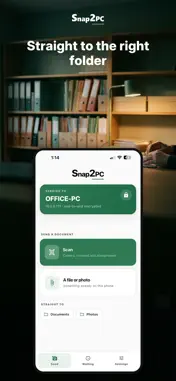
Snap2PC sends scanned documents from an iPhone to a Windows PC on the same local network. There is no account, no sign-up, and no cloud service: documents travel directly from the phone to the PC over the local network, encrypted end to end. The app never contacts our servers. The free Windows companion app is required, and is a one-click download from https://snap2pc.com/setup BECAUSE THE APP PAIRS WITH A WINDOWS PC BY SCANNING A QR CODE SHOWN ON THAT PC'S SCREEN, SCANNING AND SENDING CANNOT BE EXERCISED WITHOUT ONE. We have attached a demonstration video showing the complete flow end to end: installing the Windows app, pairing by QR code, scanning a document on the iPhone, choosing a destination folder, and the file arriving on the PC. Without a Windows PC, a reviewer can still see: - The first-run introduction, which explains what the app does and where the Windows app comes from - The three tabs (Send, Waiting, Settings), which open with nothing asked for - Settings > How it works, which documents the full setup - Settings, which shows the app is unpaired and offers "Pair with a PC" Tapping Scan or "A file or photo" opens the QR pairing screen, because there is no destination to send to until a PC is paired.
Technical Analysis
Package Overview Basic metadata
Bundle ID
com.snap2pc.snap2pc Current Version 1.0.0
Minimum iOS 18.0
Package Size App Store Size
Package Metadata 0 / 0 version records
Detailed binary, privacy manifest, framework, and Info.plist results have not been indexed for this package yet. The verified App Store and archive metadata above remains available.
Developer Information
Known Version Records
0 version records with stored package metadata
Stored metadata does not guarantee a package is currently available to download.
| Details | Version / IDs | Version date | Action |
|---|