
Preview






Description
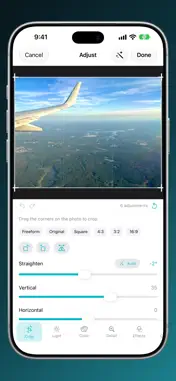
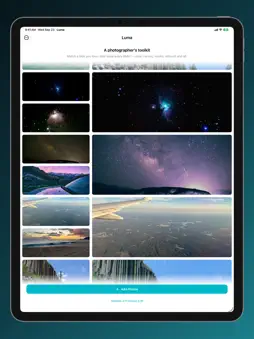
Luma turns a look you like into adjustments you can actually edit. Pick a few photos whose look you love. Luma studies one, works out how to get your photo there, and hands you the result as real adjustments — not a filter you can only turn up or down. HOW IT WORKS 1. Choose photos that have the look you want. These become your styles. 2. Choose photos to develop. Luma matches each one to the closest style. 3. Open Adjust and change anything you like, then save. A REAL EDITOR UNDERNEATH Every match arrives as a set of sliders you own: - Light: Exposure, Brilliance, Highlights, Shadows, Contrast, Brightness, Black Point, White Point - Color: Saturation, Vibrance, Warmth, Tint - Detail: Sharpness, Definition, Noise Reduction - Effects: Vignette, Grain - Tone curves for RGB and each channel - An eight-band colour mixer — hue, saturation and luminance per colour family - Split toning for the shadows and highlights - Black & White, where the colour mixer becomes the channel mix — lifting red lightens reds the way a red filter does in a darkroom CROP, STRAIGHTEN, PERSPECTIVE - Drag the corners to crop, with a thirds grid and aspect presets - Straighten by hand, or let Luma find the horizon on device - Correct perspective for a photo taken looking up at something tall - Rotate and flip in quarter turns - Lens distortion, chromatic aberration and defringe, for what the glass did RETOUCH Tap a blemish and it goes. Luma finds clean skin or sky nearby to replace it with, and you can drag the source somewhere else if you disagree. Spots are stored as adjustments, not baked into the picture — move one, resize it, or take it away a month later. With Ari Helper installed, Retouch also offers Remove Something in Ari: take a whole object out there, and come back to Luma with your grade still applied. MASKS Apply an adjustment to part of the photo instead of all of it: - Linear and radial gradients you place by dragging on the image - Luminance range — only the shadows, only the highlights - Colour range — only the blues, only the greens - Subject, Background and People, found on device Each mask gets its own complete set of adjustments, and you can match a style to a mask alone — your subject against their subject. CULL A BURST Point Luma at a burst, or a handful of shots of the same thing. It groups the near-duplicates and suggests which one to keep, measuring focus, whether eyes are open, and what is clipped or flat. The picks are filed into a Luma Keepers album — best first — so you can find them in Photos afterwards. Nothing is ever deleted. VIDEO Edit a clip from the Photos editing screen exactly the way you edit a photo. The framing, the tone, the colour, the curves, the mixer and the gradient and range masks all apply to every frame. PRESETS Save a look as a named preset and apply it to anything, or copy one photo's look and paste it onto the next. Auto Enhance is one tap when you want a starting point. NON-DESTRUCTIVE IN PHOTOS Luma edits in place the way Photos does. Your original is never touched, Revert to Original always works, edits sync through iCloud Photos, and reopening a photo brings back every slider exactly where you left it. Luma also adds itself to the Photos editing screen: tap Edit, then the extensions button, then Luma, and the whole editor is there on that photo. TAKE IT ELSEWHERE Export any look as Adobe Camera Raw settings for Lightroom, as a 3D LUT (.cube) for video work, or as JSON. SHORTCUTS AND SIRI - Apply any style to a photo from the Shortcuts app, or let Luma auto-match - List your styles, read and change settings - Your styles appear in Spotlight, so "Edit with Luma" is a search away RAW RAW captures develop through the full sensor data, so the sliders work with all the highlight headroom your camera recorded. Everything happens on device. No accounts, no third-party libraries, no data collected.
What's New
Version 2.0.3 2026-10-15
Optimized for iPhone Duo. Luma now has App Store screenshots made for iPhone Duo, in all nine languages. The welcome screen now looks finished for everyone: it... Technical Analysis
Package Overview Basic metadata
Bundle ID
com.blainemiller.Luma Current Version 2.0.3
Minimum iOS 18.0
Package Size App Store Size
Package Metadata 0 / 9 version records
5.0 / 5.0 (1 ratings)
Detailed binary, privacy manifest, framework, and Info.plist results have not been indexed for this package yet. The verified App Store and archive metadata above remains available.
Price History (USA store)
2 recorded price change points. These are historical observations, not a guarantee of the current price.
| Recorded at | Price | Currency |
|---|---|---|
| 4.99 | USD | |
| 14.99 | USD |
Developer Information
Known Version Records
0 version records with stored package metadata • 9 known version records
Stored metadata does not guarantee a package is currently available to download.
| Details | Version / IDs | Version date | Action |
|---|---|---|---|
| Not archived | App Store ID: 886841781 | Unknown | Paid / Arcade |
| Not archived | App Store ID: 884262792 | Unknown | Paid / Arcade |
| Not archived | App Store ID: 880829054 | Unknown | Paid / Arcade |
| Not archived | App Store ID: 878186988 | Unknown | Paid / Arcade |
| Not archived | App Store ID: 877735119 | Unknown | Paid / Arcade |
| Not archived | App Store ID: 877670519 | Unknown | Paid / Arcade |
| Not archived | App Store ID: 872149479 | Unknown | Paid / Arcade |
| Not archived | App Store ID: 872087639 | Unknown | Paid / Arcade |
| Not archived | App Store ID: 872065200 | Unknown | Paid / Arcade |