
Preview







Description
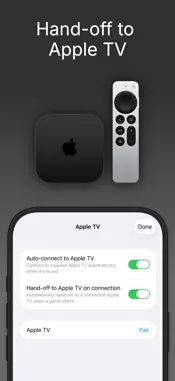
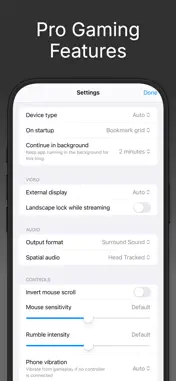
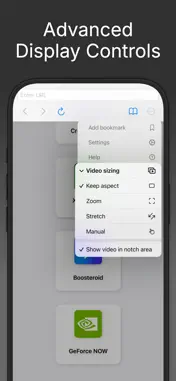
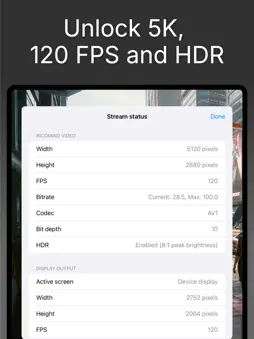
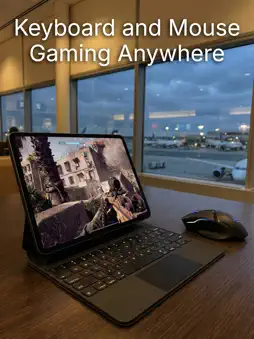
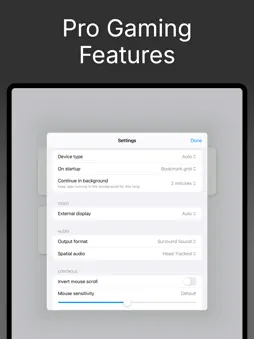
CloudGear is the browser designed for gamers - custom-engineered to deliver the speed, visuals, and control that other browsers can't. Stream from GeForce NOW, Xbox Cloud Gaming, Amazon Luna, Boosteroid, or any browser-based game with performance and immersion mobile gaming has never had. Plug into a TV, monitor, or AR glasses and your iPhone or iPad becomes a portable gaming rig. No console required. UNCOMPROMISED PERFORMANCE - High-Resolution Gaming: Stream at up to 5K video on supported platforms. - Smooth Frame Rates: Up to 120fps for fast, responsive gameplay - plus frame pacing that helps to eliminate stutter. - Advanced Codec Support: H.265 and AV1 for efficient streaming at maximum quality. - Low-Latency Streaming: A custom rendering engine built for speed. Frames display sooner and gameplay feels closer to native. YOUR GAME, ANY SCREEN - External Display & AR Glasses: Connect to a TV, monitor, or AR glasses like XREAL, Rokid, VITURE, or RayNeo via USB-C or HDMI. CloudGear outputs at native resolution with no black bars, turning your iOS device into a portable gaming rig you can plug in and play anywhere. - Apple TV Companion: Pair your iPhone or iPad with the CloudGear app for Apple TV and hand games off to the big screen. - HDR & 10-Bit Color: High dynamic range and rich color depth bring games to life the way developers intended. - Configurable Video Sizing: Zoom, stretch, or manually position the stream to fill every inch of your display. - Spatial Audio & Surround Sound: Support for 7.1 channel surround sound and spatial audio. DESKTOP-CLASS GAMING CONTROLS - True Mouse Pointer & Keyboard Lock: Get the precision you need with mouse pointer lock that makes your mobile experience feel like playing on desktop. - Steam Controller: First-class Valve Steam Controller support - use its trackpad as a mouse, with full control remapping for keyboard-and-mouse only games. - Controller Vibration: Full rumble for any connected controller. For controllers without motors, vibration routes through your iPhone's Taptic Engine. - Virtual Mouse: No mouse or controller? Control a virtual pointer using touch gestures alone. - Universal Compatibility: Works with any iOS-supported Bluetooth or USB-C controller, plus external keyboards and mice. QUICK LAUNCH & WIDGETS - Quick Launch Bookmarks: Bookmark individual games and launch them with a single tap - no menus, no browsing. - Home Screen Widget: Add any game to your iOS Home Screen as a widget for instant access. - iCloud Sync: All bookmarks sync automatically across your devices via iCloud. CloudGear works with major cloud gaming services and enables the best experience for each: - GeForce Now: Up to 5K @ 120fps, H.265 & AV1 codec, HDR, 10-bit color, 7.1 surround sound - Boosteroid: Up to 4K @ 120fps, AV1 codec, HDR, custom resolution selection - Xbox Cloud Gaming: Up to 1440p video, built-in Better xCloud script manager for higher bitrate, improved input, and more - Amazon Luna: Up to 1080p @ 60fps, max resolution and bitrate unlocked even on iPhone - OnePlay: Up to 4K @ 120fps - HTML5 Gaming Sites: Full controller support, mouse pointer lock, and keyboard lock for browser-based games Actual streaming quality depends on each service's capabilities and your account tier. CloudGear enables the maximum quality available. Please note: CloudGear is a premium utility. A subscription or one-off lifetime purchase is required to access the browser and all features. A 7-day free trial is available for new subscribers. Disclaimer: CloudGear is an independent application and is not affiliated with, endorsed by, or sponsored by GeForce Now, Boosteroid, Amazon Luna, OnePlay or Xbox. It is simply compatible with these third-party services in its capacity as a general web browser. Terms of Use: https://www.apple.com/legal/internet-services/itunes/dev/stdeula/ Privacy Policy: https://www.cloudgear.app/privacy/
What's New
Version 2.1 2026-09-10
- (tvOS) Fixed HDR games looking washed out - (tvOS) Frame pacing is now off by default for lower latency - turn it back on in Settings > Video if you see stutt... Technical Analysis
Package Overview Basic metadata
Bundle ID
com.bitwise.CloudGear Current Version 2.1
Minimum iOS 17.6
Package Size App Store Size
Package Metadata 2 / 14 version records
Detailed binary, privacy manifest, framework, and Info.plist results have not been indexed for this package yet. The verified App Store and archive metadata above remains available.
Known Version Records
2 version records with stored package metadata • 14 known version records
Stored metadata does not guarantee a package is currently available to download.
| Details | Version / IDs | Version date | Action |
|---|---|---|---|
 57.96 MB | v2.1 App Store ID: 891152677Build: 2.1 | 2026-09-11 00:12:24 | Get Version |
| 47.15 MB | v2.0 App Store ID: 889739295Build: 132 | 2026-08-15 13:40:12 | Get Version |
| Not archived | App Store ID: 888290376 | Unknown | Request Version |
| Not archived | App Store ID: 886594965 | Unknown | Request Version |
| Not archived | App Store ID: 886114075 | Unknown | Request Version |
| Not archived | App Store ID: 885257158 | Unknown | Request Version |
| Not archived | App Store ID: 885138856 | Unknown | Request Version |
| Not archived | App Store ID: 884091740 | Unknown | Request Version |
| Not archived | App Store ID: 883508555 | Unknown | Request Version |
| Not archived | App Store ID: 881513940 | Unknown | Request Version |
| Not archived | App Store ID: 880690256 | Unknown | Request Version |
| Not archived | App Store ID: 880113598 | Unknown | Request Version |
| Not archived | App Store ID: 879150182 | Unknown | Request Version |
| Not archived | App Store ID: 877259695 | Unknown | Request Version |