
Preview



Description
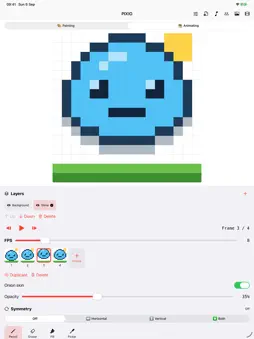
PIXIO is a small, focused pixel-art studio for iPhone and iPad. Pick a canvas, pick a colour and start painting; when the picture is done, bring it to life as a looping animation. DRAW • 8×8, 16×16, 32×32 and 64×64 canvases. Switching size is lossless: the picture is always kept at 64×64, and a coarser size simply paints whole blocks. • Pencil, eraser, flood fill and colour picker. • Horizontal, vertical or both-ways symmetry, plus flip and rotate. • Layers on every frame: add, reorder, hide and delete them, with 50 steps of undo and redo per layer. • A quick palette of the colours already in your picture, a 132-colour grid, a saturation/brightness panel and a hue slider. ANIMATE • A frame timeline with duplicate and delete. • Onion skin with adjustable opacity, so the previous frame shows through while you draw the next one. • Playback from 1 to 60 frames per second. GESTURES • One finger paints. Two fingers pan, and pinch to zoom around your fingers. • Two-finger tap to undo, three-finger tap to redo. • Tap the zoom percentage to snap back to 100 %. EXPORT • Save the current frame as a crisp 2048×2048 PNG to Photos. • Export the whole animation as a looping 512×512 GIF and share it anywhere. Optional chiptune background music, silent until you choose a song. No accounts, no ads, no in-app purchases and no tracking: your artwork stays on your device.
Technical Analysis
Package Overview Basic metadata
Bundle ID
no.bitfarm.pixioapp Current Version 1.1
Minimum iOS 16.4
Package Size App Store Size
Package Metadata 0 / 0 version records
Detailed binary, privacy manifest, framework, and Info.plist results have not been indexed for this package yet. The verified App Store and archive metadata above remains available.
Known Version Records
0 version records with stored package metadata
Stored metadata does not guarantee a package is currently available to download.
| Details | Version / IDs | Version date | Action |
|---|