
Preview


Description
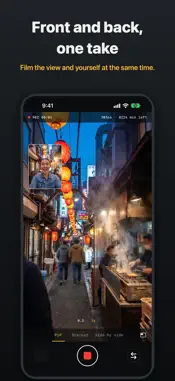
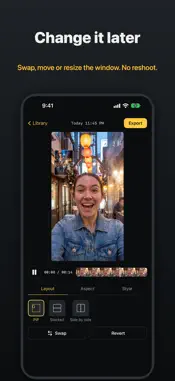
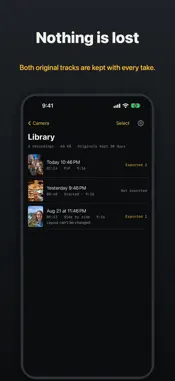
Capture both sides of the moment. Twofold records the scene in front of you, your reaction to it, and when and where it happened, all in one take. The front and back cameras film at the same time, so a walk through a new city, a concert, a day out with the kids or a walk-and-talk vlog becomes one video with you in it. No switching cameras, no stitching clips together afterwards. ONE TAKE, READY TO POST - Stop recording and a picture-in-picture video is already in Photos, ready to share. - Both cameras are also kept as separate original tracks, so nothing is lost. - Vertical 9:16 by default; the small window sits in the upper left, clear of the buttons social apps put on the right. PICTURE-IN-PICTURE, TOP AND BOTTOM, SIDE BY SIDE - Three layouts: picture-in-picture, split screen top and bottom, or side by side. - Drag the small window to a corner, pinch to resize it, double tap to swap the two cameras. CHANGE THE LAYOUT AFTER RECORDING - Wrong corner? Face should have been the big picture? Open the recording in the library, move, resize or swap the window, pick another layout, and export again. No reshoot. REMEMBER WHEN AND WHERE - Put the time, the date, the place or the coordinates and altitude on the video, and change or remove them after recording. - Your location is read only when you choose a place overlay, and goes nowhere but into the video you save. BUILT NOT TO LOSE A TAKE - Recordings are written in pieces as you film and recovered after an interruption or crash. - When the phone gets hot, quality steps down gently and the viewfinder says so, instead of silently dropping frames. - Recording stops in time when storage runs low, and keeps what was filmed. READY WHEN YOU ARE - Opens straight to the viewfinder. - Start and stop with the volume buttons, the Action button or Camera Control. - Add Twofold to the Lock Screen and Control Center to start filming without unlocking. PRIVATE BY DESIGN - No account, no sign-up, no ads. - Your videos, sound and photos never leave your iPhone. Only anonymous usage statistics and crash reports are collected. TWOFOLD PRO, A ONE-TIME PURCHASE The free version has no limit on length or number of videos; finished videos carry a small watermark. Pro is bought once, not a subscription, and can be shared with Family Sharing: - No watermark - 3:4 and 16:9 export - 4K and 60 fps where your iPhone supports it - More picture-in-picture styles - Separate voice and ambient sound tracks - Export the original front and back tracks - Place and coordinates overlays Terms of Use: https://www.shosin-labs.com/legal/twofold/ios/terms.html Privacy Policy: https://www.shosin-labs.com/legal/twofold/ios/privacy.html
Technical Analysis
Package Overview Basic metadata
Bundle ID
com.shosin-labs.twofold Current Version 1.0.0
Minimum iOS 26.0
Package Size App Store Size
Package Metadata 0 / 0 version records
Detailed binary, privacy manifest, framework, and Info.plist results have not been indexed for this package yet. The verified App Store and archive metadata above remains available.
Developer Information
Known Version Records
0 version records with stored package metadata
Stored metadata does not guarantee a package is currently available to download.
| Details | Version / IDs | Version date | Action |
|---|