
Preview



Description
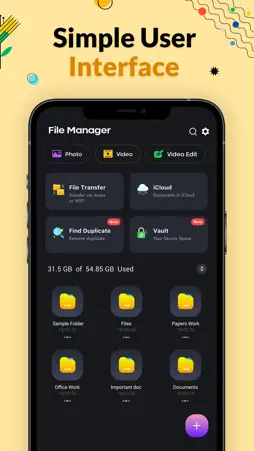
File Manager File explorer Pro is most powerful file Viewer for User. With File Manager You can easily manage your files and folders on your device, Network-attached storage. Main Storage Internal Storage you can manage all files and folders on both your storage and iCloud. You can find how many files & apps you have on your device at a glance immediately after opening File manager. It supports every file management actions File explorer like open, search, navigate directory, copy and paste, cut, delete, rename, compress, decompress, transfer, download. File Manager Plus supports media files and major file formats including app. File Manager File explorer Attractive material Design UI/UX is a Light & smooth, Simple & clean, Multi themes support. Browse files easily by category right from File Manager’s home screen: images, videos, music, applications, downloaded. Manage FIle is to Easy and Powerful File View/Manage for Devices. you also get a Process Manager and Backup Manager included within as a bonus. File Commander - File Manager - File Viewer, Supports Media Files and Major File Formats. SD File Manager will transfer content between internal storage, usb flash drive, and cloud storage. This is a dual-pane Manager, there are two folders shown at same time, and common operation such as copying files are done from one pane to another and file manager shows folder hierarchy in a tree view for clear orientation and fast switching to other location. File Manager Features Open Source, File explorer Pro light and smooth and based on Material Design guidelines. file management actions (open, search, navigate directory, copy and paste, cut, delete, rename, compress, decompress, transfer, download, bookmark, and organize). File storage supports media files and major file formats Full-Featured File Storage Tool Find powerless to manage tons of files on your mobile device? Try File Manager , see and manage all files, apps, videos and photos downloaded on your local device. Search and erase unused items to free up more space with this document manager tool. Storage analysis : You can analyze local storages to clean up useless files. You can find out which files take up the most space used File storage. • Internal image viewer / Internal music player/ Internal text editor : You can choose to use built-in utilities for faster and better performance. Features - Search and share files - Basic features like cut, copy, delete etc. easily accessible - Images: You can manage image and picture files in your storages. Image preview is available. - Audios: You can manage all music and sound related files. - Videos: You can manage all video files in your device. [File Manager Pro Subscription] - With a File Manager Pro Unlimited subscription, you have access to all features and App Passcode, Keep folder private etc. advertisements will be removed automatically. - File Manager Pro subscription is billed weekly, monthly or annually at the rate corresponding to the selected plan. In addition, a one-time payment will be offered if needed, which is not one of the subscription plan. - Payment will be charged to iTunes Account at confirmation of purchase. - Subscription automatically renews unless auto-renew is turned off at least 24-hours before the end of the current period. - Account will be charged for renewal within 24-hours prior to the end of the current period, and identify the cost of the renewal. - Subscriptions may be managed by the user and auto-renewal may be turned off by going to the user's Account Settings after purchase. - Any unused portion of a free trial period, if offered, will be forfeited when the user purchases a subscription to that publication, where applicable. [Terms of Use] https://skyinfotechdeveloper.com/FileManager_TermsOfUse.html [Privacy Policy] https://skyinfotechdeveloper.com/FileManager_PrivacyPolicy.html
What's New
Version 1.0.18 2026-07-10
• PDF Tools: Easily Merge or Split your PDF files. • Converter: Quickly convert images into PDF format. • Compression: Reduce file size with optional password p...• PDF Tools: Easily Merge or Split your PDF files. • Converter: Quickly convert images into PDF format. • Compression: Reduce file size with optional password protection. • Optimizations: Performance improvements and bug fixes for a smoother experience. Technical Analysis
Package Overview Basic metadata
Bundle ID
com.filemanager.exfileexplorer Current Version 1.0.18
Minimum iOS 15.6
Package Size App Store Size
Package Metadata 1 / 19 version records
Detailed binary, privacy manifest, framework, and Info.plist results have not been indexed for this package yet. The verified App Store and archive metadata above remains available.
Developer Information
Known Version Records
1 version record with stored package metadata • 19 known version records
Stored metadata does not guarantee a package is currently available to download.
| Details | Version / IDs | Version date | Action |
|---|---|---|---|
| 106.99 MB | v1.0.18 App Store ID: 888109224Build: 1.0.18 | 2026-07-11 00:02:04 | Get Version |
| Not archived | App Store ID: 882889911 | Unknown | Request Version |
| Not archived | App Store ID: 876869378 | Unknown | Request Version |
| Not archived | App Store ID: 872291982 | Unknown | Request Version |
| Not archived | App Store ID: 871004831 | Unknown | Request Version |
| Not archived | App Store ID: 870952702 | Unknown | Request Version |
| Not archived | App Store ID: 868378992 | Unknown | Request Version |
| Not archived | App Store ID: 866673815 | Unknown | Request Version |
| Not archived | App Store ID: 866372721 | Unknown | Request Version |
| Not archived | App Store ID: 865524014 | Unknown | Request Version |
| Not archived | App Store ID: 865150344 | Unknown | Request Version |
| Not archived | App Store ID: 864719533 | Unknown | Request Version |
| Not archived | App Store ID: 863860509 | Unknown | Request Version |
| Not archived | App Store ID: 859321305 | Unknown | Request Version |
| Not archived | App Store ID: 845017291 | Unknown | Request Version |
| Not archived | App Store ID: 844610266 | Unknown | Request Version |
| Not archived | App Store ID: 840263782 | Unknown | Request Version |
| Not archived | App Store ID: 839894484 | Unknown | Request Version |
| Not archived | App Store ID: 834641564 | Unknown | Request Version |