
Preview




Description
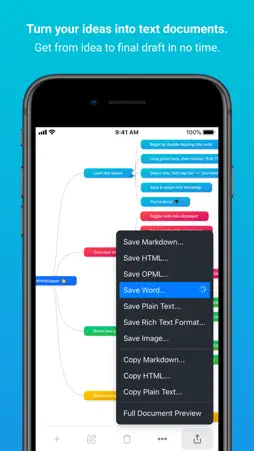
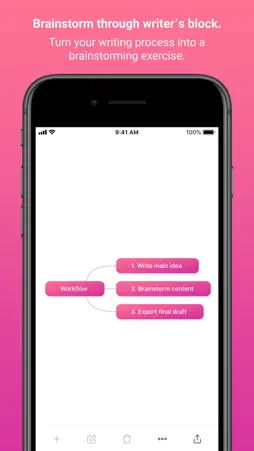
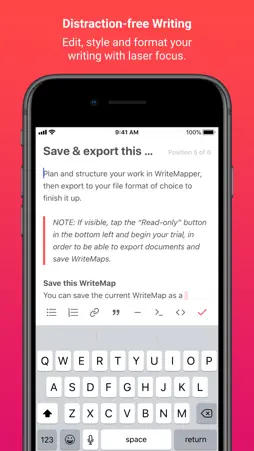
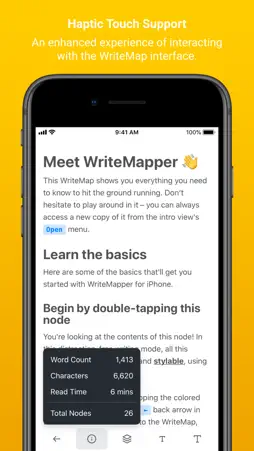
AS SEEN ON Forbes, Cult of Mac, The Next Web, MakeUseOf, MacAlert!, Apple RSS, Envato Blog, Duct Tape Marketing, AppleBase, GeekZone A WRITEMAP OUTLINE PAINTS A THOUSAND WORDS WriteMapper was built to leverage the visual nature of mind maps to give you a bird's-eye view of your writing structure. Just one glance is all it takes for you to get a good feel for the flow of your work. In doing so, you get a comprehensive yet clear picture of what's going on in your content. And, if you need to rearrange your writing sequences or move stuff around, it's as simple as drag and drop. BRAINSTORM YOUR WAY THROUGH WRITER’S BLOCK Ever write down the title, and then face a mental struggle with the rest of the blank page? WriteMapper helps you overcome writer's block by turning your writing process into a brainstorming exercise. This allows you to rapidly and relentlessly generate ideas and points for your writing. Just spend a couple minutes on this quick-fire process, and before you know it, you'll have a fully-formed content structure all ready to go! DISTRACTION-FREE WRITING Each node on the mind map has a content section you can jump in to edit at anytime. Besides being able to style and format your writing however you like, you can also edit the title of this sub-point from this view as well. The distraction-free writing mode helps you shift gears from the all-aspects-considered nature of the mind map outline, to the focused task of detailing the contents of the individual sub-point you're zoomed in on. PLAYS WELL WITH TEAMMATES WriteMapper uses the nested structure of a mind map to automatically create and export a text document for you, right in your computer's file system. You can choose from a variety of file formats, including Markdown, HTML, Microsoft Word, plain text and Rich Text Format. You can then edit the exported document in your text editing app of choice, to give that final draft the polish it needs to bring it to completion. With this supercharged content generation workflow, you'll get your writing done in no time at all! HIGHLY PRAISED "WriteMapper is an invaluable tool for those who write for a living." — Mihir Patkar, MakeUseOf "It has the perfect balance of elegance and features, and the text-editor itself is killer." — Charlie Sorrel, Cult of Mac "WriteMapper is such a powerful tool. This workflow is so logical and intuitive." — Michael Levy ALL THE POWER OF IOS WriteMapper was reworked from the ground up to be deeply integrated with and optimised for an incredible experience on your iPhone. Here’s a couple of features and capabilities which we’ve leveraged from the power of iOS, the world’s most advanced mobile operating system, to help you do your best work: 1. Dark Mode On iOS 13, dark mode in the app will now sync with the dark mode setting on your device, directly adapting to whatever theme you're currently using. 2. Haptic Touch Use of the Taptic Engine on your device allows WriteMapper to now also deliver haptic feedback upon interaction with elements in the app. 3. Pure Black Theme For iPhones with OLED displays, you can now choose to use a Pure Black dark mode theme instead, which gives a visually stunning effect. 4. Files With the help of the new Files app, you can easily save, sync and access your WriteMaps (.writemap files) across devices. 5. Drag and Drop Rearrange the nodes in your WriteMap by dragging them around, the experience of which is now also accentuated by Taptic Engine feedback. WRITEMAPPER ON YOUR OTHER DEVICES Get WriteMapper for your Mac or Windows desktop computer to experience the full power of working on your .writemap files across your devices (sold separately), accessing your WriteMaps using your preferred cloud syncing service. NEED HELP? Didn’t find what you were looking for, have questions or need help? Get in touch with us or visit our website for an extensive list of support articles which might be able to help.
What's New
Version 2.10.1 2022-02-23
Fixed background colors of editor toolbar buttons. Technical Analysis
Package Overview Basic metadata
Bundle ID
com.gx.writemapperforiphone Current Version 2.10.1
Minimum iOS 10.0
Package Size App Store Size
Package Metadata 1 / 6 version records
Detailed binary, privacy manifest, framework, and Info.plist results have not been indexed for this package yet. The verified App Store and archive metadata above remains available.
Developer Information
Known Version Records
1 version record with stored package metadata • 6 known version records
Stored metadata does not guarantee a package is currently available to download.
| Details | Version / IDs | Version date | Action |
|---|---|---|---|
| 5.99 MB | v2.10.1 App Store ID: 847342687Build: 2.10.1 | 2022-02-23 20:44:21 | Get Version |
| Not archived | App Store ID: 835301853 | Unknown | Request Version |
| Not archived | App Store ID: 833777293 | Unknown | Request Version |
| Not archived | App Store ID: 833037671 | Unknown | Request Version |
| Not archived | App Store ID: 832953299 | Unknown | Request Version |
| Not archived | App Store ID: 832839410 | Unknown | Request Version |