
Preview




Description
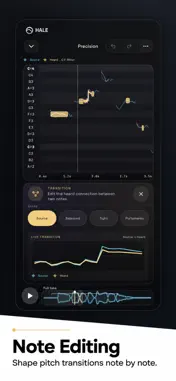
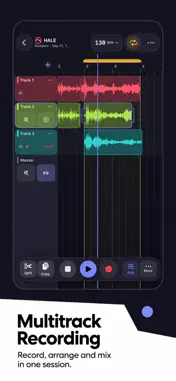
Hale brings recording, editing, vocal production, spatial mixing, stem separation, and mastering together in one touch-first mobile studio. SHAPE — PROFESSIONAL EQ Shape is a real-time tone-shaping environment for audio and video. Use an 8-band parametric EQ with precise frequency, gain, and Q controls. Solo a frequency range, apply Dynamic EQ only when needed, or use Linear Phase mode for phase-sensitive work. Build up to three independent EQ stages, add integrated effects, and switch to a landscape workspace for detailed control. Shape processes video directly while keeping sound and picture synchronized. MASTERING — LOUDNESS-AWARE FINISHING Hale Mastering starts with your delivery target—not a fixed preset. Choose a target LUFS level, then let Hale analyze the track and create a source-specific Polish profile. Adjust its intensity and character while keeping the selected loudness target stable. Shape compressor and limiter behavior for a more open, controlled, or dense result. Mastering Monitor helps you inspect tonal balance, dynamics, and limiting in real time. HALE PITCH — NOTE-LEVEL VOCAL CONTROL Hale Pitch combines fast automatic correction with detailed vocal editing. Work with detected notes, adjust their targets, and refine transitions. Preserve the natural movement of a performance or create a deliberate pitch effect. Key, scale, tonal-center, and automatic correction controls provide a fast starting point, while note-level editing provides deeper control. HALESPHERE — SPATIAL MIXING AS PERFORMANCE HaleSphere turns spatial mixing into a visual, performable experience. Treat vocals, drums, effects, and samples as objects placed around the listener. Move them in real time and record spatial automation. Bring a sound from behind the listener to the front, rotate it around their head, or guide it along a custom path. Headphone monitoring supports placement and motion decisions, and binaural WAV export preserves the spatial mix for headphone playback. CREATE SESSION — MULTITRACK PRODUCTION Create Session is a multitrack workspace for recording, arranging, editing, and mixing. Record audio, split and reposition regions, organize tracks, and build a session. Each channel can have its own EQ, effects, level, and processing chain. Create Session brings essential DAW structure to an interface designed for touch. AUDIO INTELLIGENCE — STEM SEPARATION Audio Intelligence turns a completed mix into flexible production material. Separate vocals and instrumental elements into independent stems for remixing, editing, analysis, and rearrangement. Choose efficient delivery for faster workflows or lossless WAV output for maximum fidelity. Before account-based cloud processing begins, Hale displays the estimated cloud-processing unit cost and waits for confirmation. A Hale account is required only for this cloud processing. Purchasing, restoring, editing, previewing, playing, and exporting do not require a Hale account. Separated material remains connected to the studio: edit vocals in Hale Pitch, arrange stems in Create Session, shape them with EQ, or turn them into moving spatial objects in HaleSphere. ONE CONNECTED STUDIO • Record and arrange with Create Session. • Separate editable stems with Audio Intelligence. • Refine vocals with Hale Pitch. • Shape tonal balance with Shape. • Create spatial motion with HaleSphere. • Complete the track at a defined loudness target with Mastering. Creation, editing, preview, and playback are available without a subscription. Hale Signature is required for final export and account-based cloud processing, and includes a monthly cloud-processing allowance. Monthly and Annual subscriptions provide the same access and differ only in Apple billing period. Terms of Use (EULA): https://www.apple.com/legal/internet-services/itunes/dev/stdeula/
Technical Analysis
Package Overview Basic metadata
Bundle ID
bscaudio.VideoEQ2 Current Version 1.0
Minimum iOS 18.0
Package Size App Store Size
Package Metadata 0 / 0 version records
Detailed binary, privacy manifest, framework, and Info.plist results have not been indexed for this package yet. The verified App Store and archive metadata above remains available.
Developer Information
Known Version Records
0 version records with stored package metadata
Stored metadata does not guarantee a package is currently available to download.
| Details | Version / IDs | Version date | Action |
|---|