Preview




Description
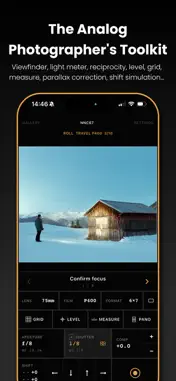
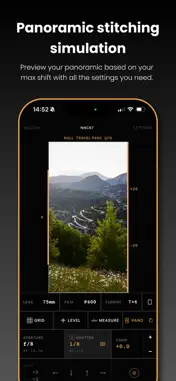
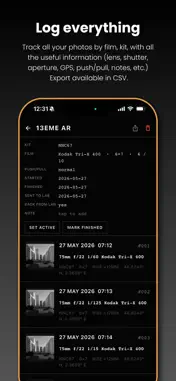
PLEASE READ FIRST Second View is not a camera app and does not take photos for you. It helps you frame, meter, and plan shots before you press the shutter on your own camera. The photos it saves are framing aids, not final images. Second View turns your iPhone into a precision field toolkit for analog photographers. Set your lens and format, and it crops the iPhone camera to match what your film camera will capture: same field of view, aspect ratio, and framing. Supports 35mm, medium format (6x4.5 through 6x17), large format (4x5, 5x7, 8x10), digital sensors, and custom sizes. VIEWFINDER Precise field-of-view matching for any focal length and format. Portrait or landscape, control side of your choice, preview rotation per kit. AUTOMATIC LENS SELECTION Frames through the sharpest back camera that holds your crop (ultra-wide, wide or tele), so long lenses look crisp. Calibrate each lens with a sheet of paper. FRAMES MODE Rangefinder-style bright lines for every lens in your kit at once. WORKSPACES Design your own control panel and switch layouts with a swipe. FREEZE MODE Hold a full-resolution still to compose rise and shift, spot-meter, and measure distance without the scene moving. LIGHT METER Pick your aperture and get the shutter speed. EV compensation, hyperfocal distance, auto/manual modes, and whole/half/third stops. SPOT METERING Meter the whole frame or a spot down to 1° through the telephoto. ZONE SYSTEM Log spot readings on a zone scale from 0 to X and slide it to place shadows and highlights. Zone V sets the exposure, with contrast range, an N+/N- hint and film latitude. METER CALIBRATION Calibrate against your reference meter at several light levels, per lens. BELLOWS COMPENSATION Folds close-focus light loss into the reading, set manually or by LiDAR. LENS FILTERS Log ND, polarizer, and color filters. The meter compensates and every capture records them. RECIPROCITY CORRECTION 60 film stocks with accurate reciprocity curves, plus your own: Portra, CineStill, Tri-X, Velvia, ECN-2 and more. Exposures over one second are corrected automatically. FILM PREVIEW Simulate B&W film with color filters, and preview color-film white balance from the loaded stock. SUN AND MOON PLANNER The day's sun path, golden and blue hour and the moon drawn over your frame. Plan any date and place on a map with sunrise, sunset and moon directions. LONG EXPOSURE TIMER Countdown with a full-screen progress ring, on the Lock Screen and in the Dynamic Island, with an optional end alert. HARDWARE BUTTONS Map the volume buttons, Camera Control, the Action button or a Bluetooth remote to shutter, timer, freeze, lens steps and more. LIDAR DISTANCE AND PARALLAX Measure subject distance with LiDAR (iPhone 12 Pro and later) or enter it manually. Parallax between the iPhone and your lens is corrected automatically. RISE, FALL AND SHIFT Simulate view camera movements in 1mm steps, up to your kit's maximum travel. COMPOSITION TOOLS Rule of thirds, phi grid, golden triangle, square, and custom grids up to 12x12. Bubble level with roll and pitch. PANORAMA SIMULATION Preview a stitched multi-frame panorama and save it as a plan. SHOT CHECKLIST Run a per-kit checklist in the viewfinder. One step can fire the shutter automatically. CAMERA KITS Save complete setups and switch instantly: lenses, format, stocks, workspace, parallax, and checklist. Pick a body and the format picker shows only the masks it can shoot. FILM ROLL TRACKING Know which roll is loaded and when every frame was exposed. CAPTURE AND GALLERY Save a reference photo with the exact framing and full metadata: lens, format, stock, filters, exposure, rise/shift, GPS, time, and sun and moon position. Export with a data overlay, add notes, group into rolls, and export a CSV log. Terms of Use : https://www.apple.com/legal/internet-services/itunes/dev/stdeula/ Privacy policy : https://secondview.app/privacy
What's New
Version 1.4 2026-11-04
Second View 1.4 brings two new Pro workspaces for planning light and exposure. ZONE SYSTEM Spot-meter the scene and log each reading on a zone scale from 0 to ... Technical Analysis
Package Overview Basic metadata
Bundle ID
com.secondview.app Current Version 1.4
Minimum iOS 16.0
Package Size App Store Size
Package Metadata 1 / 14 version records
Detailed binary, privacy manifest, framework, and Info.plist results have not been indexed for this package yet. The verified App Store and archive metadata above remains available.
Developer Information
Known Version Records
1 version record with stored package metadata • 14 known version records
Stored metadata does not guarantee a package is currently available to download.
| Details | Version / IDs | Version date | Action |
|---|---|---|---|
| 36.46 MB | v1.2.2 App Store ID: 889081629Build: 1.2.2 | 2026-08-08 02:08:40 | Get Version |
| Not archived | App Store ID: 888798225 | Unknown | Request Version |
| Not archived | App Store ID: 887197211 | Unknown | Request Version |
| Not archived | App Store ID: 886872436 | Unknown | Request Version |
| Not archived | App Store ID: 886844467 | Unknown | Request Version |
| Not archived | App Store ID: 886662878 | Unknown | Request Version |
| Not archived | App Store ID: 886516957 | Unknown | Request Version |
| Not archived | App Store ID: 886240877 | Unknown | Request Version |
| Not archived | App Store ID: 886076634 | Unknown | Request Version |
| Not archived | App Store ID: 885726012 | Unknown | Request Version |
| Not archived | App Store ID: 885454465 | Unknown | Request Version |
| Not archived | App Store ID: 885350894 | Unknown | Request Version |
| Not archived | App Store ID: 885154361 | Unknown | Request Version |
| Not archived | App Store ID: 884107322 | Unknown | Request Version |