
Preview







Description
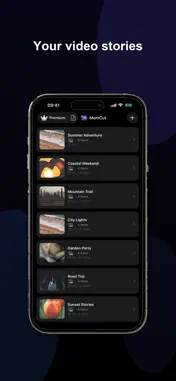
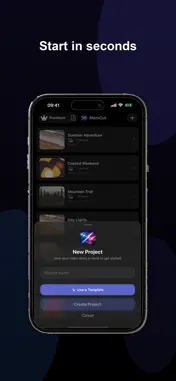
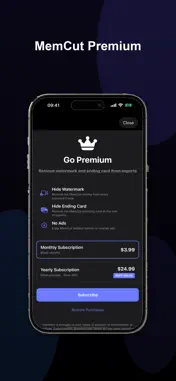
Turn your photos and videos into polished on-device video stories — sports reels, travel stories, birthday tributes, and Best Moments — for Instagram, TikTok, YouTube, Stories, and more. MemCut runs entirely on your device: no account, no cloud upload, no waiting on servers. WHY MEMCUT • Cinematic video stories from the clips and photos already on your phone • On-device AI finds your best shots — you stay in control of every cut • Beat-synced edits that snap to your music automatically • 32 ready-made templates for holidays, travel, sports, weddings, and more — all free • Photo Tools: cutout, blur, crop, erase, text erase, and enhance — on-device • Import custom LUT (.cube) colour grades • Export HD, Full HD, 4K, or 4K HDR at 30 or 60 fps • Save finished exports to your Photos library START FAST WITH TEMPLATES Pick a blank project or choose from 32 curated templates — Birthday, Travel, Wedding, Reels/TikTok, Sports Best Moments, VHS Throwback, and more. Each ships with the right aspect ratio, look, and title style. Live previews show the effect before you commit. IMPORT & ARRANGE Add photos and videos from your library. Drag clips in the timeline strip to reorder. Trim clips, use the full clip, or let AI pick the strongest moments for you. AI BEST MOMENTS On-device AI scores your footage and detects the strongest video moments — perfect for action clips, game day, concerts, and family events. Review every suggestion, adjust trim handles, add custom ranges, or turn suggestions off. Nothing exports until you approve it. PHOTO TOOLS Edit any photo in your project with on-device Photo Tools — no upload required. Cut out subjects, blur backgrounds, crop and straighten, brush-erase unwanted areas, detect and erase text, and auto enhance. Changes stay in your project and export with your video. PHOTO OVERLAYS ON FULL VIDEO Keep a full video playing underneath and drop in photos at exact moments. Video and audio keep rolling while overlays appear on top. Adjust duration; effects, zoom, crop, and per-photo adjustments apply too — great for reaction shots or stills over action footage. MUSIC, BEAT SYNC & MIXED AUDIO Import music, narration, or voiceover from your library. Cuts can snap to the beat automatically. Chain tracks in sequence or use Mixed mode to layer background music under voiceover, with per-track trim, volume, and start time. 60+ EFFECTS & 27 TRANSITIONS Cinematic colour grades, vintage film, VHS, neon, noir, golden hour, and more. Pair clips with fades, zooms, film burns, glitches, page flips, and other transitions. Add Ken Burns slow zoom, animated captions, title text, and date stamps. COLLAGE & LAYOUT Pair portrait photos side-by-side. Choose from 8 aspect ratios — 16:9, 9:16, 1:1, 4:5, 21:9, and more — so every export fits Reels, TikTok, YouTube, Instagram, and Stories. EXPORT TO YOUR LIBRARY Choose HD (720p), Full HD (1080p), 4K (2160p), or 4K HDR with real 10-bit HEVC. Full HD is true 1920×1080 or 1080×1920 — not upscaled shortcuts. Pick 30 fps for faster exports or 60 fps for smoother motion. Save to Photos — MemCut does not post for you. PRIVATE BY DESIGN Your media never leaves your device. All AI, Photo Tools, beat analysis, colour grading, and rendering run locally. No accounts. No cloud storage. No developer access to your projects. PREMIUM (OPTIONAL) Core editing is free — templates, effects, Photo Tools, LUT import, and full export quality included. Free exports include a small watermark and brief branding card. MemCut Premium removes ads and lets you optionally hide the watermark and ending card. You are responsible for the content you import and share. Terms of Use (EULA): https://www.apple.com/legal/internet-services/itunes/dev/stdeula/ Privacy Policy: https://memcut-video.web.app/privacy
What's New
Version 1.04 2026-10-05
What’s new in MemCut • Photo Tools — cutout, background blur, crop, erase, text erase, and auto enhance, all on-device • Edit any photo in your project before ... Technical Analysis
Package Overview Basic metadata
Bundle ID
com.memcut.app Current Version 1.04
Minimum iOS 17.0
Package Size App Store Size
Package Metadata 0 / 0 version records
Detailed binary, privacy manifest, framework, and Info.plist results have not been indexed for this package yet. The verified App Store and archive metadata above remains available.
Developer Information
Known Version Records
0 version records with stored package metadata
Stored metadata does not guarantee a package is currently available to download.
| Details | Version / IDs | Version date | Action |
|---|