Preview



Description
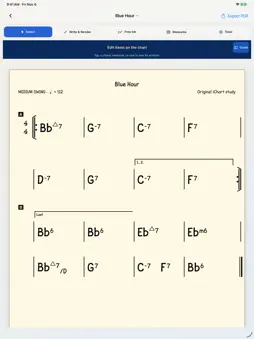
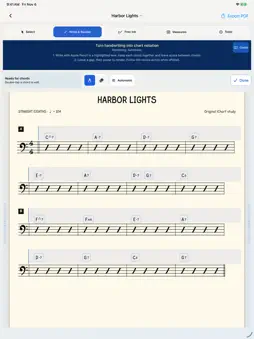
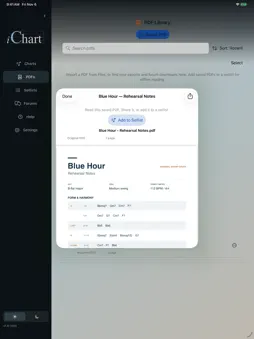
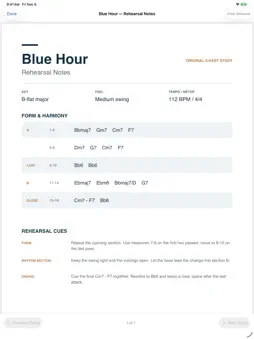
Hi, I’m Beni Rossman, a bassist, composer, educator, arranger, software engineer, and the solo developer behind iChart. I started building iChart out of a somewhat selfish necessity. I was writing paper charts for one-off gigs and wanted an easier way to keep track of them, make changes, and use them again whenever I needed them. I wanted to keep the speed and freedom of writing by hand while making charts easier to edit, transpose, organize, export, and use again. iChart is for musicians preparing charts for rehearsals, gigs, lessons, sessions, and practice. Map out a song’s harmony, prepare a rhythm-section chart with hits and chords, adjust a setlist, or change keys while keeping your original chart editable. Write it, make it yours, and use it again - Create Simple Chord Sheet and Rhythm Section Sheet charts. - Handwrite chord symbols with Apple Pencil, review the suggestions, and correct them before rendering. - Add bar lines, freehand notes and rhythm cues, text, repeats, score markings, and meter changes. - Move chords and adjust their width. - Duplicate charts and transpose chord symbols. - Export PDFs and organize them into setlists. Pro access is currently included at no charge Verified iChart accounts start with free Pro access, including unlimited local charts, Projects, cloud backup and restore, and Forums for sharing reviewed community chart PDFs. No checkout or new subscription is required for this free access. It does not automatically convert into a paid subscription. You can choose Use Basic or rejoin free Pro in the app’s Plan settings. Basic includes the core chart-writing tools and unlimited PDF exports, with a three-chart limit for new chart creation. Choosing Basic keeps your existing charts editable and does not delete your saved work. A free account and email verification are required to use iChart. Existing Apple subscriptions Changing your access in iChart does not cancel an existing Apple subscription or issue a refund. Existing Apple billing is separate from this free access. Use Manage My Subscription in the app to manage or cancel a subscription with Apple. Built around musicians’ feedback Handwritten chord readings are suggestions you can review and correct. iChart is built for practical charts rather than full score engraving. I’m one musician building a tool for other musicians. If something isn’t working, feels awkward, or could make your musical life easier, please tell me. Thanks for using iChart. Beni [email protected]
What's New
Version 1.9.3 2026-11-16
iChart 1.9.3 improves measure layout and keeps your handwriting with the music it belongs to. • In Rhythm Section Sheet, Add One After fits a new measure into ...iChart 1.9.3 improves measure layout and keeps your handwriting with the music it belongs to. • In Rhythm Section Sheet, Add One After fits a new measure into the current row and evens the measure widths. • In Simple Chord Sheet and Rhythm Section Sheet, select a measure to move a group of measures to the row above or below. • Free Ink near a measure follows it as the layout changes. Ink directly below a chord can follow the chord, and notes in open page space stay where you wrote them. Technical Analysis
Package Overview Basic metadata
Bundle ID
com.ichart.app Current Version 1.9.3
Minimum iOS 17.0
Package Size App Store Size
Package Metadata 0 / 0 version records
Detailed binary, privacy manifest, framework, and Info.plist results have not been indexed for this package yet. The verified App Store and archive metadata above remains available.
Developer Information
Known Version Records
0 version records with stored package metadata
Stored metadata does not guarantee a package is currently available to download.
| Details | Version / IDs | Version date | Action |
|---|