Preview


Description
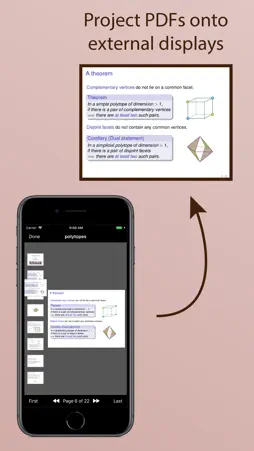
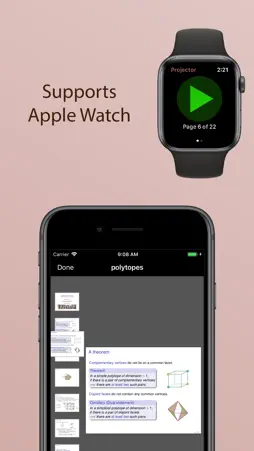
Projects PDF slideshows onto an external screen. If you have an Apple Watch, you can also use it as a remote control. This app is useful if you write presentations using LaTeX Beamer, or LibreOffice Impress, or some other application that exports to PDF. Simply open your PDF in the app and connect an external display (e.g., via VGA, HDMI, USB-C, or AirPlay). Your slides will be displayed full-screen on the external display, while the app provides additional navigation controls on your iPad or iPhone. You can navigate on your iPad or iPhone by tapping and swiping, or using the buttons on the toolbar, or scrolling through the thumbnails, or using an external keyboard. When in landscape mode, you will also see a preview of the next page (which you can turn on/off using the button on the upper toolbar). You can browse and open any of your iCloud documents, or you can share PDFs from your favourite app to open in PDF Projector. WATCH REMOTE: If you have an Apple Watch, you can use this as a remote control. Simply open a PDF document in the iPhone app and connect it to an external display, and then start the Watch app to use the remote control. If you talk a lot between slides, try adding the "Next Page" complication to your clock face (requires watchOS 7). This will let you step through the slides without having to keep reopening the app. You can also configure Settings / General / Wake Screen (on any watchOS version) to keep the app on screen for longer while you present your talk.
What's New
Version 1.7 2024-09-23
This app has been updated by Apple to prepare for watchOS 27 compatibility. No new features are included. Added dark and tinted icons for iOS 18. Technical Analysis
Package Overview Basic metadata
Bundle ID
org.benburton.PDF-Projector Current Version 1.7
Minimum iOS 12.0
Package Size App Store Size
Package Metadata 1 / 8 version records
4.7 / 5.0 (3 ratings)
Detailed binary, privacy manifest, framework, and Info.plist results have not been indexed for this package yet. The verified App Store and archive metadata above remains available.
Known Version Records
1 version record with stored package metadata • 8 known version records
Stored metadata does not guarantee a package is currently available to download.
| Details | Version / IDs | Version date | Action |
|---|---|---|---|
| 2.36 MB | v1.7 App Store ID: 869169327Build: 1.7 | 2024-09-23 10:43:26 | Paid / Arcade |
| Not archived | App Store ID: 839432798 | Unknown | Paid / Arcade |
| Not archived | App Store ID: 832881638 | Unknown | Paid / Arcade |
| Not archived | App Store ID: 830195912 | Unknown | Paid / Arcade |
| Not archived | App Store ID: 829716573 | Unknown | Paid / Arcade |
| Not archived | App Store ID: 829525621 | Unknown | Paid / Arcade |
| Not archived | App Store ID: 829448840 | Unknown | Paid / Arcade |
| Not archived | App Store ID: 829415121 | Unknown | Paid / Arcade |