Preview

Description
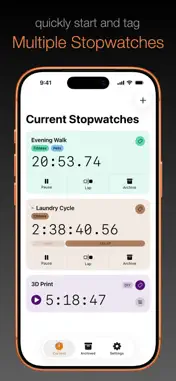
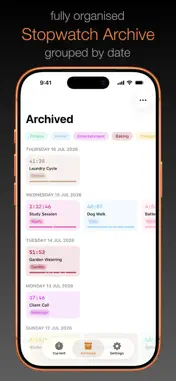
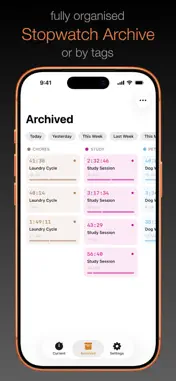
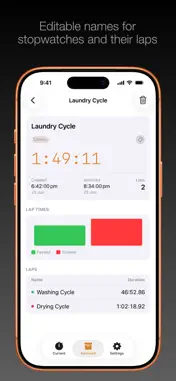
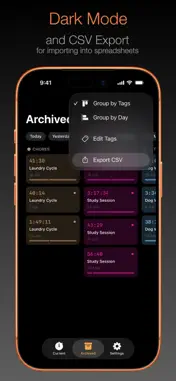
No subscriptions or in-app purchases. Multiwatch lets you quickly start and run multiple stopwatches. Starting a stopwatch is as easy as tapping '+', or swiping down when the Current Stopwatches tab is active. New Stopwatches are given a default name (Untitled). Stopwatches can be named or tagged while they're running, or after they've been archived. Stopwatches continue running while Multiwatch is closed. When more than zero stopwatches are running, the status of current stopwatches is visible on the iPhone lock screen, or in the dynamic island of newer iPhone models. Stopwatches can have custom names and multiple tags, even their individual laps can be given custom names (once archived). Archived stopwatches can be grouped and filtered either by tag or creation date. All archived stopwatches (or a filtered selection of them) can be shared as a CSV file for emailing, airdropping, or importing into common spreadsheet apps. Archived stopwatches and tag names/colours can be sync'd between multiple devices that share the same iCloud account.
What's New
Version 1.1 2026-08-11
- Running Stopwatches now appear on the iPhone Lock Screen and in the Dynamic Island - Added setting to turn off multi-tagging - Added setting to suppress warni... Technical Analysis
Package Overview Basic metadata
Bundle ID
app.bitrig.bencunningham.multiwatch Current Version 1.1
Minimum iOS 17.0
Package Size App Store Size
Package Metadata 0 / 0 version records
Detailed binary, privacy manifest, framework, and Info.plist results have not been indexed for this package yet. The verified App Store and archive metadata above remains available.
Price History (USA store)
2 recorded price change points. These are historical observations, not a guarantee of the current price.
| Recorded at | Price | Currency |
|---|---|---|
| 3.99 | USD | |
| 2.99 | USD |
Developer Information
Known Version Records
0 version records with stored package metadata
Stored metadata does not guarantee a package is currently available to download.
| Details | Version / IDs | Version date | Action |
|---|