
Preview




Description
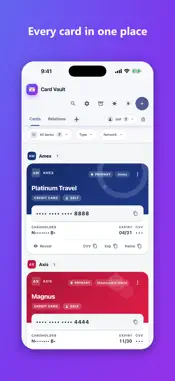
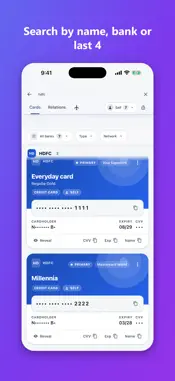
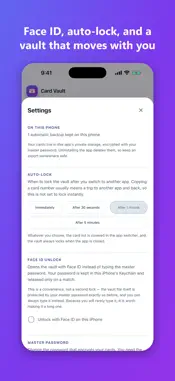
Card Vault keeps your debit and credit card details in one place, so you never have to hunt through apps or old notes just to check an expiry date or copy a card number. It runs entirely on your iPhone. There is no account to create and no server to sign in to, and the app makes no network requests of any kind. HOW IT WORKS Everything is stored in a single AES-encrypted file, unlocked with a master password you choose the first time you open the app. That password is the one and only gate. Once you are in, the full number and CVV are one tap away, and values stay masked until you reveal them, so a glance over your shoulder shows nothing. FACE ID, IF YOU WANT IT Turn on Face ID or Touch ID and unlock the vault with a single tap. Your master password is kept in the iPhone Keychain and released only on a match — the vault file itself is still protected by that password, and you can always type it instead. BUILT FOR HOW CARDS ACTUALLY WORK IN INDIA • Grouped by bank, each with its own theme — HDFC, ICICI, Axis, SBI, Kotak, IndusInd, IDFC, Amex and twenty more • Credit or debit, and a nickname for the card you actually call “the travel card” • Whose card it is — yours, your spouse’s, your family’s — with a home view you can pin • Search by bank, name, nickname or the last four digits • Scan a card with the camera to fill in the number, expiry and name — read on your iPhone, nothing photographed, saved or sent • Priority Pass numbers stored with the card they came with • Add-on cards branch off their primary, and a relationship view shows how your cards sit together MADE TO PROTECT ITSELF • Locks automatically after you leave the app — after 30 seconds, 1, 2 or 5 minutes, your choice • The card list is covered in the app switcher • A copied card number is wiped from the clipboard after 45 seconds • Your vault is excluded from iCloud and iTunes/Finder backups WORKS WITH THE DESKTOP APP Card Vault uses the same encrypted file format as the Windows and Mac versions, so you can move a vault between your PC and your iPhone by exporting and importing it — with the same master password, and without anything touching a network on the way. NOTHING ELSE No ads. No analytics. No tracking. No sign-in. No subscription. One purchase, yours to keep. Shared by @YourCardJourney
What's New
Version 2.0.0 (20003) 2026-10-28
Card Vault 2.0 — built from your feedback • Scanner rebuilt: main camera, autofocus and your iPhone's own text reader — sharp scans in a second or two • Reads t...Card Vault 2.0 — built from your feedback • Scanner rebuilt: main camera, autofocus and your iPhone's own text reader — sharp scans in a second or two • Reads the name on the card much better, and recognises names already in your vault • Vertical cards now scan • The scanner waits for you: lock each value, flip for the CVV, then "Use these details" • Fills the network and variant from the scan • Scan your Priority Pass number • Mark cards as Virtual or Dual • New icons for every bank; bank list opens only when you type • No keyboard popping up on unlock or Add card • X to clear the name or number, Visa Rewards variant, tap the logo to go home Still 100% offline: no account, no internet, everything encrypted on your iPhone. Technical Analysis
Package Overview Basic metadata
Bundle ID
com.yourcardjourney.cardvault Current Version 2.0.0 (20003)
Minimum iOS 15.0
Package Size App Store Size
Package Metadata 0 / 0 version records
Detailed binary, privacy manifest, framework, and Info.plist results have not been indexed for this package yet. The verified App Store and archive metadata above remains available.
Developer Information
Known Version Records
0 version records with stored package metadata
Stored metadata does not guarantee a package is currently available to download.
| Details | Version / IDs | Version date | Action |
|---|