
Preview






Description
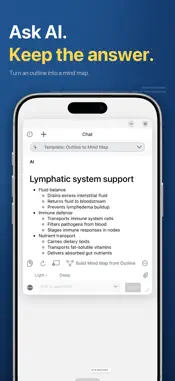
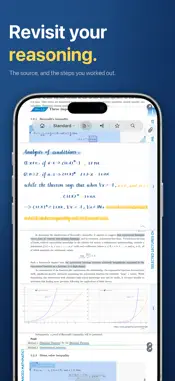
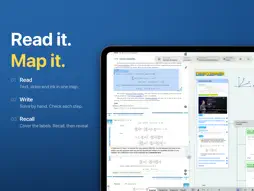
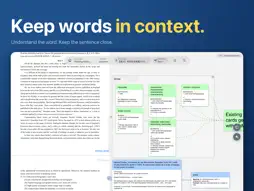
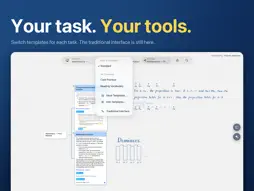
MarginNote is a PDF tool for in-depth reading and study. Keep PDF highlights linked to mind-map cards, then add those cards to review. MarginNote 5 introduces task-based templates for reading, question practice, and vocabulary. MarginNote has evolved since 2013. The upgrade from MarginNote 4 is free. Your study sets, notes, and purchases remain intact. MARGINNOTE 5: ONE TASK, ONE SETUP • Templates — a template sets the bottom tools, menus, pens, and excerpt colors. The "Standard" template has four modes: Excerpt, Handwrite, Organize, and Recall. Each mode groups tools for that task. • Template Gallery — install official templates in one tap. Some templates include examples to help you get started: – Card Practice: write answers by hand on question cards, check your answers, and focus your next review on questions you haven't mastered yet. AI can split a whole workbook into cards. – Reading Vocabulary: collect words while reading English; an offline dictionary provides base forms, pronunciation, and definitions, and finished cards join review when automatic review is enabled. • Make it yours — the corresponding controls are highlighted as you edit. Find features and settings with Feature Search, and export or share your templates. • Traditional Interface — open the template menu and choose "Traditional Interface" (except on iPhone Duo). SYNC YOU CAN SEE The home screen shows where sync stands. The Sync Center lists notes and original documents separately and tells you when a document is still downloading. Manual sync reports results and offers a protective snapshot. Applying cloud changes also protects local study data. THE CARD AT THE CENTER • Organize excerpts by chapter; for books without a table of contents, AI can build one. • Title Links — notes on concepts you've studied resurface as you read new documents. • Extend — open writing space anywhere on a PDF: inline, in the margin, or folded away. AI AS AN ASSISTANT, NOT A SUBSTITUTE AI Breakdown · Question Extraction · AI TOC · AI OCR card templates · translation · chat. Save any answer as a card, or turn its outline into mind-map branches. Online AI sends task text or images to the service provider used for the request. REVIEW: THINK FIRST, THEN LOOK Use Recall mode to hide and reveal answers in the mind map. Add cards to a review deck for FSRS spaced repetition. Write directly on card snapshots while you review. On iOS/iPadOS/macOS 26+, when Apple Intelligence is enabled and its model is available on a supported device and in a supported region, on-device recall hints work offline without MarginNote credits. THE FULL WORKFLOW PDF, EPUB, Office-to-PDF import (online), video and audio · Zotero, cloud drives and external folders · side-by-side documents · handwriting layers and mind-map backgrounds · mind-map PDF export (structure or card flow) · read aloud · fast OCR WHO IT IS FOR Anyone who rereads material and needs to remember it: medical and law students, exam takers, researchers, language learners, serious readers. ACROSS YOUR DEVICES iPhone, iPad and Mac with one Apple Account; iCloud syncs study sets, notes and review progress. Native Apple Pencil handwriting on iPad. Also adapted for iPhone Duo. ABOUT PURCHASES Free to download. Some features require Pro (one-time unlock) or Max (subscription or one-time unlock). MarginNote Agent requires Max and uses MarginNote credits. Some online AI uses MarginNote credits; external AI is billed by its provider. A Max subscription includes 500 credits/month while active. Questions: [email protected] Terms of Use: https://dist.marginnote.cn/MarginNote_Terms_and_Conditions.pdf Privacy Policy: https://dist.marginnote.cn/MarginNote_Privacy_Policy.pdf
What's New
Version 5.0.2 2026-11-10
- Introducing Clean View. Press and hold the top handle to hide toolbars and floating panels, then tap it to bring them back. Essential pen tools stay visible w...- Introducing Clean View. Press and hold the top handle to hide toolbars and floating panels, then tap it to bring them back. Essential pen tools stay visible while you write, and each scene template can have its own status bar setting. - Scroll through document tabs or find a document by its cover or title. You can also merge PDF pages, selections, or entire PDFs into another document without leaving the scene interface. - Fold PDF pages by chapter from the table of contents. Use the keyboard to navigate, select multiple entries, change their levels, and undo edits. - Your first excerpt no longer opens the mind map automatically. Use the excerpt notification to jump to the new card when you’re ready. Legacy Excerpt Occlusion is now off by default to avoid hiding text during normal reading. Existing marks and Recall behavior are unchanged. - More Mac shortcuts now work in the scene interface, including document switching, table of contents navigation, and mind map management. We’ve also improved excerpting, scrolling, and dragging with Sidecar and drawing tablets. - Fixed issues where switching to the eraser right after writing could erase unintended strokes, or unlinking handwriting from a card could remove the ink. Copying and pasting PDF text boxes now preserves font sizes, and selection handles remain draggable outside the box. - Fixed cropped annotation screenshots on long review cards. Importing study sets and restoring earlier versions now handle duplicate cards more reliably. - Sync Center now distinguishes documents waiting to upload from originals it can’t find on this device or in iCloud, and explains how to reimport or relink them. - Improved responsiveness when opening or deleting large study sets, as well as App Store purchase restoration and recognition of purchased access. Refund Help is available under Other Help on the purchase plans screen. Technical Analysis
Package Overview Basic metadata
Bundle ID
QReader.MarginStudy.easy Current Version 5.0.2
Minimum iOS 17.0
Package Size App Store Size
Package Metadata 5 / 50 version records
Detailed binary, privacy manifest, framework, and Info.plist results have not been indexed for this package yet. The verified App Store and archive metadata above remains available.
Developer Information
Known Version Records
5 version records with stored package metadata • 50 known version records
Stored metadata does not guarantee a package is currently available to download.
| Details | Version / IDs | Version date | Action |
|---|---|---|---|
 330.19 MB | v4.4.6 App Store ID: 890106149Build: 4.4.6 | 2026-08-23 16:48:39 | Get Version |
| 263.39 MB | v4.4.5 App Store ID: 888729383Build: 2 | 2026-07-23 00:58:22 | Get Version |
| Not archived | v4.4.4 App Store ID: 888203787Build: 4.4.4 | 2026-07-16 14:00:08 | Request Version |
| Not archived | App Store ID: 887062098 | Unknown | Request Version |
| Not archived | v4.4.3 App Store ID: 887043123Build: 4.4.3 | 2026-06-18 03:10:18 | Request Version |
| Not archived | v4.4.2 App Store ID: 886615475Build: 4.4.2 | 2026-06-08 04:51:24 | Request Version |
 259.53 MB | v4.4.1 App Store ID: 885809154Build: 11 | 2026-05-19 10:27:28 | Get Version |
 259.45 MB | v4.4.0 App Store ID: 885237876Build: 17 | 2026-05-12 14:09:06 | Get Version |
| Not archived | v4.3.2 App Store ID: 884090816Build: 4.3.2 | 2026-04-04 07:07:34 | Request Version |
| Not archived | v4.3.1 App Store ID: 883586221Build: 4.3.1 | 2026-03-21 04:49:27 | Request Version |
| Not archived | v4.3.0 App Store ID: 883509203Build: 4.3.0 | 2026-03-19 07:37:14 | Request Version |
| Not archived | v4.2.5 App Store ID: 882135507Build: 4.2.5 | 2026-02-05 06:27:51 | Request Version |
| Not archived | v4.2.4 App Store ID: 881933450Build: 4.2.4 | 2026-01-29 15:24:58 | Request Version |
| Not archived | v4.2.3 App Store ID: 880610982Build: 4.2.3 | 2025-12-13 13:31:31 | Request Version |
| Not archived | v4.2.2 App Store ID: 879938998Build: 4.2.2 | 2025-11-24 14:21:38 | Request Version |
| Not archived | v4.2.1 App Store ID: 879256957Build: 4.2.1 | 2025-10-29 16:16:29 | Request Version |
 451.41 MB | v4.2.0 App Store ID: 878678153Build: 50 | 2025-10-05 00:31:52 | Get Version |
| Not archived | v4.2.0 App Store ID: 878600060Build: 4.2.0 | 2025-10-07 06:15:20 | Request Version |
| Not archived | v4.1.23 App Store ID: 877509020Build: 4.1.23 | 2025-08-24 06:21:55 | Request Version |
| Not archived | v4.1.22 App Store ID: 877034780Build: 4.1.22 | 2025-08-07 04:41:21 | Request Version |
| Not archived | v4.1.21 App Store ID: 876738932Build: 4.1.21 | 2025-08-05 15:16:51 | Request Version |
| Not archived | v4.1.20 App Store ID: 875880090Build: 4.1.20 | 2025-06-26 04:02:39 | Request Version |
| Not archived | v4.1.19 App Store ID: 875800760Build: 4.1.19 | 2025-06-24 01:13:42 | Request Version |
| Not archived | v4.1.18 App Store ID: 875220594Build: 4.1.18 | 2025-06-01 02:11:06 | Request Version |
| Not archived | v4.1.17 App Store ID: 874423065Build: 4.1.17 | 2025-05-01 00:12:45 | Request Version |
| Not archived | v4.1.16 App Store ID: 874197021Build: 4.1.16 | 2025-04-24 05:01:34 | Request Version |
| Not archived | v4.1.15 App Store ID: 873556624Build: 4.1.15 | 2025-03-27 05:47:10 | Request Version |
| Not archived | App Store ID: 873427532 | Unknown | Request Version |
| Not archived | App Store ID: 871644548 | Unknown | Request Version |
| Not archived | App Store ID: 870927569 | Unknown | Request Version |
| Not archived | App Store ID: 870645251 | Unknown | Request Version |
| Not archived | App Store ID: 870427951 | Unknown | Request Version |
| Not archived | App Store ID: 870295179 | Unknown | Request Version |
| Not archived | App Store ID: 869946062 | Unknown | Request Version |
| Not archived | App Store ID: 869918931 | Unknown | Request Version |
| Not archived | App Store ID: 869435825 | Unknown | Request Version |
| Not archived | App Store ID: 869355461 | Unknown | Request Version |
| Not archived | App Store ID: 868816516 | Unknown | Request Version |
| Not archived | App Store ID: 868483217 | Unknown | Request Version |
| Not archived | App Store ID: 868260143 | Unknown | Request Version |