
Preview








Description
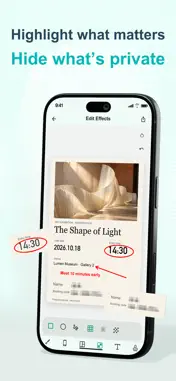
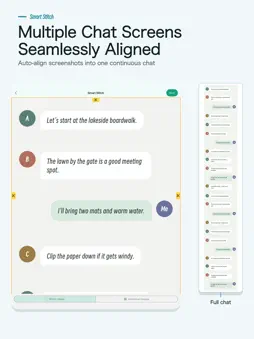
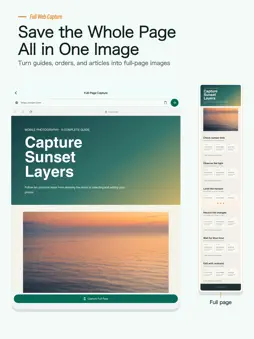
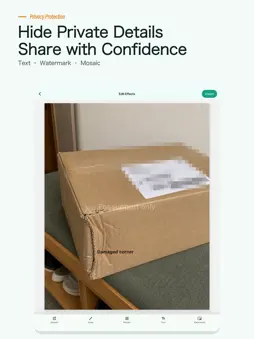
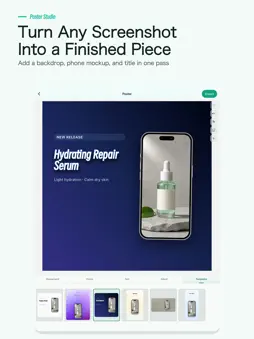
SnipRoll is an all-in-one tool for organizing, editing, and sharing screenshots. Stitch chats, webpages, subtitles, product details, tutorials, and more, then edit and export everything in one app. 【Smart Stitch】 Choose multiple screenshots from Photos. SnipRoll analyzes overlapping areas and creates one continuous long image. Reorder images, adjust overlaps, preview the result, and save it. 【Screen Recording to Long Image】 Import a screen recording or record a scrolling page with iOS. SnipRoll extracts continuous frames and turns them into a long screenshot for chats, app pages, and dynamic content. 【Full-Page Web Capture】 Open a webpage in the app and capture the complete page at once, ideal for articles, tutorials, references, and lists. 【Flexible Layouts】 Use smart vertical stitching, horizontal stitching, or subtitle stitching for movie and video frames. 【Image Editing】 Crop images and add shapes, drawings, text, mosaic blur, and watermarks. Highlight key details or hide private information before sharing. 【Poster Maker】 Add backgrounds, device frames, titles, and templates to turn screenshots into polished posters. 【Save and Share】 Preview the final image, save it to Photos, or share it with other apps. Privacy: Images and videos are processed on your device by default. Web capture, purchase verification and feedback use necessary network services. After you consent to the Privacy Policy, the app also performs anonymous usage analytics and advertising attribution as described in that policy. Tracking permissions are controlled by the system. See the in-app Privacy Policy for details. Some advanced features and high-resolution exports require Pro. Prices, subscription periods, and benefits are shown on the purchase screen. Terms of Use (Apple Standard EULA): https://www.apple.com/legal/internet-services/itunes/dev/stdeula/
What's New
Version 3.0.3 2026-11-07
Improved screen-recording stitching and import reliability. Fixed poster photo framing when moving and zooming photos. Improved default crops and long-image pre...Improved screen-recording stitching and import reliability. Fixed poster photo framing when moving and zooming photos. Improved default crops and long-image previews in subtitle stitching. Reduced app size and improved font loading. Technical Analysis
Package Overview Basic metadata
Bundle ID
com.lynnran.Screenshot Current Version 3.0.3
Minimum iOS 16.0
Package Size App Store Size
Package Metadata 0 / 0 version records
Detailed binary, privacy manifest, framework, and Info.plist results have not been indexed for this package yet. The verified App Store and archive metadata above remains available.
Developer Information
Known Version Records
0 version records with stored package metadata
Stored metadata does not guarantee a package is currently available to download.
| Details | Version / IDs | Version date | Action |
|---|