
Preview





Description
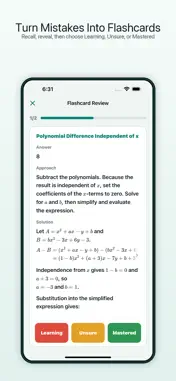
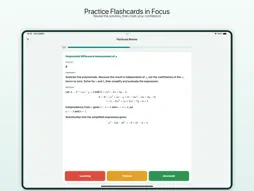
Turn a difficult homework question into a clearer next step. Photograph a question from homework, a worksheet or a practice test. Select the complete problem, compare your work with a step-by-step explanation, and keep the result for later review. SCAN AND UNDERSTAND - Capture a question with the camera or import an image from Photos. - Select the question area before recognition. - Review the question, your original work, the solution steps and mistake analysis together. - Keep the original image to check details. If recognition or an explanation is incorrect, submit a correction request. ORGANIZE AND REVIEW - Find saved questions by subject, topic and date. - See which subjects and topics appear most often in your mistakes. - Open selected topic review questions where available. Try solving first, reveal the explanation, then mark your understanding. RETURN TO PAPER PRACTICE - Select saved mistakes or available review questions for printing. - Preview the worksheet and export it as a PDF or print through the system sharing options. - Choose whether to include solution steps and mistake analysis when printing saved mistakes. Made for students and families using iPhone and iPad. Cardify helps you understand and revisit mistakes; it is not a replacement for a teacher. AI recognition and explanations can be incorrect, so check important details. SUBSCRIPTIONS AND IN-APP PURCHASES - Cardify offers weekly (1 week), monthly (1 month) and yearly (1 year) auto-renewable membership plans. - Some features, including topic flashcard review, require an active membership. Benefits, AI usage allowances or credits, subscription duration and the local price are shown on the purchase screen before confirmation. - Payment is charged to your Apple Account when the purchase is confirmed. If a trial or introductory offer is displayed, its purchase-screen terms apply. - Subscriptions renew automatically unless cancelled at least 24 hours before the current period ends. Your account may be charged for renewal within the 24 hours before the current period ends. - Manage or cancel your subscription in Settings > your name > Subscriptions, or in your App Store account settings. - One-time purchases, if offered, do not renew automatically. Included credits and usage rules are displayed before purchase. Privacy Policy: https://blynkai.app/cardify/privacy Cardify Terms of Service: https://blynkai.app/cardify/terms Apple Standard Terms of Use (EULA): https://www.apple.com/legal/internet-services/itunes/dev/stdeula/
What's New
Version 1.1.8 2026-10-30
- Fixed a crash when adding photos to notes. - Fixed a crash that could occur when launching the app. Technical Analysis
Package Overview Basic metadata
Bundle ID
app.blynkai.cardify Current Version 1.1.8
Minimum iOS 16.0
Package Size App Store Size
Package Metadata 2 / 5 version records
Detailed binary, privacy manifest, framework, and Info.plist results have not been indexed for this package yet. The verified App Store and archive metadata above remains available.
Developer Information
Known Version Records
2 version records with stored package metadata • 5 known version records
Stored metadata does not guarantee a package is currently available to download.
| Details | Version / IDs | Version date | Action |
|---|---|---|---|
| 10.88 MB | v1.1.1 App Store ID: 890486983Build: 1.1.1 | 2026-08-31 00:51:34 | Get Version |
| 10.88 MB | v1.1.0 App Store ID: 888967930Build: 1.1.0 | 2026-08-25 00:45:24 | Get Version |
| Not archived | v1.0.2 App Store ID: 888228253Build: 1.0.2 | 2026-07-27 00:40:31 | Request Version |
| Not archived | v1.0.1 App Store ID: 887959759Build: 1.0.1 | 2026-07-09 06:47:09 | Request Version |
| Not archived | v1.0.0 App Store ID: 881496958Build: 1.0.0 | 2026-07-05 17:49:57 | Request Version |