Preview




Description
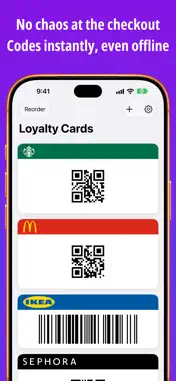
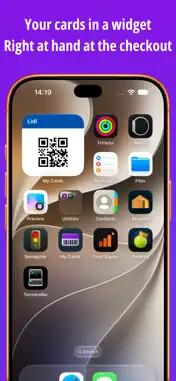
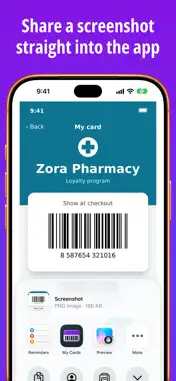
Keep your loyalty cards, store cards and membership cards in one app, so you no longer need a separate app for every store. It works offline, so you never stand at the register waiting for a store's app to load on weak signal. The app holds no bank, credit or debit cards and makes no payments. You still pay with Apple Pay or your bank card. All your cards sit on one screen, the ones you use most at the top. Tap a card and its code fills the screen at full brightness, so the scanner reads it the first time. The screen stays on at the register, and the brightness returns to normal when you close the card. If the cashier wants the number, copy it with one tap. [ Adding a card ] Scan the code on a plastic card with the camera. A card that only lives in a store's app or an email goes in from a screenshot or a photo. Barcodes and QR codes are read and the card is saved straight away. The app recognizes Kroger, Target Circle, Costco, Walgreens, CVS ExtraCare, Starbucks and more, and fills in the store name and its color by itself. You can always type the number by hand. From a store's app it's quicker still: take a screenshot, tap Share and pick My Cards. After that you can delete the store's app. [ Finding a card ] Search your cards by name, or touch and hold the app icon to open one of your top cards right away. [ Widgets ] Put a card on your Home Screen or Lock Screen and it opens with one tap at the register. Widgets come with the lifetime version. [ Privacy and backup ] Your cards stay on your phone. No account, nothing to sign up for, and the app sends nothing anywhere. To back up, save a file to iCloud Drive or Files and restore it on your next iPhone. [ Lifetime version ] Two cards are free. A single purchase of the lifetime version gives you unlimited cards and the widgets. Pay once, no subscription. Supported codes: EAN-13, EAN-8, UPC-A, Code 128, Code 39, QR, PDF417 and Aztec. Works with any card or store app that shows a barcode or QR code at the register.
What's New
Version 1.1.5 2026-11-18
Back up your cards to iCloud Drive or Files and restore them on a new iPhone. Technical Analysis
Package Overview Basic metadata
Bundle ID
com.pixelsorter.Kartar Current Version 1.1.5
Minimum iOS 17.0
Package Size App Store Size
Package Metadata 0 / 0 version records
Detailed binary, privacy manifest, framework, and Info.plist results have not been indexed for this package yet. The verified App Store and archive metadata above remains available.
Known Version Records
0 version records with stored package metadata
Stored metadata does not guarantee a package is currently available to download.
| Details | Version / IDs | Version date | Action |
|---|