
Preview
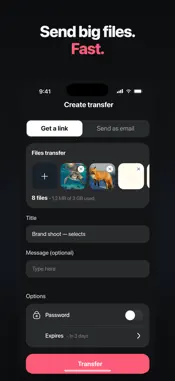




Description
iTransfer is the fastest and simplest way to send large files from your iPhone to anyone, anywhere. Create a secure shareable download link or send files directly to any email address — recipients can download immediately from a browser with no app required, no sign-up, and no friction. HOW IT WORKS Select files from your Photos library, iCloud Drive, or On My iPhone storage. Or open the camera directly in the app and capture a photo or video to include instantly. Set a title, add an optional message, configure a password, choose an expiry date, and tap Transfer. Your files are uploaded to a secure server and your link or email confirmation is ready within seconds. SHARE VIA LINK Generate a unique download link and share it through any platform — SMS, WhatsApp, Telegram, Facebook Messenger, Slack, email, or any other channel. Anyone who receives the link opens it in a browser and downloads your files immediately. No app installation, no account creation, and no technical setup required on their end. SEND FILES DIRECTLY TO EMAIL Enter one or more email addresses and iTransfer delivers the download link straight to each inbox automatically. Add multiple recipients to send the same files to an entire team or group in one single transfer. Each person receives their own download notification without you needing to forward messages manually. PASSWORD PROTECTION Add a password to any transfer link to ensure only intended recipients can access your files. The recipient is prompted to enter the password before the download begins. Ideal for confidential documents, sensitive images, private creative work, or any content you need to restrict to specific people. EXPIRY DATE CONTROL Control exactly how long your files remain available for download. Free plan users can set transfers to expire after 1 day or 3 days. Pro users can choose 7 days, 30 days, 60 days, or up to 1 full year. Once the expiry date passes, the link is automatically deactivated and the files are removed from the server. TRACK SENT TRANSFERS Every transfer you create is logged in the Sent tab. View the transfer name, total file size, number of files, date created, and days remaining before the link expires. A red badge marks transfers nearing their deadline. MULTIPLE FILE SOURCES Add files from Photos in original quality with full EXIF metadata preserved. Select documents, archives, audio, and any supported iOS file type from iCloud Drive or local iPhone storage. Mix different file types and sources in one transfer. ITRANSFER PRO Free Plan: Upload files up to 3.22 GB total with 1-day or 3-day expiry. Perfect for occasional use. Starter Pro: Upload up to 20 GB per month with up to 10 transfers per month. Available as weekly or monthly subscription. Ideal for users who regularly share files and need more storage and flexibility. Ultimate Pro: Send up to 200 GB in a single transfer with no monthly cap on transfers. Set expiry up to 1 full year. Available as weekly or monthly subscription. Built for professional photographers, videographers, graphic designers, and content creators who deliver large files to clients on a regular basis. Start a free trial of Pro from Settings. WHO USES ITRANSFER Photographers sending full-resolution image sets to clients. Videographers sending raw footage to editors and post-production teams. Designers sharing large project files and asset libraries. Remote teams exchanging heavy media files across locations. Students submitting large project deliverables. Anyone who needs to send files too large for standard email attachments or messaging app limits. iTransfer features a clean dark interface with a simple three-step workflow: add files, set options, transfer. Real-time upload progress keeps you informed, and your link is ready the moment the transfer completes. Create a free account and send your first file today. Privacy policy: https://begamob.com/policy.html Term of use: https://begamob.com/ofs-termofuse.html
What's New
Version 1.0.3 2026-07-09
Enjoy smoother file sharing with new features, performance upgrades, and general bug fixes in this update. Technical Analysis
Package Overview Basic metadata
Bundle ID
com.begamob.itransfer Current Version 1.0.3
Minimum iOS 17.0
Package Size App Store Size
Package Metadata 0 / 4 version records
Detailed binary, privacy manifest, framework, and Info.plist results have not been indexed for this package yet. The verified App Store and archive metadata above remains available.
Developer Information
Known Version Records
0 version records with stored package metadata • 4 known version records
Stored metadata does not guarantee a package is currently available to download.
| Details | Version / IDs | Version date | Action |
|---|---|---|---|
| Not archived | App Store ID: 888002744 | Unknown | Request Version |
| Not archived | App Store ID: 887910050 | Unknown | Request Version |
| Not archived | App Store ID: 887650046 | Unknown | Request Version |
| Not archived | App Store ID: 886605325 | Unknown | Request Version |