Preview
Description
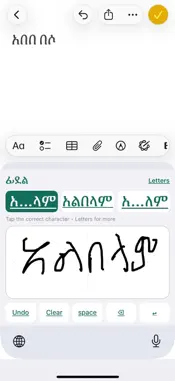
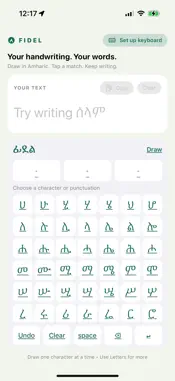
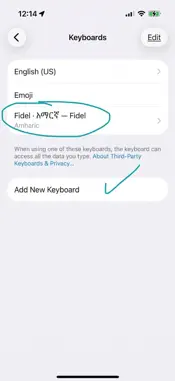
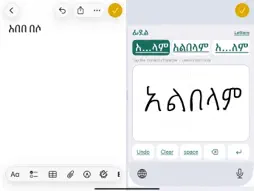
Fidel turns your handwriting into editable Amharic on iPhone and iPad. Draw a character or word and choose a recognition suggestion. WRITE IN YOUR APPS Enable the Fidel keyboard and use it in apps that support custom keyboards. Expand the keyboard to write on a scrolling page, then tap Done to insert converted text into the active text field. Preserve line breaks or choose Single line. Correct recognized words and undo insertions from the keyboard. KEEP WRITING • Automatic handwriting suggestions and optional offline word completions • Live line recognition with editable text and original ink for corrections • Scrolling notebook pages, stroke eraser, Undo, Clear and clear-line controls • Optional scratch-out gesture with Undo • Letter-family picker and Ethiopic punctuation • iPad notebook layout and Apple Pencil support • English/Amharic interface and left-handed controls YOUR WORDS AND PHRASES Teach Fidel names, places and specialist words using the local personal dictionary. Edit or delete saved words. Open Phrases from the writing panel, pin favorites and insert with one tap. Settings, phrases, favorites and personal words are shared between the app and keyboard on this device when keyboard Full Access is enabled. No cloud sharing is added. PRACTICE AND REVIEW Practice letters and short Amharic words with private progress. Use full-screen writing, word correction, draft recovery, copying and sharing. Long text scrolls inside its preview while the drawing pad stays fixed. Recognition can make mistakes; review text before sending it. SETUP AND PRIVACY The Letters picker and bundled dictionary work without Full Access. Handwriting requires an initial Amharic model download; the app and keyboard download their models separately. Enable Full Access for the keyboard download and shared-data writes. Keep the keyboard open until the download completes. Recognition then runs on your device. Drafts and optional saved words remain local. Fidel does not upload your writing to the developer. Google ML Kit handles model downloads and may send SDK diagnostics and usage information. See the privacy policy for details. Some apps and secure fields require Apple’s system keyboard.
What's New
Version 1.2 2026-11-08
• Shared on-device settings, saved phrases, favorites and personal words between Fidel and its keyboard. • Faster Phrases picker: pin favorites and return to wr...• Shared on-device settings, saved phrases, favorites and personal words between Fidel and its keyboard. • Faster Phrases picker: pin favorites and return to writing immediately after insertion. • Correct recognized words and undo word insertions directly in the keyboard. • Live line recognition, editable notebook text and preserved ink for corrections. • Local personal-word editing and short Amharic word exercises with private progress. • Improved iPad notebook layout and Apple Pencil writing. • Smoother long-page scrolling, clearer model-download progress and retry controls. • Scroll long sentences inside Your text, with jump arrows, while the drawing pad stays fixed. • Improved writing controls, setup guidance and reliability. Technical Analysis
Package Overview Basic metadata
Bundle ID
com.alphascript.Fidel Current Version 1.2
Minimum iOS 17.0
Package Size App Store Size
Package Metadata 0 / 0 version records
Detailed binary, privacy manifest, framework, and Info.plist results have not been indexed for this package yet. The verified App Store and archive metadata above remains available.
Developer Information
Known Version Records
0 version records with stored package metadata
Stored metadata does not guarantee a package is currently available to download.
| Details | Version / IDs | Version date | Action |
|---|