Preview




Description
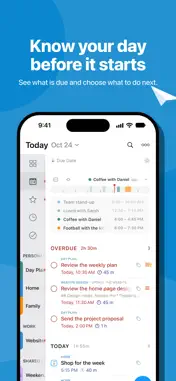
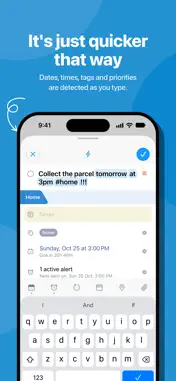
GTD®, XYZ and everything in between - it can handle it all. Seriously. NOTE: Requires an active subscription. 2Do gives you a simple way to manage tasks, with the depth to organize every part of your life. Keep a few lists or build a complete GTD system. Create your own way of working, with no method imposed on you. AWARDS • Apple - Best of 2013 Mac App Store • MacStories - App of the Year 2015 iOS • Cult of Mac - Best Task Manager for iOS CAPTURE IT ALL • Type naturally. 2Do recognizes dates, times, repeats, alerts, durations, priorities, tags, lists and saved locations as you type. • Hold [+] for Quick Add and enter one task after another. • Capture with Siri, Shortcuts, widgets and Control Center. Turn shared text, links, photos or videos into tasks. • Email tasks to your private Mail to 2Do address, or send a numbered list to create a checklist. • Collect ideas in the GTD Inbox and organize them later. SIMPLE TASKS, CHECKLISTS & PROJECTS • Create tasks, checklists and projects with sub-tasks. Add notes, images, voice recordings and multiple alarms. • Write notes with live Markdown formatting and keep useful links with your tasks. • Set flexible repeats, start dates and durations. Call, email or open a link from a task. • Arrange tasks in named sections within a list. LIST GROUPS, LISTS & SMART LISTS • Organize your lists in groups, alongside built-in views for upcoming, starred and scheduled tasks. • Save searches as reusable Smart Lists. Search titles, notes, tags and dates, with sounds-like matching when needed. • Filter by date, priority, status or tags. Each list remembers its sort order and Focus settings. PROJECT VIEW • Open a project to see just that project and its sub-tasks. Set its sort order independently of the list around it. TAGS • Organize tags in groups and tap a tag to filter tasks. • Combine tags with Smart Lists for the tasks you return to often. Pause a tag to hide its tasks until you resume it. LOCATIONS • Create and assign locations, find nearby tasks on a map and build location-based Smart Lists. • Get a reminder when you arrive, with location access enabled. SYNC, YOUR WAY • Sync with Apple Reminders, Dropbox, Todoist, Toodledo, iCloud, Fastmail, Fruux, Yahoo or a CalDAV server you trust. • Keep tasks in Apple Reminders across your devices and capture them with Siri. • Merge work from different devices or exclude private lists from sync. COLLABORATE • Share lists and work together over local Wi-Fi without a cloud service. • Share read-only or editable lists over iCloud with others using compatible versions of 2Do. FIND AND FOCUS • Jump to any task or list with Quick Open. • Select several tasks to schedule, defer, tag, move or edit them together. ALARMS & YOUR DAY • Set multiple alarms, automatic reminders and repeating alerts. • Use full-screen alarms on supported devices with iOS or iPadOS 26.1 or later. • See calendar events and the day timeline above your tasks to plan around appointments. MADE FOR IPHONE • Slide between your lists, tasks and the Tags, Nearby and Calendar panels. Pinch to choose how much task detail you see. • Check tasks on Apple Watch and add complications to your watch face. PASSWORDS & BACKUPS • Lock individual lists or the whole app. • Keep automatic backups, save and restore external backups, or restore a single list. Move backups between 2Do on iOS and Mac.
What's New
Version 4.3.3 2026-10-28
· [NEW] Added Work Week settings. Shades non-working days in the mini calendar and date picker and is used by the new Repeat options · [NEW] Added monthly repea... Technical Analysis
Package Overview Basic metadata
Bundle ID
com.2doapp.2Do4iOS Current Version 4.3.3
Minimum iOS 18.6
Package Size App Store Size
Package Metadata 0 / 0 version records
Detailed binary, privacy manifest, framework, and Info.plist results have not been indexed for this package yet. The verified App Store and archive metadata above remains available.
Developer Information
Known Version Records
0 version records with stored package metadata
Stored metadata does not guarantee a package is currently available to download.
| Details | Version / IDs | Version date | Action |
|---|