
Preview


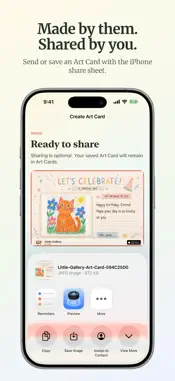


Description
More than a photo of their artwork. Give each child's creativity a gallery of its own. Browse their artwork by age, keep the story behind each piece, and turn favourite drawings into personal Art Cards for birthdays, thank-yous and goodbyes. Add their words, voice or video, then share with someone special. SAVE THEIR CREATIONS Photograph artwork or import an image from Photos or Files. Crop and adjust it, then add a title, date and a little story. WATCH THEIR CREATIVITY GROW Create a separate gallery for each child. Browse artwork by age and mark favourites to revisit the pieces you love. MAKE SOMETHING PERSONAL Turn a drawing, painting or collage into an Art Card. Choose a style and occasion, add a written note, or record a short voice or video message. Celebrate a friend's birthday, thank a teacher, say goodbye, or send a little love to family. SHARE WITH SOMEONE SPECIAL Use the familiar iPhone share sheet to send or save your Art Card as an image or video. You choose the destination. YOUR GALLERY, ON YOUR DEVICE No account required. No ads or tracking. Your gallery is stored on your device, not on BeeEdge servers. Little Gallery does not generate artwork with AI. Made for parents and caregivers to use with their children. Preserve the artwork you already love, and help them share it in their own words. Little Gallery does not provide cloud sync or its own backup service. Preserve copies of important artwork before removing the app or changing devices.
Technical Analysis
Package Overview Basic metadata
Bundle ID
au.com.beeedge.littlegallery Current Version 1.0
Minimum iOS 18.0
Package Size App Store Size
Package Metadata 0 / 0 version records
Detailed binary, privacy manifest, framework, and Info.plist results have not been indexed for this package yet. The verified App Store and archive metadata above remains available.
Known Version Records
0 version records with stored package metadata
Stored metadata does not guarantee a package is currently available to download.
| Details | Version / IDs | Version date | Action |
|---|