
Preview


Description
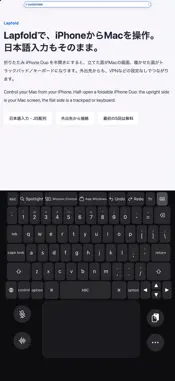
[Requires the free Mac companion app "Lapfold Host"] Download it at https://begrit.co.jp/lapfold/ (macOS 15 or later, Mac with Apple silicon). Lapfold lets you see and control your Mac from your iPhone. Half-open a foldable iPhone Duo and stand it up: the upright side shows your Mac screen, and the flat side becomes a trackpad or keyboard, like a laptop. FEATURES - Laptop layout for iPhone Duo: half-open to split into a Mac screen and a trackpad/keyboard - Japanese text input and JIS keyboard layout supported - Connect from away from home with no extra network setup (devices connect directly to each other, so some networks may not be able to connect) - Video and input are encrypted and exchanged directly between your iPhone and your Mac GET STARTED 1. Install and open Lapfold Host on your Mac, then allow Screen Recording and Accessibility 2. Copy the connection link from Lapfold Host in the menu bar 3. Paste it in Lapfold on your iPhone to connect PRICING Your first 5 connections are free. From the 6th connection, Lapfold Pro (auto-renewable subscription) is required. There is no one-time purchase. - Lapfold Pro: 750 JPY per month or 5,000 JPY per year (prices vary by region) - Payment is charged to your Apple ID account at confirmation of purchase. - The subscription renews automatically unless it is canceled at least 24 hours before the end of the current period. Your account is charged for renewal within 24 hours before the end of the current period. - After purchase, manage or cancel anytime in Settings > your name > Subscriptions on your iPhone. Terms of Use (Apple standard EULA): https://www.apple.com/legal/internet-services/itunes/dev/stdeula/ Privacy Policy: https://begrit.co.jp/lapfold/en/privacy.html Support: [email protected]
What's New
Version 1.0.1 2026-11-10
- Voice input: tap the mic button once and speak; your words are typed on your Mac as text. Short pauses no longer cut you off. - Keys respond faster: a key is ...- Voice input: tap the mic button once and speak; your words are typed on your Mac as text. Short pauses no longer cut you off. - Keys respond faster: a key is sent the moment your finger touches it. - In the half-open laptop layout, the keyboard is now always shown with the trackpad below it, like a laptop. The keyboard has a backlit look, and the JIS Return key is now tall. - In the sideways half-open layout, the Mac screen is now always on the left and the keyboard on the right (fixed the layout sometimes appearing reversed). - Fixed the Mac screen sometimes staying blank right after opening the device. - The trackpad is brighter and easier to find. - The keyboard layout defaults to your device language, and the layout you choose is remembered. Technical Analysis
Package Overview Basic metadata
Bundle ID
jp.begrit.lapfold Current Version 1.0.1
Minimum iOS 26.0
Package Size App Store Size
Package Metadata 0 / 0 version records
Detailed binary, privacy manifest, framework, and Info.plist results have not been indexed for this package yet. The verified App Store and archive metadata above remains available.
Developer Information
Known Version Records
0 version records with stored package metadata
Stored metadata does not guarantee a package is currently available to download.
| Details | Version / IDs | Version date | Action |
|---|