
Preview



Description
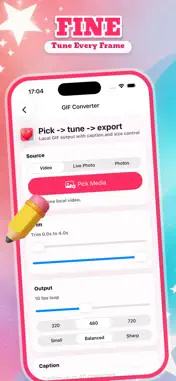
Tifime turns local video clips, Live Photos, photo sequences, and still photos into expressive GIFs. Arrange a photo sequence, make a clip play backwards, or bring a single photo to life with sound-responsive motion. Use Tifime to: - Take a photo with the camera, review it, and animate it or add it to a photo-sequence GIF. - Create GIFs from videos, Live Photos, photo sequences, or a selected photo. - Choose Forward, Reverse, or Bounce playback to shape your loop. - Reorder selected photos and remove frames before generating a photo-sequence GIF. - Fit your media into its original shape, a square, a 4:5 portrait, or a 9:16 canvas. Choose White, Ink, Pink, or Teal for the background. - Start with Chat reaction, Photo story, or Bounce loop presets, then adjust the settings to suit your own media. - Animate a photo with Breathe, Zoom, or Glow motion, then fine-tune intensity and frame rate. - Trim clips, add an optional caption, and choose frame rate, dimensions, and compression. - Preview your GIF, keep it in local History, and share it with the iOS share sheet. Whether you are saving a quick reaction, polishing a memory, or making a short visual accent, Tifime keeps the creation and export workflow in one focused editor.
What's New
Version 1.0.1 2026-11-06
New tools for your GIFs: - Take photos in the app, then animate one photo or add multiple shots to a GIF sequence. - Choose Forward, Reverse, or Bounce playback... Technical Analysis
Package Overview Basic metadata
Bundle ID
com.tifime.ios Current Version 1.0.1
Minimum iOS 16.0
Package Size App Store Size
Package Metadata 0 / 0 version records
Detailed binary, privacy manifest, framework, and Info.plist results have not been indexed for this package yet. The verified App Store and archive metadata above remains available.
Developer Information
Known Version Records
0 version records with stored package metadata
Stored metadata does not guarantee a package is currently available to download.
| Details | Version / IDs | Version date | Action |
|---|