Preview







Description
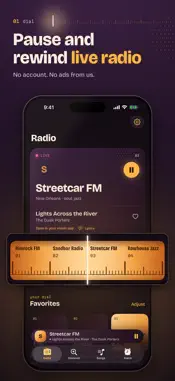
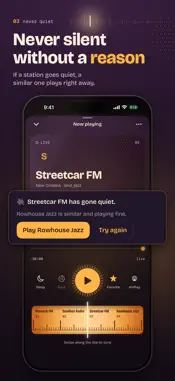
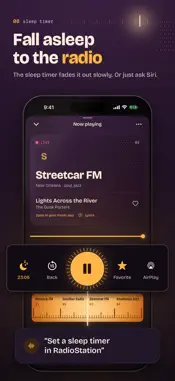
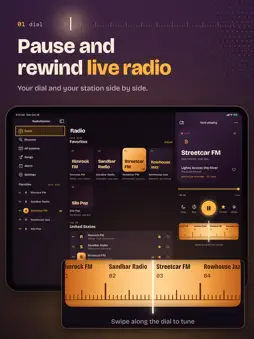
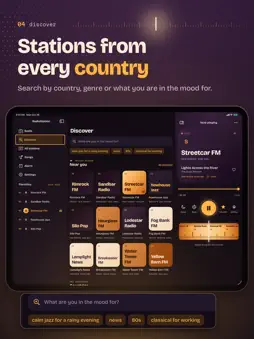
Listen to live radio stations from your own country and around the world, and pause or rewind up to 30 minutes. RadioStation starts your station straight away and does not go quiet without telling you why. Free, with no ads from us and no account. PAUSE AND REWIND LIVE RADIO Someone at the door, a phone call, missed the start of that song? Pause the radio and carry on where you were. Rewind up to 30 minutes, 15 seconds per tap or with the slider. One tap takes you back to live. YOUR COUNTRY FIRST Pick your own country in Settings and its stations come first. Handy when you live abroad and want to listen to home. 50 GENRES From the 80s, reggae and soul to techno, classical and Christmas music. Every station also shows stations that sound like it. NEVER SILENT WITHOUT A REASON If a station stutters, RadioStation first tries another connection by itself. If it really has gone quiet, you see that at once, with a similar station that is playing fine. After a phone call your radio simply carries on. TURN THE DIAL Your favorites sit on a station dial, like on an old radio. Swipe along the dial and the next station plays right away. Save a favorite with one tap on the star; your favorites live in your own iCloud. FIND WHAT YOU WANT TO HEAR Search by name, genre, country or language. Or just type what you are in the mood for, like "calm jazz for a rainy evening". Living in the Netherlands or Flanders? Pick your province once and your regional station is always close by. EVERY COUNTRY, EVERY STATION Pick a country and see all its stations from A to Z, with a letter bar to jump around. Sort by popularity or filter by genre. Stations that are not working right now, RadioStation leaves out. SEE WHAT JUST PLAYED RadioStation keeps a list of the songs that came by, with the station and the time. If a station does not say what it plays, RadioStation often recognizes the song itself. Like a song? Save it with the heart, look up the lyrics or open it in your music app. SLEEP AND WAKE UP The sleep timer fades the radio out slowly and stops it by itself, after 15 to 90 minutes. On iOS 26, RadioStation can also wake you with your favorite station: your alarm sounds with a soft tuning-in chime, and one tap on Radio on plays your station. ON YOUR HOME SCREEN AND BY VOICE Widgets for your Home Screen, Lock Screen and StandBy, a button in Control Center and the Action button. Tell Siri which station you want to hear, or say "Save this song". ALSO ON IPAD AND MAC On iPad you get a sidebar with your favorites and the player beside it, with keys for play and back to live. On the Mac, RadioStation sits in your menu bar, with a floating player you park in a corner. Playing on your iPhone? Your Mac shows it, and one click carries on there. Made for iPhone Duo: half folded on a table, it becomes a bedside clock radio. One app, free on all your devices. ALSO ON APPLE WATCH Turn the Digital Crown and you tune in, station by station, like on a real radio. Listen on your watch with your headphones, or use your watch as a remote for the radio on your iPhone. With 30 seconds back, a sleep timer, your favorites from your iPhone and complications for your watch face. IN THE CAR WITH CARPLAY Your favorites, recent stations, every country and all genres on your car's screen. Tap a station and it plays. SOUND THE WAY YOU LIKE IT Clearer voices for news and talk, a night mode with softer peaks, and every station about as loud as the last one. Play through AirPlay too. WHY IT COSTS NOTHING RadioStation is made by A Brand New Company. We add no ads, there is nothing to unlock and you need no account. We collect nothing about you. GOOD TO KNOW • You listen to the broadcasts that stations put online themselves. Ads that a station airs itself, you still hear. • You need an internet connection. • For iPhone and iPad with iOS 18 or later and Mac with macOS 15 or later, Apple Watch with watchOS 11 or later. Waking up to radio needs iOS 26.
What's New
Version 2.4.0 2026-10-30
New in this version: • Made for iPhone Duo. Open it, flat or like a book: your stations on one half, the radio dial on the other. Closed, or open and upright, i... Technical Analysis
Package Overview Basic metadata
Bundle ID
com.molkinteractive.radiostation Current Version 2.4.0
Minimum iOS 18.0
Package Size App Store Size
Package Metadata 0 / 0 version records
Detailed binary, privacy manifest, framework, and Info.plist results have not been indexed for this package yet. The verified App Store and archive metadata above remains available.
Developer Information
Known Version Records
0 version records with stored package metadata
Stored metadata does not guarantee a package is currently available to download.
| Details | Version / IDs | Version date | Action |
|---|