Preview
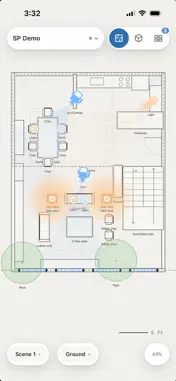

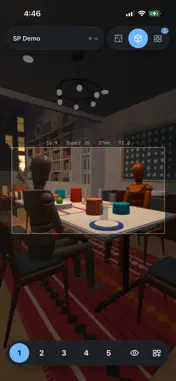

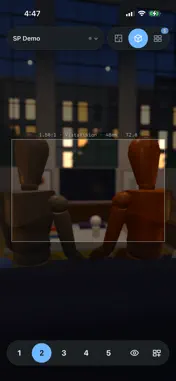


Description
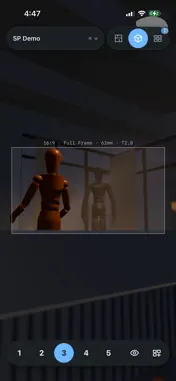
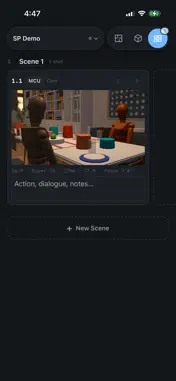
Turn your lighting and blocking plan into a 3D scene. Lay out cameras, lights and actors on a top-down floor plan, then step inside the setup, look through each camera and build your storyboard before you shoot. Plan on iPad, review on iPhone and pick up where you left off on Mac. Built by a working director for his own productions, Set Plan helps you turn an idea into a clear plan your whole crew can follow. WHAT YOU GET ON EACH DEVICE - iPad and iPhone Duo: the full Set Plan experience. Draw lighting diagrams and floor plans, build your set, switch to 3D and create storyboards. - iPhone: your companion on set. Open projects from iCloud, view the plan in 2D and 3D, play back camera moves, and print or share. Add storyboard shots from your camera or photo library, edit notes and reorder panels, and everything merges back into your project on iPad or Mac. - Mac: the full desktop app, included with your purchase. FROM DIAGRAM TO 3D Place your cameras, lights and actors on a top-down floor plan. Set their positions and angles, then switch to 3D to explore the same scene. Nothing to rebuild: your 3D setup comes from the plan you already drew. PLAN YOUR SHOTS Look through your cameras to check framing and sightlines. Previs camera positions, blocking and actor placements before shoot day, and show your DP, gaffer and crew exactly the setup you have in mind. BUILD YOUR SET Draw a simple shape and label it "couch," "bookshelf" or "dining table." Smart objects turn those shapes into furnished 3D objects, helping you build a room without modeling it from scratch. START WITH A LOCATION Use a ready-made set instead of starting with an empty room: - Brooklyn Loft: a furnished apartment with living, dining, kitchen, bedroom and bathroom spaces. - Brooklyn Street: a New York-style neighborhood with storefronts, sidewalks and a park. CREATE STORYBOARDS Turn your camera views into storyboard panels with lens and shot size details. Add notes, organize your shot list by scene, then print your boards or export a PDF to share with your crew. SYNC AND SHARE Projects save to iCloud Drive, so the same plan opens on your iPad, iPhone and Mac. 3D works offline, with no internet needed. Your crew doesn't need to own Set Plan. Send them a project file and they can open, view and edit the 2D plan for free in the Set Plan web app. Their changes come back into your project, with your 3D scene and smart objects intact. Made for directors, cinematographers, gaffers, ADs and production designers planning shorts, features, commercials and music videos. One purchase for iPad, iPhone and Mac. No subscription. 3D viewing on iPhone requires a model with 8GB of memory or more.
What's New
Version 1.0.2 2026-10-21
What's New in Set Plan 1.0.2 iPhone • Start a new project from the title menu, and reopen the demo project any time. • Move and turn lights and actors on the p... Technical Analysis
Package Overview Basic metadata
Bundle ID
com.baffe.setplan Current Version 1.0.2
Minimum iOS 26.0
Package Size App Store Size
Package Metadata 0 / 0 version records
Detailed binary, privacy manifest, framework, and Info.plist results have not been indexed for this package yet. The verified App Store and archive metadata above remains available.
Developer Information
Known Version Records
0 version records with stored package metadata
Stored metadata does not guarantee a package is currently available to download.
| Details | Version / IDs | Version date | Action |
|---|