
Preview
Description
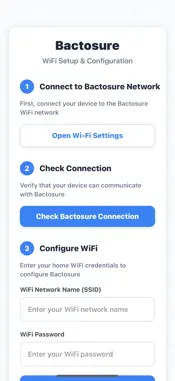
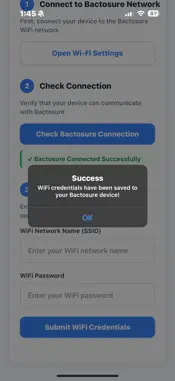
The Bactosure WiFi Setup App helps you quickly and easily connect your Bactosure testing device to your local WiFi network. How it works: On your Bactosure device, go to: SETTINGS > SETUP WIFI On your phone, connect to the WiFi network called “Bactosure” Open this app Enter your WiFi SSID (exactly as it appears) and password Tap Save to update the device Once saved, your Bactosure device will connect to the selected WiFi network automatically. This app is designed to streamline the setup process and ensure your device stays connected to the internet for seamless test uploads and software updates.
Technical Analysis
Package Overview Basic metadata
Bundle ID
com.bactosure.wiki-setup Current Version 1.0
Minimum iOS 15.1
Package Size App Store Size
Package Metadata 0 / 1 version records
Detailed binary, privacy manifest, framework, and Info.plist results have not been indexed for this package yet. The verified App Store and archive metadata above remains available.
Developer Information
Known Version Records
0 version records with stored package metadata • 1 known version records
Stored metadata does not guarantee a package is currently available to download.
| Details | Version / IDs | Version date | Action |
|---|---|---|---|
| Not archived | App Store ID: 875270074 | Unknown | Request Version |