
Preview





Description
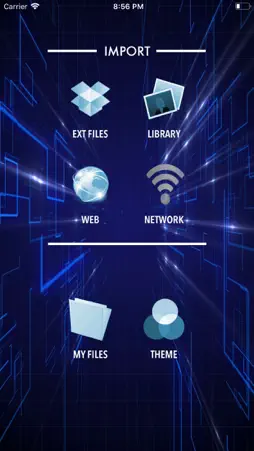
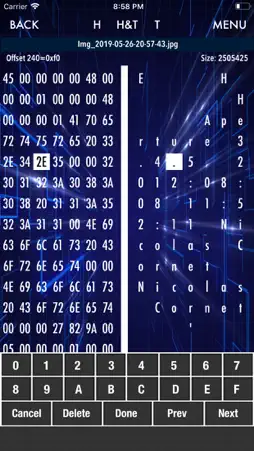
** Featured in Editor's Picked by Best10Apps.com ** HEX Editor iOS App allows you to view & edit the raw data contents of a file. The data of the file are represented in two columns; hexadecimal paired values & ASCII characters. HEX Editor supports editing & viewing on all types of file (regardless of OS platform). With its simple UI yet packed with features, editing any type of files on-the-go will be effortless. Features include: 1. Supports editing in both HEX or TEXT mode concurrently. 2. Switch views between HEX only, TEXT only or both views anytime while editing a file. 3. Search function supports both for HEX & TEXT mode. Users are now able to select "Find Next", "Replace" once, or "Replace All". In addition, "Exact Match" or "Case Insensitive" search options are added. Note** - replacing bytes will results in adding or removing of bytes IF number of bytes you are replacing is different from the number of bytes you are searching. i.e. if you search "00FF" & replace with "AA01FF", this will automatically insert the additional byte to the file. If you search "editor" & replace with "edit", this will automatically delete the unwanted 2 bytes. 4. Move easily between bytes while editing via the "Prev" & "Next" buttons on the keyboard. 5. Insert & delete any number of bytes at any given locations are supported. 6. "Jump to.." any location of the file easily by specifying the byte number to go to. 7. "Save" or "Save as" edited files are supported. 8. Export files via email or Files App instantly within App. 9. File manager allows user to rename, delete, and preview all files inside the App's document folder. 10. From the preview view, users will have the options to export or open the files via any other installed App that supports that particular type of files or do other useful supported actions for example.. if the file is "PDF", user can export & open this file in iBooks, print to any air print printer, email file, export to Files, export to PDF Assembler, etc. 10a. Use AirDrop feature to share files with others or to import files from other iOS device! 11. Theme selector will allow you to choose the color theme while in edit mode. This will help many users to choose colors that are best for their eyes only i.e. black background with white text, etc. 12. Web downloader will allow users to download files from the internet or LAN. 13. Media importer will allow users to import raw photos & videos from the photo library. 14. Uploader will allow users to upload files to the App's document folder via the built-in web based file-server. You can switch on this service on your device & point your PC or Mac web browser to the given IP address & start uploading your files. 15. Import any files from your iCloud Files is also supported. 16. Import any files from your email attachments or any other installed Apps that supports file sharing via the "Open in.." feature. Please email us for suggestions, comments or any bug reports at [email protected] & kindly spare some time to rate this App in the App Store to show your support. We appreciate if user can contact us directly at the email above for any issues & we for sure needs all the information from users in order for us to troubleshoot the issues. Thank you & Enjoy! IMPORTANT NOTES : Editing the raw content of a file may rendered the file to be useless. Make sure you know what your are editing & we shall not be held responsible for any kind of damages to the system or software due to the use of this App.
What's New
Version 6.2 2023-10-24
* Fixed issues loading photos & videos from iCloud. * Bug fixes & more improvements to enhance user experience! Technical Analysis
Package Overview Basic metadata
Bundle ID
my.push.HEXEditor Current Version 6.2
Minimum iOS 12.0
Package Size App Store Size
Package Metadata 1 / 12 version records
Detailed binary, privacy manifest, framework, and Info.plist results have not been indexed for this package yet. The verified App Store and archive metadata above remains available.
Developer Information
Known Version Records
1 version record with stored package metadata • 12 known version records
Stored metadata does not guarantee a package is currently available to download.
| Details | Version / IDs | Version date | Action |
|---|---|---|---|
| 3.89 MB | v6.2 App Store ID: 860527703Build: 6.2 | 2023-10-24 02:56:28 | Paid / Arcade |
| Not archived | App Store ID: 843258263 | Unknown | Paid / Arcade |
| Not archived | App Store ID: 830866134 | Unknown | Paid / Arcade |
| Not archived | App Store ID: 184582642 | Unknown | Paid / Arcade |
| Not archived | App Store ID: 56262812 | Unknown | Paid / Arcade |
| Not archived | App Store ID: 15912773 | Unknown | Paid / Arcade |
| Not archived | App Store ID: 14183047 | Unknown | Paid / Arcade |
| Not archived | App Store ID: 13259259 | Unknown | Paid / Arcade |
| Not archived | App Store ID: 12464233 | Unknown | Paid / Arcade |
| Not archived | App Store ID: 11240439 | Unknown | Paid / Arcade |
| Not archived | App Store ID: 10165655 | Unknown | Paid / Arcade |
| Not archived | App Store ID: 9156037 | Unknown | Paid / Arcade |