Preview


Description
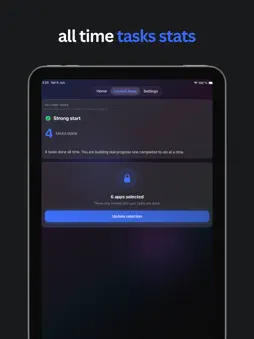
Unlockify - Complete tasks. Unlock your apps. Tired of opening social apps before you've done what matters? Unlockify helps you earn screen time by finishing real to-dos first. Pick the apps you want locked, add your tasks, and your selected apps stay locked until you've hit your daily goal. HOW IT WORKS 1. Add your tasks for the day - with priorities and optional due times 2. Choose which apps to lock using Apple's Screen Time 3. Complete your tasks to unlock those apps 4. Start fresh each day with a clear progress reset Simple, intentional, and built around habits that actually stick. KEY FEATURES • App locking with Screen Time - Lock specific apps and categories until your tasks are done • Flexible daily goals - Complete every task on your list, or set a fixed number (e.g. 3 tasks per day) • Task management - Create, edit, prioritise, and track to-dos in a clean dashboard • Daily progress - See today's progress at a glance with a live lock/unlock status • Completed history - Review finished tasks grouped by date • All-time stats - Track how many tasks you've completed over time • Home Screen widgets - See today's progress and all-time tasks at a glance • Optional task reminders - Get a gentle evening nudge if you still have unfinished tasks • Light & dark mode - Match your system or choose your preferred appearance PRIVACY & PERMISSIONS Unlockify uses Apple's Screen Time APIs to lock the apps you choose. Your task data stays on your device. Screen Time permission is required for app locking to work. Optional local notifications are available for task reminders - off by default, and you choose whether to enable them during onboarding or in Settings. Take back your focus - one completed task at a time.
What's New
Version 1.0.1 2026-06-12
• Home Screen Widgets - see today’s progress and all-time tasks at a glance • Hold to complete - press and hold a task to mark it done (can be turned off in Set...• Home Screen Widgets - see today’s progress and all-time tasks at a glance • Hold to complete - press and hold a task to mark it done (can be turned off in Settings) • Optional task reminders - get an evening nudge if you still have tasks left • Settings improvements and smoother task creation Technical Analysis
Package Overview Basic metadata
Bundle ID
dev.Unlockify Current Version 1.0.1
Minimum iOS 17.0
Package Size App Store Size
Package Metadata 0 / 2 version records
Detailed binary, privacy manifest, framework, and Info.plist results have not been indexed for this package yet. The verified App Store and archive metadata above remains available.
Developer Information
Known Version Records
0 version records with stored package metadata • 2 known version records
Stored metadata does not guarantee a package is currently available to download.
| Details | Version / IDs | Version date | Action |
|---|---|---|---|
| Not archived | App Store ID: 886831737 | Unknown | Request Version |
| Not archived | App Store ID: 886544600 | Unknown | Request Version |