
Preview





Description
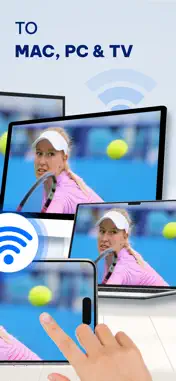
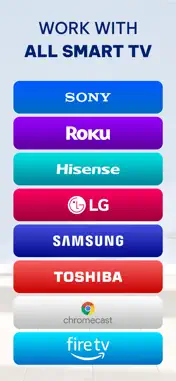
Smart Cast: Mirror To PC & TV makes it easy to display photos, videos, and web content from your phone onto a big screen. Watch movies, present slideshows, browse the web, or mirror your entire phone screen to a TV, PC, or MacBook for a more immersive experience. No more limitations of a small screen—enjoy your favorite content in a clearer, larger, and more shareable way. Cast Photos & Videos to TV – Enjoy Your Content on a Bigger Screen - Cast photos and videos from your phone to Chromecast, Smart TVs and AirPlay - Requires all devices to be connected to the same WiFi network for a stable and fast connection - The app requests local network access to connect with your TV, ensuring secure and private streaming - Only displays selected photos and videos, keeping your personal files private - Find online photos and videos and cast them directly to your TV without downloading View photos in high resolution, play videos in full quality, relive memories on a big screen, and enjoy content with family and friends Mirror Your Entire Phone Screen to TV & PC – Work and Entertainment Without Limits - Supports screen mirroring via a web browser on TV, MacBook, laptop, PC, or AirPlay-compatible device - Simply open the provided link in a web browser on your receiving device—no extra software required - Your entire phone screen will be displayed in real time, allowing seamless interaction - Watch movies in full HD on a big screen for a better cinematic experience - Play games with a larger view and smoother controls for a console-like feel - Boost productivity with presentations and document viewing on a bigger screen, making work and online learning more effective Turn your phone into a powerful tool for entertainment, gaming, and work without being restricted by a small display! Cast Whiteboard from Your Phone – Enhance Learning & Team Collaboration - Use your phone as a digital whiteboard to draw, take notes, and sketch ideas directly on a big screen - Perfect for presentations, teaching, and teamwork, making it easier to share concepts and brainstorm ideas - Compatible with Chromecast, Smart TVs, AirPlay, and web browsers on PC, MacBook, and laptops - Share handwritten notes and drawings instantly, eliminating the need for a physical whiteboard Simplifies collaboration, enhances teaching and presentations, and provides a more interactive way to communicate ideas. Smart Cast: Mirror To PC & TV allows you to enjoy content on a big screen effortlessly—whether for entertainment, gaming, work, or learning—all in one simple app. Disclaimer: - This app is not affiliated with any official TV brands, Chromecast, or AirPlay manufacturers. - Some streaming services may have content restrictions that prevent screen mirroring or video casting. - The performance of screen mirroring may depend on device compatibility, network stability, and TV model. • Privacy Policy: https://sites.google.com/view/pp-screen-mirroring-tv/home • Terms of Use(EULA): https://sites.google.com/view/eula-of-screen-mirroringstream/home
What's New
Version 2.2.20260717 2026-07-27
* New feature: Screen mirroring with sound - Seamless TV connectivity. - Enhanced user experience. Technical Analysis
Package Overview Basic metadata
Bundle ID
com.avntech.screen-mirroring Current Version 2.2.20260717
Minimum iOS 16.0
Package Size App Store Size
Package Metadata 2 / 18 version records
Detailed binary, privacy manifest, framework, and Info.plist results have not been indexed for this package yet. The verified App Store and archive metadata above remains available.
Developer Information
Known Version Records
2 version records with stored package metadata • 18 known version records
Stored metadata does not guarantee a package is currently available to download.
| Details | Version / IDs | Version date | Action |
|---|---|---|---|
 162.1 MB | v2.2.20260717 App Store ID: 888448097Build: 2.2.20260717 | 2026-07-27 03:54:44 | Get Version |
| 95.23 MB | v2.1.20260403 App Store ID: 884099591Build: 54 | 2026-04-03 14:13:36 | Get Version |
| Not archived | App Store ID: 881524277 | Unknown | Request Version |
| Not archived | App Store ID: 879100736 | Unknown | Request Version |
| Not archived | App Store ID: 878693099 | Unknown | Request Version |
| Not archived | App Store ID: 878001607 | Unknown | Request Version |
| Not archived | App Store ID: 877839568 | Unknown | Request Version |
| Not archived | App Store ID: 876637963 | Unknown | Request Version |
| Not archived | App Store ID: 876572007 | Unknown | Request Version |
| Not archived | App Store ID: 876095416 | Unknown | Request Version |
| Not archived | App Store ID: 875847759 | Unknown | Request Version |
| Not archived | App Store ID: 875580279 | Unknown | Request Version |
| Not archived | App Store ID: 875550840 | Unknown | Request Version |
| Not archived | App Store ID: 875465751 | Unknown | Request Version |
| Not archived | App Store ID: 875217343 | Unknown | Request Version |
| Not archived | App Store ID: 874551318 | Unknown | Request Version |
| Not archived | App Store ID: 873629544 | Unknown | Request Version |
| Not archived | App Store ID: 873352545 | Unknown | Request Version |