
Preview



Description
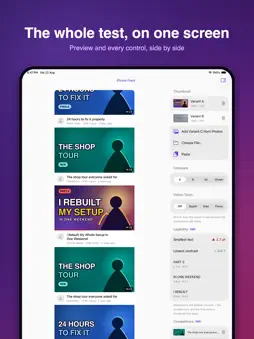
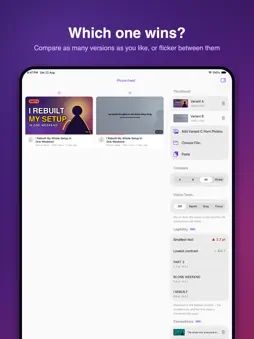
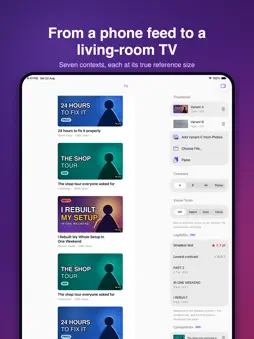
You design a thumbnail at full size, on a big bright screen. Almost nobody sees it that way. They see it 120 pixels wide, in a grey row, halfway down a phone, next to five other thumbnails competing for the same tap. Squint shows you that view — the one that actually decides — before you publish. DESIGNED FOR THE SIZE THAT MATTERS Drop in a thumbnail and see it inside pixel-accurate mock layouts: a phone feed, a search row, a sidebar suggestion. Not a full-screen preview. The real thing, at the real size, with the real chrome on top of it. COMPARE TWO IDEAS HONESTLY Put version A next to version B, or flicker between them in the same spot with no fade and no delay. Your eye catches the difference instantly — which is exactly the judgement a viewer makes in a quarter of a second. TEST WHAT SURVIVES Blur it until it is a smudge. If the composition still reads, it works. Drain the colour out. If it holds up in grey, it holds up anywhere. Or dim everything the attention model expects a viewer to skip, and check that your subject is not in the dark half. MEASURE, DO NOT GUESS The legibility report reads the text in your image and tells you how tall it will be at the smallest size it appears, and whether its contrast clears the WCAG floor. Small type and muddy contrast are the two most common reasons a good thumbnail fails, and both are invisible at full size. SEE IT AMONG ITS NEIGHBOURS Load the thumbnails yours will actually sit beside. A thumbnail is never judged alone, and grey filler rows do not tell you whether yours stands out. ON EVERY SCREEN YOU OWN One purchase covers iPhone, iPad and Mac. Actual-size mode on the Mac renders the mock at its true physical dimensions — you can hold a ruler to it. PRIVATE BY DEFAULT Every image and every project stays on your device. There is no account, no sign-in, no upload and no analytics. The only thing Squint ever sends anywhere is the purchase itself, handled by the App Store. FREE TO USE The free version gives you three preview contexts, an A/B pair, and the squint and grayscale tests. Squint Pro is a one-time purchase — not a subscription — and adds the attention test, the legibility report, four more contexts, competitor rows, unlimited variants, and side-by-side export as PNG or PDF. Squint is not affiliated with, endorsed by, or connected to any video platform. Its layouts are generic feed shapes of our own design.
Technical Analysis
Package Overview Basic metadata
Bundle ID
com.sensuelle.squint Current Version 1.0
Minimum iOS 17.0
Package Size App Store Size
Package Metadata 0 / 0 version records
Detailed binary, privacy manifest, framework, and Info.plist results have not been indexed for this package yet. The verified App Store and archive metadata above remains available.
Developer Information
Known Version Records
0 version records with stored package metadata
Stored metadata does not guarantee a package is currently available to download.
| Details | Version / IDs | Version date | Action |
|---|