
Preview



Description
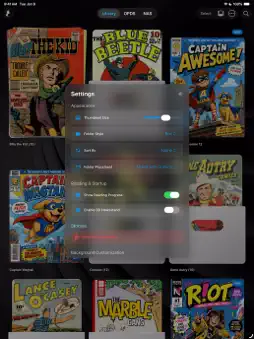
Welcome to ComicDeck, the ultimate premium comic, manga, and webtoon reader. Designed for comic lovers who want both cutting-edge technology and nostalgic aesthetics, ComicDeck transforms your digital library into a stunning, interactive experience. THE 3D NEWSSTAND Step into a beautifully rendered, interactive 3D virtual kiosk. Swipe to spin your collection, tap to pull a book from the shelf, and dive right into the action. Customize your space with built-in environments (Eclipse, Vortex, Walnut) or your own photos. SMART PANEL ZOOM Reading on an iPhone? Double-tap any page and let our CoreML-powered AI automatically detect the comic panels. Tap the edges of your screen to effortlessly glide through the action, frame by frame. NAS & OPDS STREAMING Don't waste storage space. Connect directly to your home server via WebDAV (Local IP or DDNS) or OPDS catalogs like Komga and Kavita. Stream your comics instantly without downloading the full file, or download them for offline reading. VINTAGE PAPER & VISUAL ENHANCEMENTS Make digital feel physical. Apply authentic vintage textures like Newsprint or Old Paper directly to your pages. Got low-res scans? Instantly crisp them up using our built-in CoreImage contrast, noise-reduction, and sharpness filters. READ YOUR WAY • Seamlessly read CBZ, CBR, ZIP, RAR, and PDF files. • Read Left-to-Right, Right-to-Left (Manga Mode), or vertically (Webtoons). • Turn pages with gorgeous 3D Page Curls, Cross Fades, or Slides. • Organize your collection into Box or Stacked folders with custom cover art. EFFORTLESS TRANSFERS Start the built-in Wi-Fi server to drag and drop comics directly from your computer's web browser straight to your device. Upgrade to ComicDeck Pro to unlock the full 3D Newsstand, premium page transitions, advanced background customizations, and unlimited OPDS/NAS cloud streaming!
What's New
Version 1.0.2 2026-08-11
This update fixes one of the most annoying issues with downloading comics online: wrong file extensions. Have you ever downloaded a .cbr file only to find out ... Technical Analysis
Package Overview Basic metadata
Bundle ID
com.ajdesign.ComicDeck Current Version 1.0.2
Minimum iOS 15.6
Package Size App Store Size
Package Metadata 1 / 2 version records
Detailed binary, privacy manifest, framework, and Info.plist results have not been indexed for this package yet. The verified App Store and archive metadata above remains available.
Developer Information
Known Version Records
1 version record with stored package metadata • 2 known version records
Stored metadata does not guarantee a package is currently available to download.
| Details | Version / IDs | Version date | Action |
|---|---|---|---|
| 68.84 MB | v1.0.2 App Store ID: 885334562Build: 1.0.2 | 2026-08-11 18:08:54 | Get Version |
| Not archived | App Store ID: 884913796 | Unknown | Request Version |