Preview



Description
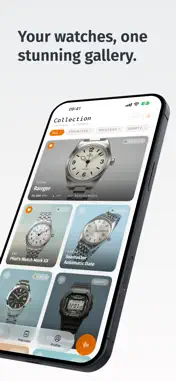
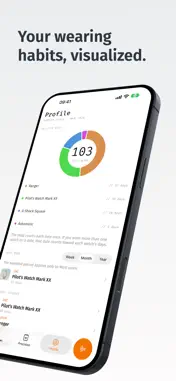
Oscillo is a watch timegrapher for iPhone. Use your iPhone microphone to measure the same metrics a professional watchmaker checks: rate, beat error, and amplitude. No adapters, cables, or expensive equipment. Built for mechanical watch collectors who care about precision. HOW TO MEASURE 1. Place the iPhone microphone flat against the watch crystal or case back. 2. Start recording the tick sounds and wait for the measurement to finish. 3. Review your rate, beat error, and amplitude. KEY FEATURES • Watch Rate Checker — Measure rate (seconds/day), beat error (ms), and amplitude (degrees). Supports the beat rates listed below. • AI Watch Identification — Snap a photo and let AI detect the brand, model, and reference number automatically. • AI-Generated Portraits — Oscillo turns your watch photos into magazine-style cards for your collection. • Collection Management — Browse your watches in grid, full, or list views. Mark watches as favorites, archive them, change their order, and organize your collection. • Measurement History — Detailed charts and trends for every watch, with health badges that help you interpret your measurements. • Precision Tracking — Record manual readings from the dial and follow your watch’s drift over days. Compare observations before and after a regulation or service. • Guided Measurement Cycles — Record timegrapher readings in different watch positions. With Oscillo Pro, complete all six positions and compare results with a saved reference cycle. • Weekly Watch Report — A seven-day summary of your collection: average rate, most-worn watch, best reading, and suggested next actions. • Profile and Wearing Habits — A personal calendar of activity, collection milestones, timing performance, and a heatmap that shows which watches you wear and when. • Reminders — Optional local notifications remind you to log which watch you wore, capture the next precision reading, or open your weekly report. • Offline Access — Your saved collection and measurements are available on your device. Cloud sync and AI features require an internet connection. ACCURACY & ENVIRONMENT • Best results in a quiet room — background noise can affect readings. • Place the case back flat against the microphone for a strong, consistent signal. • If readings seem unstable, move to a quieter space or adjust mic position. • Supported beat rates: 12,000 / 14,400 / 17,280 / 18,000 / 19,800 / 21,600 / 25,200 / 28,800 / 36,000 / 43,200 / 72,000 BPH. DESIGNED FOR COLLECTORS Whether you own one watch or fifty, Oscillo helps you follow changes in each movement’s timing performance over time. Payments and Renewal Oscillo offers limited free use and optional Pro purchases, including subscriptions and a one-time purchase. Payment will be charged to your Apple Account at confirmation of purchase. Subscription automatically renews unless auto-renew is turned off at least 24 hours before the end of the current period. Your Apple Account will be charged for renewal within 24 hours prior to the end of the current period. You can manage or turn off auto-renew in your Account settings at any time after purchase. Privacy Policy: https://oscillo.app/privacy Terms of Service: https://oscillo.app/terms
What's New
Version 1.7.4 2026-10-24
Improved syncing and small refinements throughout the app. We’ve also been working behind the scenes on something new for Oscillo. We’re looking forward to sha... Technical Analysis
Package Overview Basic metadata
Bundle ID
app.oscillo.oscillo Current Version 1.7.4
Minimum iOS 26.0
Package Size App Store Size
Package Metadata 2 / 24 version records
Detailed binary, privacy manifest, framework, and Info.plist results have not been indexed for this package yet. The verified App Store and archive metadata above remains available.
Developer Information
Known Version Records
2 version records with stored package metadata • 24 known version records
Stored metadata does not guarantee a package is currently available to download.
| Details | Version / IDs | Version date | Action |
|---|---|---|---|
| Not archived | v1.7.2 App Store ID: 891444032Build: 1.7.2 | 2026-09-18 17:05:17 | Request Version |
| 61.69 MB | v1.7.1 App Store ID: 891208444Build: 1.7.1 | 2026-09-13 02:43:15 | Get Version |
| Not archived | v1.7.0 App Store ID: 891018866Build: 1.7.0 | 2026-09-09 09:39:39 | Request Version |
| Not archived | v1.6.1 App Store ID: 889713433Build: 1.6.1 | 2026-08-18 13:45:50 | Request Version |
| Not archived | v1.6.0 App Store ID: 889178003Build: 1.6.0 | 2026-08-10 09:21:16 | Request Version |
| Not archived | v1.5.4 App Store ID: 888680342Build: 1.5.4 | 2026-07-23 16:09:52 | Request Version |
| Not archived | v1.5.3 App Store ID: 888447239Build: 1.5.3 | 2026-07-19 19:41:49 | Request Version |
| 59.29 MB | v1.7.1 App Store ID: 888100264Build: 1.7.1 | 2026-09-13 02:43:15 | Get Version |
| Not archived | v1.5.1 App Store ID: 887706733Build: 1.5.1 | 2026-07-02 02:01:43 | Request Version |
| Not archived | v1.5.0 App Store ID: 887547759Build: 1.5.0 | 2026-06-28 22:19:32 | Request Version |
| Not archived | v1.4.4 App Store ID: 887450361Build: 1.4.4 | 2026-06-26 00:46:11 | Request Version |
| Not archived | v1.4.3 App Store ID: 887232690Build: 1.4.3 | 2026-06-21 20:36:58 | Request Version |
| Not archived | v1.4.2 App Store ID: 886915699Build: 1.4.2 | 2026-06-19 20:29:50 | Request Version |
| Not archived | v1.4.1 App Store ID: 886668445Build: 1.4.1 | 2026-06-12 21:54:42 | Request Version |
| Not archived | v1.4.0 App Store ID: 885785898Build: 1.4.0 | 2026-06-07 18:18:59 | Request Version |
| Not archived | v1.3.2 App Store ID: 885509442Build: 1.3.2 | 2026-05-17 09:05:37 | Request Version |
| Not archived | v1.3.1 App Store ID: 885344320Build: 1.3.1 | 2026-05-09 10:11:43 | Request Version |
| Not archived | v1.3.0 App Store ID: 885075492Build: 1.3.0 | 2026-05-02 20:57:00 | Request Version |
| Not archived | v1.2.2 App Store ID: 884885887Build: 1.2.2 | 2026-04-28 23:05:26 | Request Version |
| Not archived | v1.2.1 App Store ID: 884747855Build: 1.2.1 | 2026-04-22 02:42:07 | Request Version |
| Not archived | v1.2.0 App Store ID: 884535163Build: 1.2.0 | 2026-04-20 22:07:09 | Request Version |
| Not archived | v1.1.1 App Store ID: 884484301Build: 1.1.1 | 2026-04-14 21:34:41 | Request Version |
| Not archived | v1.1 App Store ID: 884318540Build: 1.1 | 2026-04-14 04:34:56 | Request Version |
| Not archived | v1.0 App Store ID: 882519973Build: 1.0 | 2026-04-09 11:52:10 | Request Version |