
Preview



Description
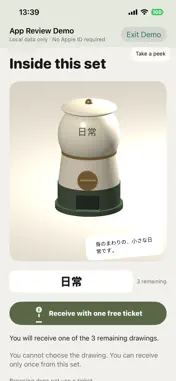
What would you draw from a single word? And how would someone else see it? Kaku turns one Japanese word into three hand-drawn pictures, sealed inside a capsule machine for people you haven't met. Browse the words and silhouettes, use a ticket, and receive one of the remaining originals. The picture stays a surprise until you open the capsule. Make a machine with three drawings inspired by one word. Choose from three shapes and eight color schemes. Draw on full-screen portrait 3:4 paper, then fill areas with eight colors while keeping your lines. When a capsule opens, the drawn lines play back to reveal the picture. The world of Kaku is made to look like cut paper. A window on each machine shows how many capsules remain. Refreshed sharing cards let you pass along a machine's word and silhouette. Manage your machines, drafts, and drawings together in the Create tab. Refill capsules that have been taken from your machine with new drawings, subject to availability and safety review. In Discover, switch between the newest machines and a shuffled selection. Your name and profile aren't public, and there are no popularity counts. Let the word and the drawing speak for you. You can report a machine or a received drawing, and block its creator. For ages 18 and over. Browse, receive drawings with tickets, and work on drafts without signing in with Apple or Google. Publishing requires Apple or Google sign-in. After signing in, you can choose optional notifications in Settings and change each type at any time. Privacy: https://kazusa703.github.io/privacy.html Terms: https://kazusa703.github.io/terms.html Support: https://kazusa703.github.io/support.html
What's New
Version 1.3.1 2026-11-01
Kaku has a new cut-paper world. • Give your machine its own look: choose from 3 shapes and 8 color schemes when publishing. • Open a capsule and watch the draw... Technical Analysis
Package Overview Basic metadata
Bundle ID
com.imai.bunshoclip Current Version 1.3.1
Minimum iOS 17.0
Package Size App Store Size
Package Metadata 0 / 0 version records
Detailed binary, privacy manifest, framework, and Info.plist results have not been indexed for this package yet. The verified App Store and archive metadata above remains available.
Developer Information
Known Version Records
0 version records with stored package metadata
Stored metadata does not guarantee a package is currently available to download.
| Details | Version / IDs | Version date | Action |
|---|