
Preview




Description
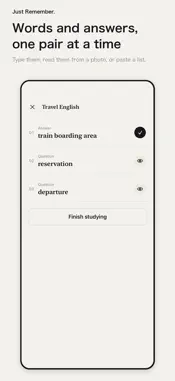
Study from the notes you already have. Take or import a photo, cover the answers, then tap each cover to check what you recalled. Just Remember also keeps your own text flashcards, and image cards with a photo on the front and the answer on the back. COVER A PHOTO, CHECK ONE ANSWER AT A TIME Brush freehand or draw rectangles over a page. Each cover shows its number in the middle. Tap one to reveal its answer, reveal them all, or hide them again. MAKE YOUR OWN QUESTION-AND-ANSWER SETS Type pairs in two columns, read a photo of a word list, paste a list or import a CSV file. Study as a list or one card at a time, choose which side to show, and use saved or shuffled order. IMAGE CARDS Photograph the front, type an answer or add a photo for the back, then flip through the cards full screen. KEEP IT ORGANIZED Sheets, Pairs and Images each have their own tab and folders. Name a folder at the end, or skip it and a name is chosen for you. The ? button on the home screen shows a working sample of each kind. SEE WHAT YOU REVIEWED Records show the distinct answers opened and when you last reviewed each material. Revealing an answer does not mean it was correct or mastered. USE SAVED MATERIALS OFFLINE Materials that have finished saving in the app can be studied without an internet connection. Purchases, purchase restoration and ads may need a connection. FREE AND PRO Free: keep up to 200 each of photo sheets, text pairs and image cards, and 20 folders. On the free plan, ads appear between your folders once you have four or more. Saved materials remain available to study and edit even above the free limit. Pro removes ads and all of these limits. Monthly and one-time purchase options are supported; see the purchase screen for available plans and current terms. Privacy Policy: https://kazusa703.github.io/privacy.html Terms of Use: https://kazusa703.github.io/terms.html Support: https://kazusa703.github.io/support.html
What's New
Version 1.8 2026-10-25
• A new paper-and-ink design: your latest material fills the top of the home screen, with Sheets, Pairs and Images tabs along the bottom. • New Images tab: make... Technical Analysis
Package Overview Basic metadata
Bundle ID
com.imai.kakushi Current Version 1.8
Minimum iOS 26.0
Package Size App Store Size
Package Metadata 0 / 3 version records
Detailed binary, privacy manifest, framework, and Info.plist results have not been indexed for this package yet. The verified App Store and archive metadata above remains available.
Known Version Records
0 version records with stored package metadata • 3 known version records
Stored metadata does not guarantee a package is currently available to download.
| Details | Version / IDs | Version date | Action |
|---|---|---|---|
| Not archived | App Store ID: 888827273 | Unknown | Request Version |
| Not archived | App Store ID: 887583560 | Unknown | Request Version |
| Not archived | App Store ID: 887142587 | Unknown | Request Version |