
SynerSync: Tasks & Time App Icon

SynerSync: Tasks & Time

Productivity • Atomar, LLC
4+ v0.9.2 Recorded price: Free App Store →
IPA Analysis
Technical Specs
Bundle ID com.synersync.app
Version 0.9.2
App Store Size 37.08 MB
Minimum iOS 15.1
Devices iPhone, iPad, iPod touch
Catalog release date 2026-08-02
Latest recorded version date 2026-11-11
Features & Support
Advisory 4+
Languages (1)
EN
Top In App Purchases
No In App Purchases Listed

Preview

SynerSync: Tasks & Time screenshot 1 SynerSync: Tasks & Time screenshot 2 SynerSync: Tasks & Time screenshot 3 SynerSync: Tasks & Time screenshot 4 SynerSync: Tasks & Time screenshot 5

Description

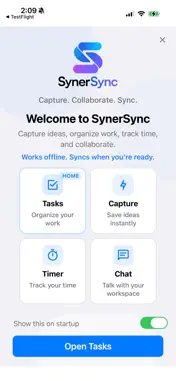
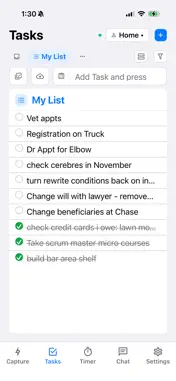
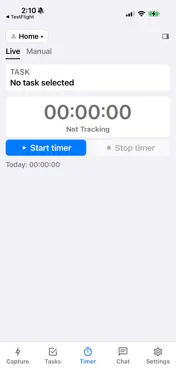
Your work shouldn't be trapped inside five different tools. SynerSync is one focused workspace for tasks, capture, time tracking and AI. Use it on its own. When you want, connect the tools your team already uses — ClickUp, Jira, monday.com, and others. Capture something the moment you think of it. Work from a focused task list. Track time. Send and sync when you're ready. One Workspace. Every System. TASKS Organize work in a focused list — personal and shared team projects. Set due dates, open rich task details, and stay in one place instead of bouncing between apps. CAPTURE Grab ideas from your iPhone or iPad, email, screenshots, and attachments the moment they appear, then send them into the workspace — or into a connected tool if you use one. TIME Track time where the work lives. Start a timer on the task, not in a separate timesheet. AI Assist where you're already working — rewrite, expand, and tidy task details without leaving the workspace. SYNC Integrations are optional. When you want them, send and keep work in sync with ClickUp, Jira, monday.com, and other tools. Connect on the web; stay in flow on your device. Connected systems can stay the system of record — or SynerSync can be the only one. PERSONAL PRO Upgrade in Settings for more projects, storage, and connected tools. Monthly or yearly auto-renewable subscription via the App Store. Manage or cancel anytime in your Apple ID subscriptions. TEAM Shared workspaces and seats are billed on the website (Stripe) — never as App Store in-app purchases. Invite members from the app; manage billing on synersync.com. FREE TO START Create an account with a passwordless email code. Start free with personal capture and a lightweight team workspace, then upgrade when you need more. Privacy: https://www.synersync.com/privacy-policy Terms of Use (EULA): https://www.synersync.com/terms-of-use Support: https://www.synersync.com/support

What's New

Version 0.9.2 2026-11-11
What's New in SynerSync • Private lists — mark a named list Private in List Settings so only you and people you add can see it; a lock sits on the name, and th...What's New in SynerSync • Private lists — mark a named list Private in List Settings so only you and people you add can see it; a lock sits on the name, and the Private / Shared chip switches without opening settings • Time — hub says Time with Timer and Timesheet as the two primary tabs; expand Time on a task for your hours, Log time, and Edit; Manual can use Times or Duration (1h 25m) • Timesheet — filter by Task (All tasks or one task), All time range, searchable List / Task / Customer menus, and open an invoice right after Add; Choose invoice stays available before you check hours • Log time freely — on a team task you can log hours without taking the assignment; Timer can show assigned, plus unassigned, or every open task you can see • Calendar stays tidy — meetings older than a week move to Trash (notes, comments, or In progress keep them); multi-day events show once under each day; provider time moves land on the next sync • Notes stay yours — Notes shows notes you created, are assigned, or follow; new notes on a shared workspace start Private until you share with Followers • Lists remember — switching lists shows rows already on this device first; each list keeps your scroll place; pinned order and colors follow your account • Sections — items stay under their section when you add another header; rename, copy, or Move to Trash from the … menu • Description — double-tap to edit (single tap still follows links and checkboxes); paste from Gemini / Markdown cleans escaped links and uploads embedded screenshots; resting photos offer Open or Download • Siri — say Create a task, Start timer, or Stop timer in SynerSync; Settings → Integrations has a Siri how-to with Things you can say • Invites — pending people in Members and Chat → People offer Copy link next to Resend when mail lands in spam • Linked tools — ClickUp custom ids (ENG-42) show as a details chip and power Open in ClickUp / Copy link; Sync from picks them up when ClickUp assigns them later • iPhone / iPad — count badges sit higher in the circle; Files open PDFs in the system viewer again; invoice Choose invoice scrolls under the keyboard

Technical Analysis

Package Overview Basic metadata
Bundle ID com.synersync.app
Current Version 0.9.2
Minimum iOS 15.1
Package Size App Store Size
Package Metadata 0 / 0 version records
Detailed binary, privacy manifest, framework, and Info.plist results have not been indexed for this package yet. The verified App Store and archive metadata above remains available.

Developer Information

Known Version Records

0 version records with stored package metadata

Stored metadata does not guarantee a package is currently available to download.

Details Version / IDs Version date Action