Preview







Description
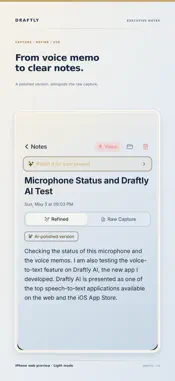
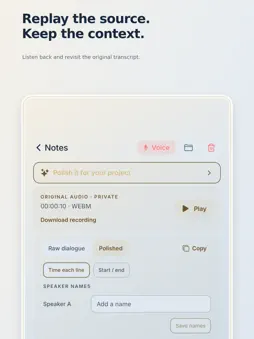
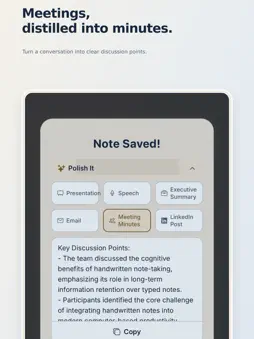
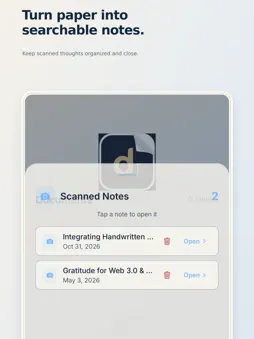
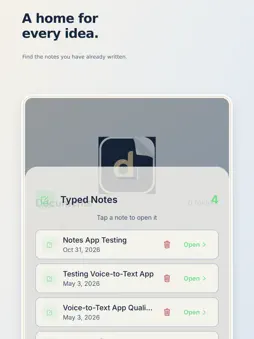
Draftly AI turns handwritten notes, voice recordings, and rough ideas into clear, useful documents. Capture a meeting, scan a notebook page, or type a quick thought. Then use AI to refine your notes, organize the information, and shape it for what comes next—from an email to a presentation or a set of meeting minutes. CAPTURE IDEAS YOUR WAY • Scan handwritten notes and convert them into editable digital text. • Record conversations, lectures, interviews, and personal voice memos for transcription. • Type a quick note whenever an idea comes to mind. • Keep your notes together and search for what you need. FOLLOW THE CONVERSATION WITH PREMIUM Premium Meeting Transcripts make conversations easier to review with speaker-labeled dialogue. Follow individual contributions, revisit important statements, and choose the timestamp style that suits your workflow: • Timestamps with each speaker’s statement. • Meeting start and end timestamps only. Timestamps use hours, minutes, and seconds, helping you connect the transcript to the recording. Speaker names can be inferred from spoken introductions when identifiable; review AI-generated labels for accuracy. KEEP THE ORIGINAL RECORDING Paid plans save your original audio alongside your transcription, so you can return to the source—not just the AI’s interpretation. Replay a discussion, check the context, or revisit a detail that matters. ONE NOTE. MORE POSSIBILITIES. Use Polish It to transform captured information into formats suited to your next task: • Meeting Minutes • Executive Summary • Email • Presentation • Speech • LinkedIn Post • Meeting Transcript with Premium Start with rough notes and create something clearer, more structured, and easier to use. RE-POLISH WITHOUT STARTING OVER Your notes can serve more than one purpose. Return to a saved note and polish it into a different format. Turn meeting notes into an executive summary, reshape a presentation into an email, or prepare a professional post from an earlier idea—all while retaining the original captured content. ORGANIZE YOUR WORK Keep scanned, recorded, and typed notes accessible in one place. Use folders to group related material and search your collection when it’s time to pick up where you left off. EXPORT AND SHARE Export supported notes and polished results as TXT, Word-compatible DOCX, or PDF files. Move from capturing information to sharing a document without manually rebuilding it elsewhere. A PROFESSIONAL WORKSPACE Choose a bright, readable Light Mode or an executive Dark Mode. Draftly AI brings a consistent workspace to iPhone and iPad, with account-based access to your saved notes across devices. FOR WORK, STUDY, AND EVERYDAY IDEAS Use Draftly AI for team meetings, lectures, interviews, project planning, handwritten research, and the thoughts you don’t want to lose. Capture first. Make it useful with Draftly AI. SUBSCRIPTIONS AND AVAILABILITY Draftly AI offers free access and optional Standard, Pro, and Premium subscriptions. Feature availability and processing limits vary by plan. Speaker-labeled Meeting Transcripts require Premium. AI processing and transcription require an internet connection. AI-generated text and speaker labels may contain errors. Review important information before sharing or relying on it. Obtain any required consent before recording others. Subscriptions renew automatically unless canceled at least 24 hours before the current period ends. Manage or cancel your subscription in your Apple Account settings. ——— PRIVACY ——— • Your notes are yours. We never sell your data or use your content. • Download Draftly AI and start capturing your best thinking — one tap at a time. Terms of Service: http://www.apple.com/legal/itunes/appstore/dev/stdeula
What's New
Version 1.0.7 2026-11-02
A fresh look. More powerful notes. - Introducing Light Mode, with a professional gradient design and improved readability. Switch between Light and Dark in Pro...A fresh look. More powerful notes. - Introducing Light Mode, with a professional gradient design and improved readability. Switch between Light and Dark in Profile. - More room for your notes, with compact Scan, Record, and Type buttons. - New Premium Meeting Transcripts with speaker labels and flexible timestamp options. - Keep your original recordings alongside your transcripts with a paid plan. - Re-polish saved notes into meeting minutes, emails, presentations, and more. - Improved iPad layouts and refreshed App Store screenshots. Technical Analysis
Package Overview Basic metadata
Bundle ID
com.atkinsmedia.draftly Current Version 1.0.7
Minimum iOS 15.1
Package Size App Store Size
Package Metadata 0 / 5 version records
Detailed binary, privacy manifest, framework, and Info.plist results have not been indexed for this package yet. The verified App Store and archive metadata above remains available.
Developer Information
Known Version Records
0 version records with stored package metadata • 5 known version records
Stored metadata does not guarantee a package is currently available to download.
| Details | Version / IDs | Version date | Action |
|---|---|---|---|
| Not archived | App Store ID: 887667086 | Unknown | Request Version |
| Not archived | App Store ID: 887271203 | Unknown | Request Version |
| Not archived | App Store ID: 885222834 | Unknown | Request Version |
| Not archived | App Store ID: 884835369 | Unknown | Request Version |
| Not archived | App Store ID: 884614356 | Unknown | Request Version |