
Preview






Description
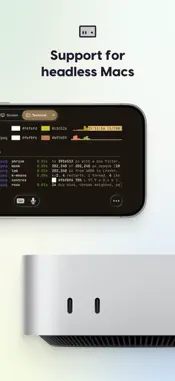
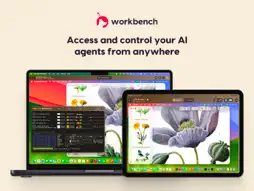
Access and control your Mac from anywhere, with full remote desktop and built-in terminal. Workbench connects you to your Mac from your iPhone, iPad, or another Mac. Check in on AI agents and long-running jobs, run desktop apps, or drop into the command line without being tethered to your desk. ——— KEY FEATURES Desktop and terminal: Switch between your Mac's full desktop and a terminal right from the toolbar. Terminal sessions keep running after you disconnect, so you can pick up where you left off on another device. Unified display: Combine your Mac's displays into one screen that matches your device's resolution. Headless Mac support: Run a Mac mini with no monitor attached. Workbench gives it a virtual display and manages sleep settings so it's always reachable. Voice input: Dictate prompts and commands from your iPhone or iPad, on the desktop or in the terminal. Apple Pencil and keyboard support: Use your Apple Pencil for precise cursor control in Mac apps, and your keyboard to type and trigger shortcuts. No-hassle connections: Connect instantly without port forwarding, VPNs, or router configuration. Fast, high-fidelity streaming: Interact with your Mac in real time with responsive controls and sharp visuals. Secure by design: Sessions are protected with end-to-end AES-256 encryption, and Astropad can't see your screen or activity. Built for Apple devices: Workbench uses fully native apps built specifically for Mac, iPad, and iPhone. ——— DESIGNED FOR AI AGENT WORKFLOWS Your agents don't stop when you leave your desk. Workbench lets you monitor progress, fix issues, and restart jobs from wherever you are. It's just as useful for checking on tools and software that don't have a mobile app. ——— BUILT BY EX-APPLE ENGINEERS From the team behind Astropad Studio and Luna Display, Workbench delivers fast, responsive control with crisp visuals and reliable performance on any network. ——— PRICING Workbench includes a Free plan with 20 minutes of access per day. Upgrade to Unlimited for uninterrupted access (subscription required). ——— SYSTEM REQUIREMENTS Mac: macOS 15 or later iPhone: iOS 26 or later iPad: iPadOS 26 or later
What's New
Version 1.4 2026-10-27
New in Workbench 1.4: Remote terminal, iPhone Duo support, and Mac-to-Mac file transfer. REMOTE TERMINAL Switch between your Mac’s desktop and terminal without... Technical Analysis
Package Overview Basic metadata
Bundle ID
com.astropad.workbench Current Version 1.4
Minimum iOS 26.0
Package Size App Store Size
Package Metadata 3 / 8 version records
Detailed binary, privacy manifest, framework, and Info.plist results have not been indexed for this package yet. The verified App Store and archive metadata above remains available.
Developer Information
Known Version Records
3 version records with stored package metadata • 8 known version records
Stored metadata does not guarantee a package is currently available to download.
| Details | Version / IDs | Version date | Action |
|---|---|---|---|
 Not archived | App Store ID: 887752551 | Unknown | Request Version |
| 33.48 MB | v1.2.2 App Store ID: 886545537Build: 883 | 2026-06-04 16:55:00 | Get Version |
 33.36 MB | v1.2.1 App Store ID: 885395822Build: 863 | 2026-05-07 14:05:46 | Get Version |
| Not archived | App Store ID: 885034896 | Unknown | Request Version |
 32.45 MB | v1.1.1 App Store ID: 884474691Build: 796 | 2026-04-13 21:15:20 | Get Version |
| Not archived | App Store ID: 884244122 | Unknown | Request Version |
| Not archived | App Store ID: 883765663 | Unknown | Request Version |
| Not archived | App Store ID: 882204284 | Unknown | Request Version |