
Preview


Description
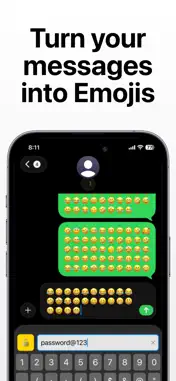
Encrypted Keyboard – Private Chat & Secure Messaging Protect your conversations like never before with Encrypted Keyboard, a smart and secure keyboard that encrypts your messages in real time before sending and decrypts them instantly on receipt. Designed for privacy-focused users, this app ensures your personal chats stay truly private. Whether you’re chatting passwords, sensitive information, or private thoughts, Encrypted Keyboard adds a powerful security layer directly to your keyboard. Key Features 1. Real-Time Encryption & Decryption 2. Messages are encrypted as you type and decrypted seamlessly for the recipient — no extra steps, no complexity. 3. Secure Custom Keyboard 4. A fully functional iOS keyboard with built-in encryption, allowing you to type securely in messaging apps. Secret Key Protection Use a secret key to lock and unlock conversations, ensuring only intended users can read the message. Custom Themes & Fonts Personalize your keyboard with modern dark themes, font styles, and a clean premium UI. Multiple Encryption Types Choose from different encryption methods based on your security needs. Multi-Language Support Type securely in multiple languages without compromising privacy. Fast & Lightweight Optimized for performance with instant encryption and minimal battery usage. Privacy First. Always. - No message storage - No data tracking - No cloud uploads - No third-party access - All encryption happens locally on your device. Your data stays yours. How to Enable the Keyboard Go to Settings > General > Keyboard > Keyboards Tap Add New Keyboard Select Encrypted Keyboard Enable Allow Full Access to activate encryption features Who Is This App For? Privacy-conscious users Secure messaging enthusiasts Professionals sharing sensitive data Anyone who values confidential communication Why Choose Encrypted Keyboard? Unlike regular keyboards, Encrypted Keyboard transforms your everyday typing into a secure communication channel — without changing how you chat. Simple. Secure. Powerful. Policy and Terms / EULA: https://sites.google.com/view/mienc
Technical Analysis
Package Overview Basic metadata
Bundle ID
Filt.MyKeyboard Current Version 1.1
Minimum iOS 17.6
Package Size App Store Size
Package Metadata 1 / 1 version records
Detailed binary, privacy manifest, framework, and Info.plist results have not been indexed for this package yet. The verified App Store and archive metadata above remains available.
Developer Information
Known Version Records
1 version record with stored package metadata
Stored metadata does not guarantee a package is currently available to download.
| Details | Version / IDs | Version date | Action |
|---|---|---|---|
| 4.46 MB | v1.1 App Store ID: 881589360Build: 1.1 | 2026-01-22 14:07:02 | Get Version |