Preview




Description
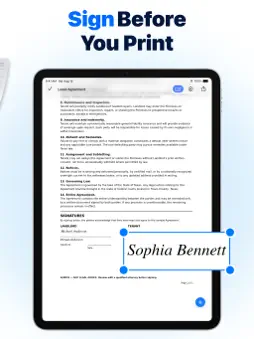
Need a fast and reliable AirPrint app to print documents, scan contracts, or print photos directly from your iPhone or iPad? Smart Printer is your all-in-one wireless printing and mobile PDF scanner solution. Print files, images, emails, and web pages in seconds without cables or complex setups. Transform your iOS device into a portable document hub. Smart Printer allows you to scan physical papers with your camera, make quick edits, add a handwritten digital signature, and send files straight to any AirPrint-enabled printer over Wi-Fi. KEY FEATURES: • Mobile PDF Scanner: Turn your camera into a high-quality document scanner. Scan multi-page contracts, receipts, or notes, automatically adjust contrast, crop edges, and save as PDF files. • Edit & Sign Documents: Add your digital signature, custom text notes, or dates to any scan or PDF before sending it to print — no separate PDF editor needed. • Photo Printing & Gallery: Print high-resolution photos, picture collages, and gallery images with custom paper size and layout options. • Web Pages & Email Printing: Print web articles, online receipts, travel tickets, and email attachments directly within the app. • Text Notes & Contacts: Type quick text notes or select contacts to print formatted contact cards instantly. • Multi-Format File Support: Easily print PDF, JPG, PNG, TXT, and MS Office files wirelessly. • Print Preview: Preview layout, margin settings, and page orientation before printing to save paper and ink. HOW IT WORKS: 1. Connect your iPhone and printer to the same Wi-Fi network. 2. Make sure your printer supports Apple AirPrint technology. 3. Select your document, scan, or photo, edit or add a signature, and tap Print! FREQUENTLY ASKED QUESTIONS: •Do I need to install printer drivers? No. Smart Printer utilizes native Apple AirPrint technology, eliminating the need for extra drivers, software, or computer connections. •Which printers are compatible? Any wireless printer with official Apple AirPrint support (including models from HP, Canon, Epson, Brother, Xerox, Lexmark, Kyocera, and more). Note: Smart Printer requires an Apple AirPrint-compatible printer connected to the same Wi-Fi network as your iOS device. Privacy Policy - https://legal.sparkleafapps.com/smartprinter/privacy-policy.html Terms of Use - https://legal.sparkleafapps.com/smartprinter/terms-of-use.html
What's New
Version 1.2 2026-10-26
Updated promotional visuals for Smart Printer. App functionality remains unchanged. Technical Analysis
Package Overview Basic metadata
Bundle ID
com.artemteluschenko.smartprinter Current Version 1.2
Minimum iOS 17.0
Package Size App Store Size
Package Metadata 0 / 0 version records
Detailed binary, privacy manifest, framework, and Info.plist results have not been indexed for this package yet. The verified App Store and archive metadata above remains available.
Known Version Records
0 version records with stored package metadata
Stored metadata does not guarantee a package is currently available to download.
| Details | Version / IDs | Version date | Action |
|---|