
Preview




Description
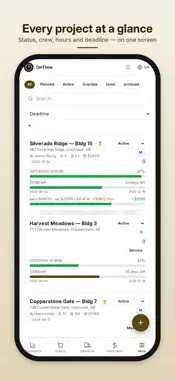
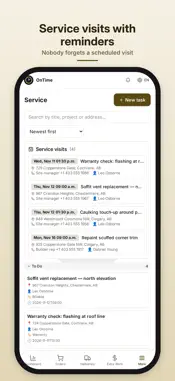
OnTime is the field app for construction and exterior-finishing contractors. Crews check in on site, hours land against the project budget in real time, and managers see where every job stands — without chasing paperwork or texting photos around. BUILT FOR THE JOB SITE • QR check-in with on-site verification — scan the site code, and the app confirms you are actually there before the shift starts. Forgotten shifts close themselves at end of day. • Live hours vs budget — every project card shows hours spent against hours budgeted, days remaining, and labour cost against what the job earns. Trouble shows up in red while there is still time to react. • Daily reports with photos — installers submit what was done, how many hours, and photo evidence. Reports and check-in sessions are reconciled automatically, so payroll gets one number, not two. • Materials and deliveries — bill of materials per project, installed quantities, short shipments, delivery tasks with driver assignment and proof-of-delivery photos. • Quality control — log defects with photos, assign them, and hand a subcontractor a time-limited link where they see only their punch list and upload proof of the fix. No account needed on their side. • Equipment and lifts — service logs, refuels, and service requests from the crew straight to the mechanic, with before-and-after photos. • Foreman scoreboard — punctuality, budget discipline and project results roll up into a ranking, so good crews are visible instead of merely assumed. • Timesheets and payroll export — pay-period matrix, overtime watch, cost per project, CSV and Excel export. WHO IT IS FOR Siding, roofing, exterior-finishing and general construction contractors running multiple crews across multiple sites. Roles inside the app: director, project manager, purchasing, foreman, installer, service technician, driver — each sees only what their job needs. HOW ACCESS WORKS OnTime is a company tool. Your company's administrator issues an invitation code, and that code sets your role. Accounts cannot be self-created, which is why the app opens on a sign-in screen. PRIVACY No ads. No analytics SDKs. No tracking. Location is read only while you are using the app, only to confirm you are on the site you checked into — never in the background. Full policy: https://ontime.management/legal/privacy.html
What's New
Version 1.0.21 2026-11-20
• Service: a calendar view by week or month — drag a visit to another day. Moves made by service staff go to the office for approval. • Service: planned end dat...• Service: a calendar view by week or month — drag a visit to another day. Moves made by service staff go to the office for approval. • Service: planned end date for a job, a "who is free" grid when assigning a task, "Busy" blocks and a colour for each person. • Item photos in material requests, delivery checklists and the project materials list; photos in lists load much faster. • Every file and photo now opens inside the app with a Back button. • Deliveries: a task is marked ready for pickup only when the vendor says the order is ready; the date the vendor promises is shown in the stages. • Stability and performance improvements. Technical Analysis
Package Overview Basic metadata
Bundle ID
management.ontime.app Current Version 1.0.21
Minimum iOS 15.0
Package Size App Store Size
Package Metadata 0 / 0 version records
Detailed binary, privacy manifest, framework, and Info.plist results have not been indexed for this package yet. The verified App Store and archive metadata above remains available.
Developer Information
Known Version Records
0 version records with stored package metadata
Stored metadata does not guarantee a package is currently available to download.
| Details | Version / IDs | Version date | Action |
|---|