
Preview

Description
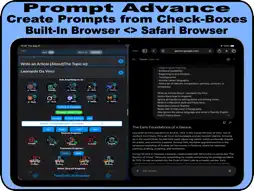
With TwinTwit AI Browser You Can very fast Inspect and Choose Which AI Chat Platforms Give The Best Answers. Together With TwinTwit App and The Split View function on Your iPad, You are able to Get Your AI Answers to the Left and Right Site On Your Screen, The Trick is This: TwinTwit Does Have a Function to Get The AI Answers, into Built-in Browser or To Get it On Your Safari Browser. You Only Need to Enable or Disable That Check Box. What Can TwinTwit Do What Other AI Apps Not Can Do ? Most Of The AI Apps Does Have One Favorite AI Platform, it Will Calculate Which AI Answers it Must Be Given, You Can Choose Diverse AI Models Manually On That Platform. TwinTwit Does Work Different, First You Do Have ONE QUESTION BAR, You Can Ask ONETIME, And Then You Can Decide Which AI Platform You Want To Use, Perplexity (Automatic), ChatGPT (Automatic), Gemini AI (From Clipboard), And More. Click That Button And it Will Do From There, Automatic or From Clipboard, Asking The Questions, You Can Decide, To Repeat it Again and Again, Without Typing or Asking The Same Questions. This Way You Can Choose Very Fast, which AI Does Gives The Best Answers. And With TwinTwit You Can Simple Choose, in The AI Tuning Settings, Which Languages it Must Be Answer. You Can Ask in Different Languages, But it Will Always Answer Back, into That Language. Not One AI App Can Do That So Easy. TwinTwit is Able To Have The Search Results To : . Safari Browser. . Built-in Browser. ADVANTAGES : . One Main Question Bar for Different AI’s, 8x Translations and diverse Search Engines. . Light Weight App. . Get the Search Results into a Built-in Browser or Safari Browser. . Simple interface. . Fast Response. . Better Workflow for AI and Web Search. . Searching Google With Precision By Enable Fast Some Check-Boxes. . Reduce Repetitive Text input. . Handy Check-Boxes For Tuning fast Your AI Answer Results. It Is Based on 6x Categories : Language, Format, Job, Style, Tone, Words (Sample: Germany, HTML, Scientist, Academic, Authoritative, 5 Titles each 2 Paragraphs) (You are able to Leave it There, And So Repeat all Your Questions) FEATURES : . Diverse AI Platforms (Free To Use) . Main/Dynamic Question Bar with Sub/Static Questions Bar. . You Can Do Searches Without or With History influence. . You Are Able to Get Search Results Without Ads. . SpinText Ability in Sub or Main Question Bars. ( Notice! You use in 1e level Spin-Text {word|word}text{word|word} and in 2e Level {{word|word}|{word|word}} ) . Getting the Search Results by Time for Google. . Do Searchings Based on Extensions for Google. . Gettting Search Results Based on all/intitle:all/inurl: all/inanchor: Related: And More. . Get Translations From Differrent AI’s or Translations Platforms. . Translate Your Text into More Than 8x Languages. . You are able to do Meta search. (Based on Meta Data’s) For Beginners : You Are Able To Start Directly Without To Must Have learning Some Coding, Ask your Questions ONETIME in the Question Bar, Choose and Click a Search Button, And You Will Get The Answers. For Professionals : You can Get the Search Results from out more then 10.000 WebSites + Social Sites + Search Engines. The Trick is by Using Bangs from DuckDuckGo. !w = Wikipedia - !tw = Twitter - !qr = Qr code - !p = Pinterest - !fb = Facebook - !Earth = Google Earth - and many more. Place These Bangs in the Sub Search Bar and Leave it There. Recommendations : Use Safari Browser As Default Browser. (We Also Advise For The Best Workflow Experience, That You Disabled in the Settings The Private Browser.) Some of Websites, it Will Ask You To Sign-in (You Will Need it For The Best Experience Of This App.) If You Facing a Bug, Please Contact Us First By Email: [email protected] - So That We Can Fix it. And if You Like This App, Please Post a Review On The App Store (Thanks)
What's New
Version 1.09 2026-09-26
Optimized the interface. Add more AI's buttons. Optimized the workflow. Improved the section "Prompt - Insert Tool" Add more functions in the Settings. Bugs Fi...Optimized the interface. Add more AI's buttons. Optimized the workflow. Improved the section "Prompt - Insert Tool" Add more functions in the Settings. Bugs Fixed. Optimized the Built-in Browser. Technical Analysis
Package Overview Basic metadata
Bundle ID
com.twintwit.TwinTwit Current Version 1.09
Minimum iOS 15.0
Package Size App Store Size
Package Metadata 0 / 8 version records
Detailed binary, privacy manifest, framework, and Info.plist results have not been indexed for this package yet. The verified App Store and archive metadata above remains available.
Developer Information
Known Version Records
0 version records with stored package metadata • 8 known version records
Stored metadata does not guarantee a package is currently available to download.
| Details | Version / IDs | Version date | Action |
|---|---|---|---|
| Not archived | App Store ID: 869520638 | Unknown | Request Version |
| Not archived | App Store ID: 869195503 | Unknown | Request Version |
| Not archived | App Store ID: 868388106 | Unknown | Request Version |
| Not archived | App Store ID: 868142336 | Unknown | Request Version |
| Not archived | App Store ID: 868008973 | Unknown | Request Version |
| Not archived | App Store ID: 867949618 | Unknown | Request Version |
| Not archived | App Store ID: 867287614 | Unknown | Request Version |
| Not archived | App Store ID: 867087722 | Unknown | Request Version |