
Preview




Description
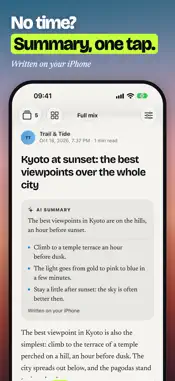
One card, one second: you read it or you skip it. Riff is an RSS and news reader with no account, no ads and no tracking, with an AI summary on request. Keeping up with the news shouldn’t mean opening twenty links and stacking tabs. Riff shows you the stories from your sources one at a time, full screen: the headline, the picture, the gist. Interested? Read it right here. Not? Swipe. YOUR SOURCES, YOUR PACE • More than 1,000 sources in French and English, switched on in one tap • Paste the address of a site or an RSS feed to add your own • Import your subscriptions from another RSS reader with an OPML file: folders become categories • Playlists: your categories grouped under the name you like, up to 10 • For You: a feed composed on your iPhone from your reading, with “fewer stories like this” one tap away • Subject: tap it to find the articles that talk about the same subject, in your sources and beyond The article’s text shows in the app when the publisher makes it freely available. If it is for subscribers only, Riff shows the excerpt and the link: it never gets around a paywall. AN AI SUMMARY, ONE TAP AWAY Tap the Riff logo: Apple Intelligence writes a short summary above the article, on your iPhone. Nothing is summarized unless you ask, and the text you read stays the publisher’s. It needs a device that supports Apple Intelligence (iPhone 15 Pro or later), with Apple Intelligence turned on in Settings. Without it, everything else works. LISTEN (experimental) Riff reads the article aloud, in French or English, with the voices of your device: the text is sent nowhere. Controls on the lock screen, with headphones and in the car. You need an enhanced or premium voice installed in Settings. ON IPHONE DUO Opened and in landscape, the list of articles and the article sit side by side. Swipe from one article to the next, and your watchlist opens on the left. Closed or in split screen, the buttons and the action bar stand down the side. WATCHLIST AND WIDGETS • Keep an article in one tap, with its text and its summary: it opens even offline • Widgets in three sizes on the home screen, and on the lock screen with the number of articles left to read NO ACCOUNT, NO ADS, NO TRACKING Riff has no account and no server: your device fetches articles directly from the publishers. Your sources, settings and reading history stay on your iPhone and, unless you turn sync off, in your private iCloud. Export the sources you added yourself (OPML) to open them in another RSS reader. Riff is free, with no subscription and no in-app purchase. Articles belong to their publishers: Riff sends you to the source and is not affiliated with any of them. Apple Intelligence is a trademark of Apple Inc. Privacy: https://riff.watch/en/privacy/ Riff terms: https://riff.watch/en/terms/
What's New
Version 1.1.3 2026-10-28
FIXES AND READING IMPROVEMENTS • The source and date are no longer repeated below the cover. Reading time appears next to the category. • The “For You” count, w... Technical Analysis
Package Overview Basic metadata
Bundle ID
com.arnaudlewis.riff Current Version 1.1.3
Minimum iOS 26.0
Package Size App Store Size
Package Metadata 0 / 0 version records
Detailed binary, privacy manifest, framework, and Info.plist results have not been indexed for this package yet. The verified App Store and archive metadata above remains available.
Developer Information
Known Version Records
0 version records with stored package metadata
Stored metadata does not guarantee a package is currently available to download.
| Details | Version / IDs | Version date | Action |
|---|