Preview




Description
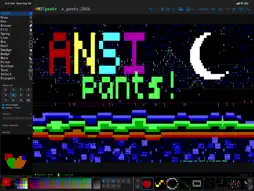
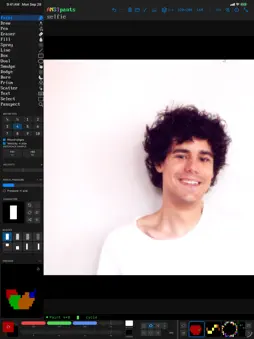
ANSIpants is a full-featured ANSI and ASCII art studio for iPhone, iPad, and Mac. Draw retro text art with modern tools: pressure-sensitive brushes, layers, true color, and a canvas that feels like a paint app. Whether you're recreating the BBS art scene of the '90s or discovering textmode art for the first time, ANSIpants gives you serious drawing tools built for the medium. GET COZY • Pen, paint, smudge, dodge & burn, fill, box, oval, and text tools • Adaptive line width and stitch modes for crisp diagonals • Box and oval thickness controls tuned to the 2:1 character cell • Velocity-sensitive brush size, scatter, and color shift • Apple Pencil support on iPad COLOR WITH OR WITHOUT LIMITS • Classic ANSI 16, 256-color, and 24-bit true color modes • Bulk palette selection: grab the whole color cube or grayscale ramp in one tap • Color cycling and random pools for organic texture • Reference image sampling that respects your color depth TEXT IS THE POINT • TDF and FIGlet font rendering with a fast built-in font browser • Import your own font collections • Full ASCII and extended character set access BUILT FOR CREATIVITY • Up to 7 layers with offsets, visibility, and flattening • Deep undo with full history • Reusable tool presets • Status bar with cursor position, layer, and selection info SHARE IT ANYWHERE • Import and export .ANS files — compatible with the classic art scene • Export images to your photo library • iCloud document support across all your devices • Native document-based app: your art lives in Files One purchase, all three platforms: iPhone, iPad, and Mac.
What's New
Version 2.0.2 2026-11-11
Turn any picture into text art, and ANSIpants on the iPhone Duo. Import a picture • The picture button in the top bar opens a photo or a file and previews the ...Turn any picture into text art, and ANSIpants on the iPhone Duo. Import a picture • The picture button in the top bar opens a photo or a file and previews the result live on the canvas. Drag to move it, resize with the size bar, Fit and Center put it back. • Styles: Half, Quad, Sext, Oct, Braille, Outline, Words, ANSI and more, with brightness, contrast and saturation. Oct uses the VGA face in a Unicode document. • None keeps the picture as a picture: place it, then Apply makes it the reference image to trace over. • Import adds the result as a new layer and hides the reference. The reference has its own row in Layers, and an exported PNG can include it. iPhone Duo • Folded, ANSIpants is the iPhone edition. Opened out, it is the iPad edition: sidebar, top bar and palette bar, in either orientation. • The app lays itself out by the space it has, so it also behaves in Split View and Stage Manager on iPad. Panspect • The inspected cell follows the pointer, and the view pans when you hover near an edge of a zoomed canvas. • Double-click a cell to take its glyph and colors into the current settings. Layers • Layer numbers count from the bottom, so a badge matches the layer's default name. Chrome • On iPhone, the filename and credit under the wordmark are in the VGA face while the canvas wears it. • The Draw tool's hint says what it does: shades by pressure or speed. Fixes • Fixed a crash at launch on iOS 18 and iPadOS 18. Technical Analysis
Package Overview Basic metadata
Bundle ID
com.arlofishman.ANSIpants Current Version 2.0.2
Minimum iOS 16.0
Package Size App Store Size
Package Metadata 0 / 0 version records
Detailed binary, privacy manifest, framework, and Info.plist results have not been indexed for this package yet. The verified App Store and archive metadata above remains available.
Developer Information
Known Version Records
0 version records with stored package metadata
Stored metadata does not guarantee a package is currently available to download.
| Details | Version / IDs | Version date | Action |
|---|