Preview




Description
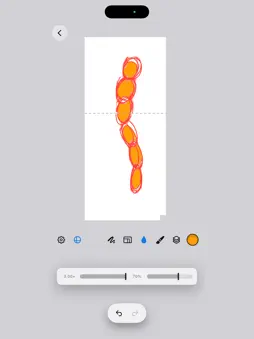
Room Draw turns the room you're standing in into a canvas. Scan the room with your iPhone or iPad's LiDAR scanner, then paint directly onto the real walls, floor, ceiling and furniture through the camera. Ink sticks to the surface it touches and clips at its edges, like masking tape. Put the device down, come back later — your art is still on the wall where you left it. THREE WAYS TO DRAW • AR view — paint on the room live through the camera • 3D viewer — orbit a model of your room and paint from any angle, with an optional glide joystick • 2D mode — open any wall as a flat page and work like a desktop drawing app: zoom, layers, precise linework. Unfold two or three connected surfaces and draw across the corner A REAL DRAWING TOOLKIT • 30 stamp brushes in Procreate-style sets — pencils, inks, markers, watercolor, charcoal, chrome, iridescent — with favorites and per-brush dynamics • Vector ink: every stroke stays editable forever. Select strokes, change their color, brush, size or opacity after the fact • Layers on every surface, with rename, merge and per-layer smudge • Bucket fill, gradients, text, perfect shapes with quick-shape hold • Stroke stabilization: streamline, averaged and weighted smoothing plus motion filtering, each with its own dials • Mirror drawing — vertical, quadrant and 8-way radial • Liquify, smudge, eyedropper (including sampling color straight from the camera), selection tools MADE FOR IPAD AND APPLE PENCIL • Full Apple Pencil support: pressure with a custom curve, double-tap and squeeze actions, hover size preview • Pencil-only painting so a resting hand never marks the wall • Movable tool and slider bars — dock them on any edge, collapse them to a button • Portrait and landscape, keyboard shortcuts, trackpad support KEEP WHAT YOU MAKE • Photo capture and video recording • Export the whole room as a USDZ 3D model with your art baked in — opens in Quick Look and Blender • Export any wall as a transparent 4K PNG, or unfold connected walls into one flat sheet • Rooms are saved and shared between projects: scan once, start new drawings in the same room any time Room Draw needs a LiDAR scanner: iPhone 12 Pro or later Pro models, or a LiDAR-equipped iPad Pro. One purchase, everything included — no subscriptions, no in-app purchases.
Technical Analysis
Package Overview Basic metadata
Bundle ID
aristides.lintzeris.Room-Draw Current Version 1.0
Minimum iOS 18.0
Package Size App Store Size
Package Metadata 0 / 0 version records
Detailed binary, privacy manifest, framework, and Info.plist results have not been indexed for this package yet. The verified App Store and archive metadata above remains available.
Developer Information
Known Version Records
0 version records with stored package metadata
Stored metadata does not guarantee a package is currently available to download.
| Details | Version / IDs | Version date | Action |
|---|